AskTTY
A Ruby gem for interactive terminal prompts.
Installation
Install it globally:
gem install askttyor, add it to your application Gemfile:
bundle add askttyUsage
require "asktty"Input Prompt
name = AskTTY::InputPrompt.ask(
  title: "Name",
  details: "Enter the name you want displayed on your badge.",
  placeholder: "Vlad"
)
Text Prompt
project = AskTTY::TextPrompt.ask(
  title: "Ruby Project",
  placeholder: "AskTTY\nTerminal prompts for Ruby"
)
Select Prompt
experience = AskTTY::SelectPrompt.ask(
  title: "Experience Level",
  options: [
    { label: "Beginner", value: :beginner },
    { label: "Intermediate", value: :intermediate },
    { label: "Advanced", value: :advanced }
  ],
  value: :intermediate
)
Select and multi-select options must be provided as a non-empty array of symbol-keyed { label:, value: } hashes.
Option values must be unique.
MultiSelect Prompt
topics = AskTTY::MultiSelectPrompt.ask(
  title: "Topics",
  details: "Select all topics you are interested in.",
  options: [
    { label: "Rails", value: :rails },
    { label: "Metaprogramming", value: :metaprogramming },
    { label: "API development", value: :api_development },
    { label: "Background jobs", value: :background_jobs },
    { label: "Testing", value: :testing }
  ],
  values: [:metaprogramming]
)
Confirm Prompt
confirmed = AskTTY::ConfirmPrompt.ask(
  title: "Confirmation",
  details: "Confirm that you plan to attend the event.",
  value: true
)
Validation
Pass a block that returns true when the current value is valid, or a non-empty error message when it is not:
name = AskTTY::InputPrompt.ask(title: "Name") do |value|
  value.length >= 3 || "Name must be at least 3 characters"
end
Validation runs after each edit or selection change. A paste is one edit. If the value has not been validated yet, the first submission validates it. Submissions reuse the result until the value changes. Moving the focus in a multi-select prompt does not validate until an item is toggled or the selection is submitted. Keep validators free of side effects and use checks whose result depends on the supplied value. Exceptions raised by the block propagate to the caller after terminal cleanup.
Examples
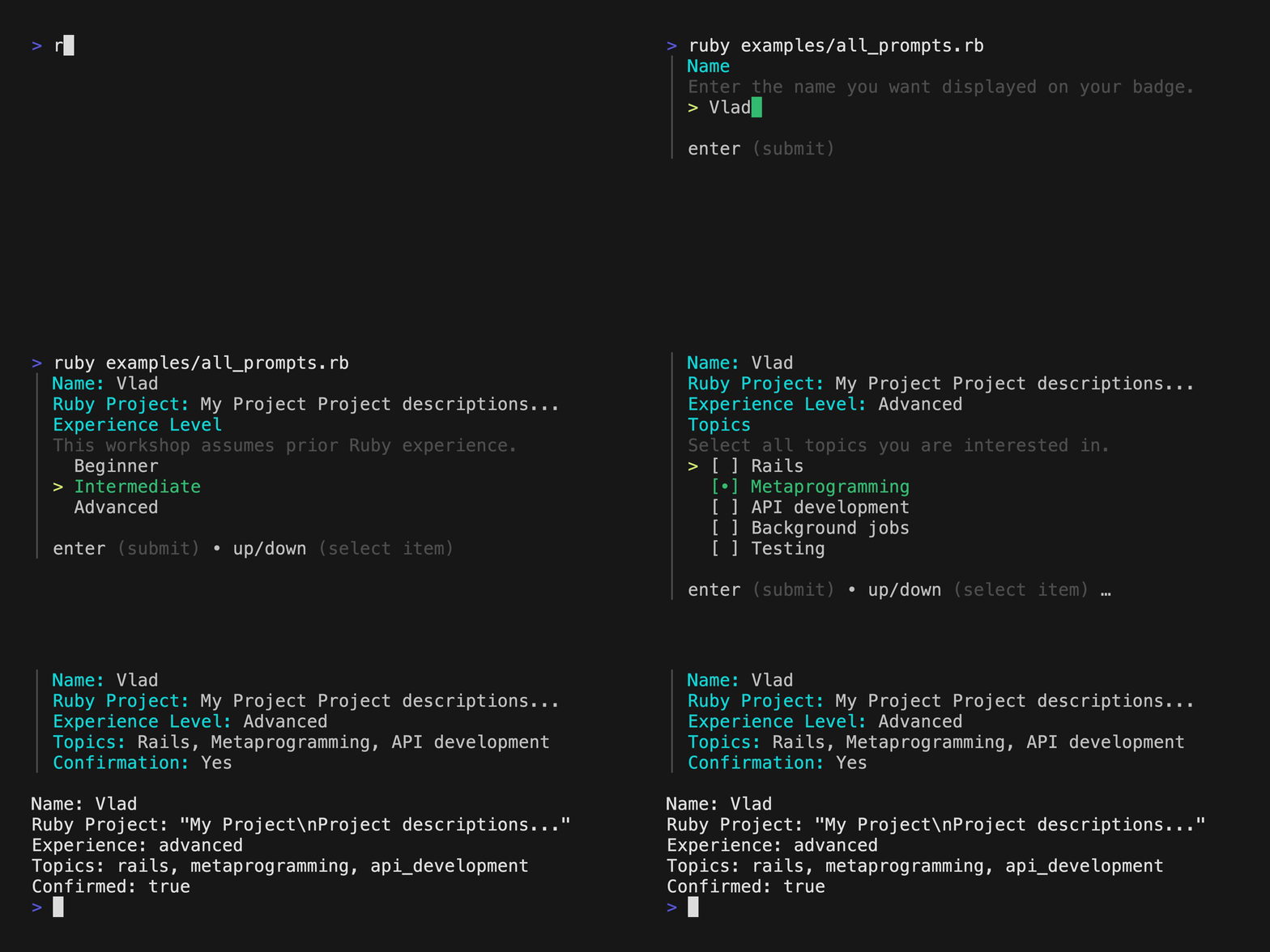
Run the interactive example from the project root:
ruby examples/all_prompts.rbCredit
The prompt UI in AskTTY is based on huh?.