Stop decoding vague bug reports! Let users pin the problem and fix it right beside your app
Next.js · Rails · MCP
NPM · RubyGems · Next.js Quickstart · Rails Quickstart · 3-Tier Workflow · Live Demo · Smart & Verbose Selectors · Unified MCP Hub · Privacy & Redaction · Configuration
Why
When someone reports "the button on the checkout card isn't working," engineers usually spend 20 minutes hunting down which view partial, feature flag, viewport width, or overlapping toast banner caused the problem.
ContextDrop (context_drop) embeds a tactile, zero-bleed Shadow DOM book-corner launcher, environment-adaptive selector, and unified multi-environment MCP hub directly into your Ruby on Rails application (Rails >= 7.1, including Rails 8+):
-
Minimal Book-Corner Launcher → Peel-to-Pin on Drag: Rests quietly as a
38×38pxfolded page corner. Click the book corner to open the feedback form (or, when opted-in locally, the docked Agentic Sidebar); drag the book corner to peel and animate it into a live pushpin over any part of the page—or snap it to another viewport corner. -
3-Tier Environment-Adaptive UX (
production·staging·local): Automatically adapts toRails.env—giving production end-users a compact, jargon-free Smart Component Selector with automatic surrounding-context screenshots, and giving staging/QA teams and local developers the verbosev0.1.xCSS/layer inspector. -
MCP-First Workflow for Developers: Keep your active coding in your preferred editor (Antigravity, Cursor, Claude Code, VS Code). Register one local MCP server (
bin/rails context_drop:mcp) in your IDE to query and resolve feedback with multimodal screenshots acrosslocal,staging, andproductionsimultaneously. -
Opt-in Local BYOK Agentic Sidebar: Want an agent right in the browser? Flip
config.enable_local_agent = truein development to unlock the docked in-browser agent sidebar with human-approved file diffs.
Environment-Adaptive Workflow
Different environments serve completely different people:
-
Production users shouldn't be overwhelmed with
#css.selectors, pixel dimensions (681×350), overlapping DOM layer counters, or<kbd>⌥⇧P</kbd>shortcuts just to report a bug. They need a rapid, clutter-free way to point at an issue. - Staging & QA teams need surgical leaf/layer inspection, mouse-wheel layer scrubbing, and exact geometry coordinates.
-
Local developers want two things:
-
In-browser testing: The exact same verbose DOM inspector as staging to verify element pinning and capture payloads on
localhost. -
Active resolution in their IDE: Powerful MCP resources & tools so their preferred AI coding agents (Antigravity, Cursor, Claude Code, VS Code) can query, analyze, and resolve bug reports without forcing development into a browser sidebar. For teams that do want an in-page browser agent, ContextDrop includes an experimental BYOK Agentic Sidebar enabled via
config.enable_local_agent = true.
-
In-browser testing: The exact same verbose DOM inspector as staging to verify element pinning and capture payloads on
ContextDrop automatically adapts its UI, copy, and selector behavior from your host Rails.env (and loopback connection check) with zero per-environment view templates:
flowchart TD
  Boot["<%= context_drop_widget %>\nReads Host Rails.env + Request Loopback"] --> CheckEnv{"Host Environment?"}

  CheckEnv -->|"Rails.env.production?\n(selection_mode = smart)"| Prod["1. Production · Quick User Feedback\n• Compact 356px 'Send Feedback' card\n• Smart Component Promotion (no raw spans/selectors)\n• Plain-language labels (“Complete Order” button)\n• Auto-captured redacted surrounding screenshot"]

  CheckEnv -->|"staging / qa\n(selection_mode = verbose)"| Staging["2. Staging & QA · Verbose Inspector (v0.1.x)\n• Full 404px ContextDrop composer\n• Exact <tag#id.class> & pixel geometry HUD\n• Mouse-wheel overlapping layer scrubbing\n• ⌥⇧P Freeze & Pin + multi-element pinning"]

  CheckEnv -->|"Rails.env.development?\non 127.0.0.1 / ::1"| LocalCheck{"config.enable_local_agent?"}

  LocalCheck -->|"false (Default)\nIDE MCP Workflow"| LocalVerbose["3a. Local (Default) · Verbose Inspector + MCP\n• Full 404px floating feedback composer\n• Verbose DOM element picker & layer scrubbing\n• Developer uses their IDE agent via bin/rails context_drop:mcp\n• Full MCP resources across local + staging + production"]

  LocalCheck -->|"true (Opt-in)\nExperimental"| LocalAgent["3b. Local (Opt-in) · BYOK Agentic Sidebar\n• Antigravity / VS Code-style docked sidebar\n• Agent | Feedback mode switcher (verbose pin)\n• Pulls local + staging + production MCP feedbacks\n• Read-only workspace tools + human diff approval"]
How Each Environment Behaves
| Tier | Host Condition | Surface & Size | Selector Behavior (selection_mode) |
Screenshot Behavior | Copy & Controls Shown to User |
|---|---|---|---|---|---|
| 1. Production (End-Users) | Rails.env.production? |
Compact Quick-Feedback Card (356px, clutter-free) |
"smart" — Coarsely promotes hovered/dropped <span>/<svg> leaves to the nearest meaningful UI component (button, link, field, card, banner, dialog, row). Single click selects & reopens the form immediately. |
Automatic surrounding context (~84px neighborhood, min 340×220px, [REDACTED]-safe) merged into one clean preview card. |
Plain human labels (“Complete Order” button, “Enterprise Plan” card), Send Feedback, Select area, Add image. Zero CSS selectors, pixel metrics, wheel layer lists, or <kbd> badges.
|
| 2. Staging / QA (Technical Triage) |
staging, qa, or non-loopback development
|
Verbose Inspector Chatbox (404px, v0.1.x style) |
"verbose" — Exact leaf/ancestor/overlap inspection with scroll-wheel layer scrubbing (1/6 layers), ArrowUp/ArrowDown stepping, ⌥⇧P Freeze & Pin, and multi-pin mode. |
Manual Viewport Screenshot button + per-pin Element Crop camera icon (Shot & Pin chips). |
Technical HUD (button#pay-btn · 180×42), Pin Element, <kbd>⌥⇧P</kbd>, <kbd>Space</kbd>, Dropped #42. |
| 3. Local Development (Default · IDE MCP Focus) |
Rails.env.development? (default: enable_local_agent = false)
|
Verbose Inspector Chatbox (404px, identical to staging) |
"verbose" — Exact leaf/ancestor inspection, layer scrubbing, and coordinate pinning to test feedback capture locally. |
Manual Viewport Screenshot + per-pin Element Crop camera icon. | Technical HUD (button#pay-btn · 180×42), Pin Element, <kbd>⌥⇧P</kbd>, <kbd>Space</kbd>. Feedbacks feed directly into your IDE coding agents via bin/rails context_drop:mcp. |
| 4. Local Agentic Sidebar (Opt-in · Experimental) |
Rails.env.development? on loopback and config.enable_local_agent = true
|
Docked BYOK Agentic Coding Sidebar (100dvh, resizable 360–920px, Left/Right + Push Layout) |
"verbose" + live workspace file search (`Agent |
Feedback` toggle lets you switch between agent and feedback modes). | Attaches live DOM pins & redacted screenshots directly to LLM prompts + pulls remote staging/production screenshots. |
Tip
Zero Signal Lost in Production! Even though production users only see friendly labels like “Complete Order” button and an automatic surrounding-context screenshot, ContextDrop still captures the full sanitized selector (#checkout-btn), dom_path, bounding_rect, metadata.friendly_label, and metadata.original_target_selector (span.inner-label) under the hood—so engineers triaging production:108 in their IDE via MCP get 100% exact technical coordinates. Need verbose mode in an internal-only production tool (or smart mode in staging)? Override config.selection_mode = :verbose or :smart in config/initializers/context_drop.rb.
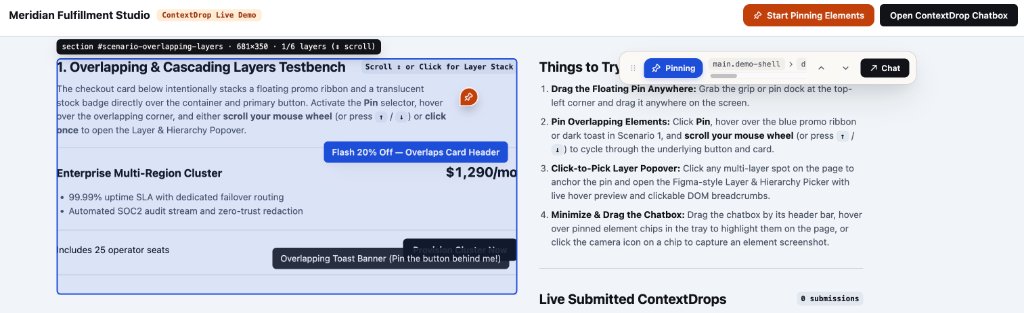
Above: Active Pin Mode on the live demo page. While hovering over a stacked UI card (
section #scenario-overlapping-layers · 681×350 · 1/6 layers), ContextDrop frames the target in Inspector Cobalt, displays layer depth for mouse-wheel cycling, and collapses the chatbox into the Compact Pinning Bar (Pinning, live DOM ancestor breadcrumbs, Up/Down layer controls, andChattoggle) so the host page stays completely unobstructed.
| 1. Click or Peel the Book-Corner Launcher | 2. Pin DOM Layers & Capture Element Screenshots |
|---|---|
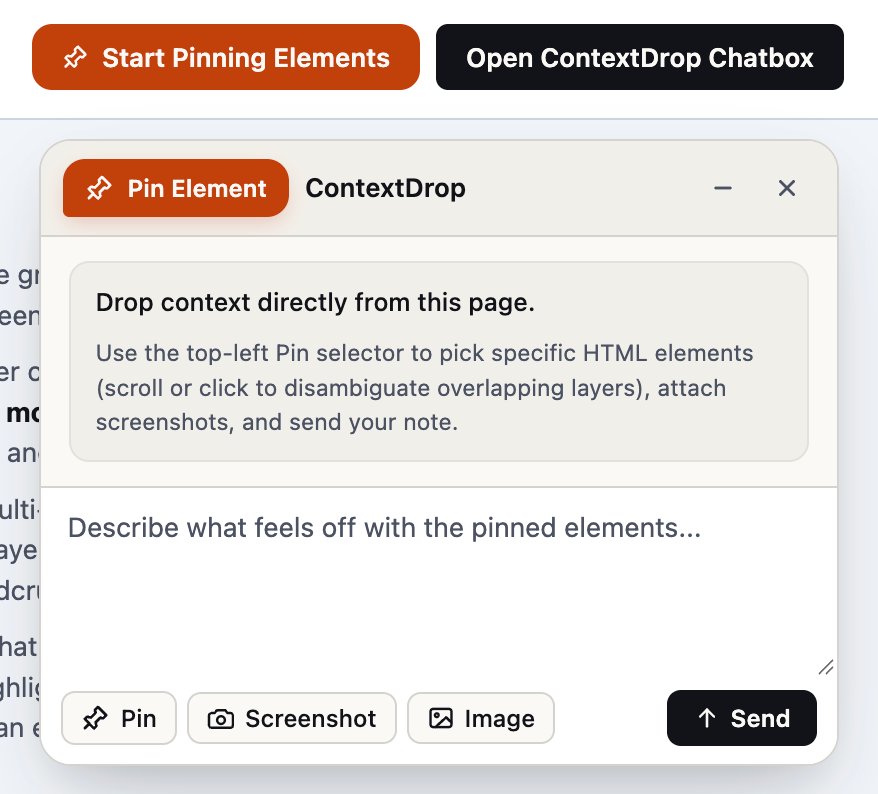
Drop |
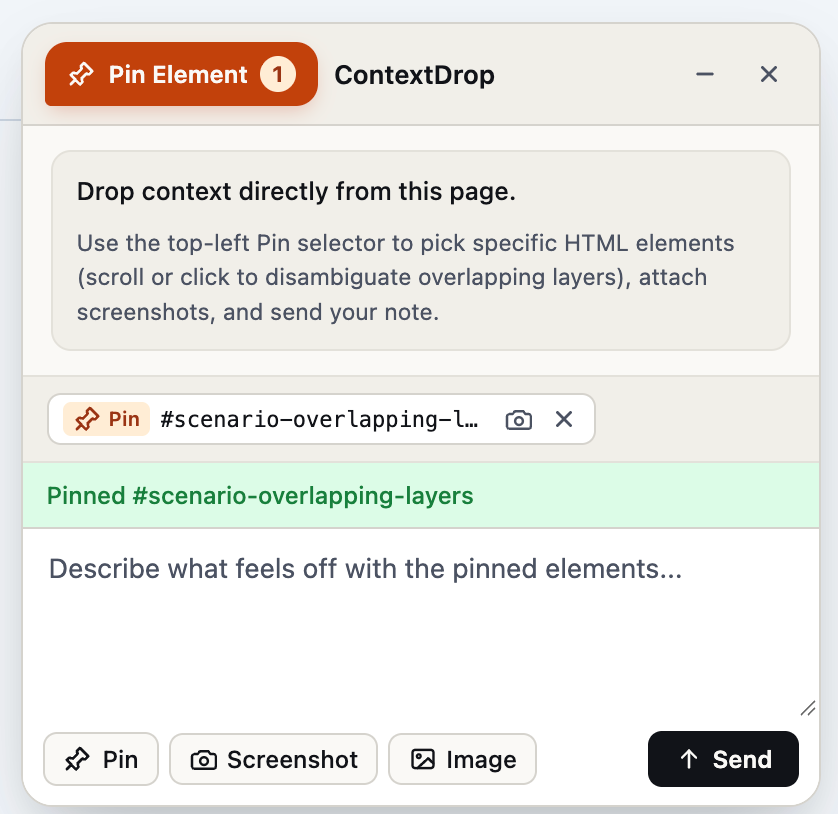
Every pinned element is added to the context tray (`#scenario-overlapping-layers`) with a live count badge (`Pin Element 1`). Hover the chip to highlight the element on the page, click the camera icon to crop a screenshot of that exact node, and hit Send. |
Why ContextDrop
| Capability | Typical SaaS Feedback Widgets | Manual Slack / Issue Reports | ContextDrop (context_drop) |
|---|---|---|---|
| Data & Storage Ownership | Exfiltrates DOM & screenshots to 3rd-party cloud servers | Scattered across chat threads |
100% self-hosted in your Rails DB (context_drop_*) & Active Storage
|
| Overlapping DOM Layers | Gets stuck on topmost wrapper, modal backdrop, or toast | Requires reporter to open DevTools | Scroll-wheel depth cycling, Click-to-Pick Layer Popover, & DOM Breadcrumbs |
| Host Page Safety | Injects global CSS; clicks can accidentally fire host buttons | N/A | Strict Shadow DOM isolation + capture-phase event suppression during Pin Mode |
| Sensitive Data Protection | Captures raw DOM or requires complex PII scrubbing rules | Risk of unredacted screenshots |
Zero-trust redaction before rasterization ([data-feedback-sensitive], passwords, cards) |
| Authentication Model | Separate vendor accounts & seats | Manual identity lookup |
Host-agnostic polymorphic submitter (Devise, Rails 8 Auth, Sorcery, custom, or anonymous) |
| Developer Resolution Flow | Copy-paste from external vendor dashboard | Back-and-forth reproduction questions |
Local BYOK Agentic Sidebar + Single Unified Multi-Env MCP Server (local + staging + production) + Rails Triage Dashboard
|
Important
Core Architectural Principle: ContextDrop owns its domain. Your Rails app owns its identity and infrastructure.
ContextDrop mounts cleanly as an isolated Rails Engine (isolate_namespace ContextDrop) with zero mandatory frontend framework dependencies (no React, Vue, or Tailwind required).
Next.js & React Quickstart
ContextDrop ships as a zero-dependency NPM package (context-drop) supporting both standalone full-stack Next.js (App Router & Pages Router + pluggable storage + npx context-drop mcp) and decoupled Next.js / React frontends connected to a Ruby on Rails context_drop backend.
1. Install & Scaffold Route Handler
npm install context-drop
npx context-drop init
npx context-drop init auto-detects App Router (app/api/context-drop/[[...path]]/route.ts) or Pages Router (pages/api/context-drop/[[...path]].ts) and adds .context-drop/ to .gitignore:
// app/api/context-drop/[[...path]]/route.ts
import { createContextDropNextHandler } from "context-drop/next/server";

export const { GET, POST, OPTIONS } = createContextDropNextHandler({
  // Zero-config local default stores SQLite/JSON + redacted screenshots in .context-drop/
  mcp: {
    enabled: Boolean(process.env.CONTEXT_DROP_MCP_API_KEY),
    apiKey: process.env.CONTEXT_DROP_MCP_API_KEY
  }
});
2. Mount <ContextDrop /> in Your Root Layout
context-drop/next includes "use client" out of the box—drop <ContextDrop /> directly into your Server Component app/layout.tsx with zero wrapper boilerplate and zero hydration mismatches:
// app/layout.tsx
import { ContextDrop } from "context-drop/next";

export default function RootLayout({ children }: { children: React.ReactNode }) {
  return (
    <html lang="en">
      <body>
        {children}
        <ContextDrop
          position="bottom_right"
          metadata={{ release: process.env.NEXT_PUBLIC_VERCEL_GIT_COMMIT_SHA }}
        />
      </body>
    </html>
  );
}
Want to open ContextDrop from your own navbar or help menu? Call useContextDrop() from any client component:
"use client";
import { useContextDrop } from "context-drop/next";

export function ReportBugButton() {
  const { open } = useContextDrop();
  return <button onClick={open}>Report an issue</button>;
}
3. Connect Your IDE Coding Agent via MCP (npx context-drop mcp)
Register one unified stdio MCP server in .mcp.json (Claude Code), ~/.cursor/mcp.json (Cursor), or mcp_config.json (Antigravity / Windsurf). It automatically loads .env.local / .env and federates local + remote staging & production Next.js (or Rails!) deployments:
{
  "mcpServers": {
    "context-drop": {
      "command": "npx",
      "args": ["context-drop", "mcp"],
      "env": {
        "CONTEXT_DROP_STAGING_MCP_URL": "https://staging.your-app.com/api/context-drop/mcp",
        "CONTEXT_DROP_STAGING_MCP_API_KEY": "your-staging-mcp-bearer-token",
        "CONTEXT_DROP_PRODUCTION_MCP_URL": "https://your-app.com/api/context-drop/mcp",
        "CONTEXT_DROP_PRODUCTION_MCP_API_KEY": "your-production-mcp-bearer-token"
      }
    }
  }
}
4. Production Storage Adapters (PostgreSQL, S3 / Vercel Blob, or Custom ORM)
Locally, ContextDrop works with zero configuration using Node's built-in SQLite (node:sqlite, or atomic JSON fallback) inside .context-drop/. For staging and production Next.js deployments (Vercel, Fly, AWS, Render, Railway), plug in createPostgresStorageAdapter (compatible with pg.Pool, @vercel/postgres, Neon, and Supabase) or implement the StorageAdapter interface for Prisma / Drizzle:
// app/api/context-drop/[[...path]]/route.ts
import { Pool } from "pg";
import {
  createContextDropNextHandler,
  createPostgresStorageAdapter
} from "context-drop/next/server";

const pool = new Pool({ connectionString: process.env.DATABASE_URL });

export const { GET, POST, OPTIONS } = createContextDropNextHandler({
  storage: createPostgresStorageAdapter({
    pool,
    autoMigrate: true // Creates context_drop_* tables automatically if missing
    // Optional blobStore: { putBlob, getBlob, deleteBlob } for S3 / R2 / Vercel Blob
  }),
  resolveSubmitter: async (request) => {
    // Optional: attach your NextAuth / Clerk / Supabase user identity
    return null;
  },
  mcp: {
    enabled: true,
    apiKey: process.env.CONTEXT_DROP_MCP_API_KEY
  }
});
5. Connecting Next.js to a Ruby on Rails Backend
Already running ContextDrop::Engine on Rails? Point <ContextDrop /> at your Rails mount path:
-
Via Next.js Rewrites (Same-Origin, Recommended): Proxy
/context_drop/:path*to your Rails API innext.config.tsand render<ContextDrop endpoint="/context_drop" />. -
Cross-Origin CORS: Add
config.allowed_origins = ["http://localhost:3000", "https://app.example.com"]inconfig/initializers/context_drop.rband render<ContextDrop endpoint="https://api.example.com/context_drop" credentials="include" />.
NPM Package Exports Reference
| Import Path | Environment | Exports |
|---|---|---|
context-drop/next |
Client ("use client") |
Next.js <ContextDrop />, <ContextDropWidget />, useContextDrop() (defaults to /api/context-drop) |
context-drop/next/server |
Node / Server |
createContextDropNextHandler, createContextDropPagesHandler, createContextDropFetchHandler, createLocalStorageAdapter, createPostgresStorageAdapter, createMemoryStorageAdapter
|
context-drop/react |
Client ("use client") |
Framework-agnostic React <ContextDrop />, useContextDrop() (defaults to /context_drop) |
context-drop/mcp |
Node / Server |
createContextDropMcpServer, runContextDropMcpStdio, ContextDropMcpDispatcher, EnvironmentRouter
|
context-drop/widget |
Browser | Auto-registering <context-drop-widget> Web Component & ContextDropApiClient
|
context-drop/bundle |
Browser IIFE | Self-contained <script> bundle (context_drop.js) |
npx context-drop |
CLI |
npx context-drop mcp (stdio MCP server) & npx context-drop init (Next.js scaffolder) |
Quickstart (Ruby on Rails)
Requirements
-
Ruby
>= 3.1 -
Ruby on Rails
>= 7.1(7.1,7.2,8.0+) -
Active Storage installed in the host application (
bin/rails active_storage:install)
1. Install the Gem & Run the Generator
Install context_drop from RubyGems.org (or add gem "context_drop" to your Gemfile):
bundle add context_drop
bin/rails generate context_drop:install
bin/rails db:migrate
What bin/rails generate context_drop:install sets up for you:
- Creates
config/initializers/context_drop.rb. - Mounts
mount ContextDrop::Engine => "/context_drop"inconfig/routes.rb. - Copies four engine-owned migrations (
context_drop_feedbackswithenvironmentattribution,context_drop_element_references,context_drop_attachments) intodb/migrate/. - Verifies that Active Storage migrations are present.
2. Render the Widget in Your Layout
Add <%= context_drop_widget %> right before </body> in app/views/layouts/application.html.erb:
<%= context_drop_widget %>Need page-specific copy or release metadata? Override options per view without mutating global configuration:
<%= context_drop_widget(
  position: :bottom_left,
  placeholder: "Spot an issue with checkout? Pin the element and let us know...",
  metadata: { release: ENV["GIT_COMMIT_SHA"], feature_flag: "checkout_v2" }
) %>
3. Enable & Launch
export CONTEXT_DROP_ENABLED=true
bin/rails server
Visit any page in your Rails app to use the floating widget, or open /context_drop/dashboard/feedbacks to triage submissions.
Interactive Playground
Want to test all three environment modes (local (Agent) · staging (Verbose) · production (Smart)), peel-to-pin corner dragging, smart component promotion with auto surrounding screenshots, overlapping-layer disambiguation, and the live payload inspector before installing the gem into a Rails app? Run the standalone playground in this repository:
# Start the local interactive demo server at http://127.0.0.1:4173
npm run demo

# Or open demo/index.html directly in your browser (works offline via built-in payload interceptor)
open demo/index.html
Use the top-bar switcher in the demo to flip live between Local (Agent Sidebar), Staging (Verbose Inspector), and Production (Smart Quick-Feedback).
Feedback-to-Fix Loop
flowchart LR
  subgraph Browser["Host Rails App (Browser)"]
    Widget["<context-drop-widget>\n(Book-Corner + Layer Picker\n+ Local Agentic Sidebar)"]
  end

  subgraph Engine["ContextDrop::Engine (Local Development Rails App)"]
    Controller["FeedbacksController\n+ AgentController (Loopback Only)"]
    DB[("Local DB + Active Storage\n(environment = development)")]
    MCP["Unified MCP Hub\nbin/rails context_drop:mcp"]
  end

  subgraph Remote["Staging & Production Rails Apps"]
    RemoteMCP["Streamable HTTP /context_drop/mcp\n(environment = staging | production)"]
  end

  subgraph IDE["Developer IDE / Coding Agent"]
    Agent["Cursor · Claude Code · Antigravity\nWindsurf · VS Code"]
  end

  Widget -->|"POST /context_drop/feedback"| Controller
  Widget <-->|"BYOK Chat + Diff Approval\n(development + 127.0.0.1 only)"| Controller
  Controller --> DB
  DB --> MCP
  RemoteMCP <-->|"Bearer HTTPS Federation\n(EnvironmentRouter)"| MCP
  MCP -->|"Single MCP Server\n(environment: all | local | staging | prod)"| Agent
Every submission captures a rich, sanitized engineering payload:
-
ContextDrop::Feedback(context_drop_feedbacks): Automatic hostenvironment(Rails.env—e.g.development,staging,production), polymorphicsubmitter(User,Employee,AdminUser, or anonymous),message,page_url,user_agent,viewport& custommetadata, and workflowstatus(new,reviewed,resolved,dismissed). -
ContextDrop::ElementReference(context_drop_element_references): Point-in-time DOM snapshot includingtag_name, best-effort CSSselector, structuraldom_path, truncatedtext_content, allowlistedattributes_snapshot(id,class,role,aria-*,data-testid), and CSS pixelbounding_rect({ x, y, width, height }). -
ContextDrop::Attachment(context_drop_attachments): Viewport screenshots, element-cropped screenshots (linked viaelement_reference_id), and uploaded images stored in your app's Active Storage.
Smart & Verbose Element Selection
ContextDrop stays tucked away as a 38×38px folded Book Corner until needed—click the corner to open the feedback surface, or drag the corner to peel and morph it into a pushpin over any part of the page (or drop it into another viewport corner to re-dock). All pointerdown, mousedown, mouseup, and click events are intercepted in the capture phase while selecting so host links, buttons, and forms never fire by mistake.
Once selecting, ContextDrop tailors precision and verbosity to the active environment (config.selection_mode = :auto):
1. Production: Smart Component Selector (selection_mode = "smart")
Optimized for speed, compactness, and non-technical end-users—being slightly coarse on hover is intentional because ContextDrop pairs the component with a wide neighborhood screenshot:
-
Automatic Component Promotion: Hovering or dropping on inner leaf nodes (
<span>,<svg>,<strong>, icon wrappers) automatically promotes the highlight to the nearest meaningful UI unit—such as abutton,link,inputfield,card,banner,dialog,form,navigationbar,table row, or boundedsection. -
Plain-Language Labels Only: The hover pill and composer show human-friendly descriptions (
“Complete Order” button,“Enterprise Plan” card)—never#id.classstrings,681×350pixel readouts, layer counters, wheel-scrubbing interception, or<kbd>shortcut hints. -
Automatic Surrounding-Context Screenshot: A single click selects the component, automatically captures a privacy-redacted neighborhood screenshot (
smart_capture_padding = 84, minimum340×220pxclamped to viewport, framing the target component in Pin Vermilion), merges both into one clean preview card, and immediately reopens the compact356pxSend Feedback form. -
Full Technical Fidelity Preserved: Under the hood, the submitted
ElementReferencestill records the exact sanitizedselector,dom_path,bounding_rect,metadata.friendly_label,metadata.component_kind, andmetadata.original_target_selectoralongside the linkedAttachment.
2. Staging, QA & Dev: Verbose Layer Inspector (selection_mode = "verbose", v0.1.x Format)
Optimized for QA engineers, designers, and developers debugging dense, overlapping layouts (sticky navbars, floating ribbons, translucent toasts, nested Flexbox/Grid wrappers):
-
Exact
<tag#id.class>& Geometry HUD: Displays exact tag/selector identifiers,tabular-numspixel dimensions (681×350), and overlapping candidate depth (1/6 layers). -
Scroll-Wheel & Keyboard Depth Scrubbing: Roll your mouse wheel (
wheel) or pressArrowUp/ArrowDown([/]) over any coordinate to cycle throughdocument.elementsFromPointoverlapping layers, child nodes, and parent containers while keeping a dashed ghost outline on the original leaf node. -
Freeze & Pin Transient Menus (
⌥⇧P): PressAlt+Shift+P(⌥⇧P) while a hover dropdown or tooltip is open to freeze the page coordinate and scrub/pin transient layers, or pressSpace/ click to pin multiple elements in a single pass.
Local BYOK Agentic Sidebar (development Opt-in)
Note
MCP-First Workflow by Default: In v0.2.0, local development defaults to the staging/verbose DOM inspector (config.enable_local_agent = false) so you can test element pinning and feed bug reports directly to your preferred AI coding agent in your IDE (Antigravity, Cursor, Claude Code, VS Code) via the unified MCP server.
If you prefer an integrated in-browser coding assistant, set config.enable_local_agent = true (or CONTEXT_DROP_LOCAL_AGENT_ENABLED=true) to enable the embedded sidebar.
When enabled (config.enable_local_agent = true) and running locally (Rails.env.development? on localhost / 127.0.0.1), clicking or peeling the Book-Corner transforms ContextDrop into a full-height, resizable Agentic Coding Sidebar—similar to the coding sidebars in Antigravity and VS Code:
-
Dual
Agent | FeedbackMode Switcher: Triage bugs and edit local Rails code in Agent mode, or flip to Feedback mode at any time to preview and submit through the standard floating feedback chatbox. -
Flexible Docked Layout: Dock to the Right or Left edge, drag the resize handle (
360px–920px, defaulting to560px), and toggle Push Page Layout so the sidebar sits side-by-side with your running app without covering content. -
Dark & Light Theme Support: Click the sun/moon switcher in the top bar to toggle between the crisp off-white light theme and the deep charcoal dark theme (
theme: :darkordata-theme="dark"). -
Cross-Environment Context Attachment: Peel-and-drop live DOM elements and redacted screenshots from the current page, and attach bug reports directly from
local,staging, orproductionvia the built-in Feedback Inbox drawer. -
Bring Your Own Key (BYOK): Supports Anthropic (
Claude), Google Gemini, OpenAI, and Custom OpenAI-Compatible endpoints (OpenRouter, Groq, Ollama, vLLM). Automatically detects local server environment variables (ANTHROPIC_API_KEY,GEMINI_API_KEY/GOOGLE_API_KEY,OPENAI_API_KEY,CONTEXT_DROP_LLM_API_KEY), or saves keys you enter in the sidebar's BYOK Vault drawer encrypted on disk (AES-256-GCM, mode0600) inside gitignoredtmp/context_drop_byok.enc.
Defense-in-Depth Local Agent Safety
Because user-submitted feedback messages from staging or production are untrusted input, the Local Agentic Sidebar enforces five strict security walls:
-
Hard-Blocked Outside Local Development:
/context_drop/agent/*returns404 Not FoundwheneverRails.env.production?is true, whenlocal_agent_enabledis false, or when a request does not originate from strict loopback (127.0.0.1/::1) with a loopbackHostheader, same-origin headers, CSRF token, andauthorize_dashboardpermission. -
Zero Browser Key Exposure: API keys are never stored in
localStorage,sessionStorage, cookies, or DOM attributes. Input fields are wiped immediately upon save, and/agent/statusreturns only masked tails (••••••••7f9a). -
Workspace Root Jail & Secret Denylist: File tools (
list_workspace_files,search_workspace,read_workspace_file,propose_file_edit) enforceFile.realpathcontainment insideRails.rootand block.env*,config/master.key,config/credentials*,*.pem,*.key,tmp/context_drop_byok*,.git/config, and.git/hooks/*. -
No Arbitrary Shell Execution: No
bash/sh/systemtool is exposed to LLM tool calls, eliminating prompt-injection command execution. -
Human-Approved Inline Diffs + 1-Click Revert: Proposed file edits are staged in memory and rendered as unified diff cards (
+N / -N). Disk writes occur only when you click Apply Change (guarded by SHA-256 pre-image verification), with 1-click Revert afterward.
MCP
ContextDrop ships with a built-in Model Context Protocol (MCP) server (ContextDrop::MCP::Server) so you or your AI coding agent can pull bug reports, inspect exact CSS selectors and DOM paths, view multimodal screenshots, and mark issues resolved without leaving your editor.
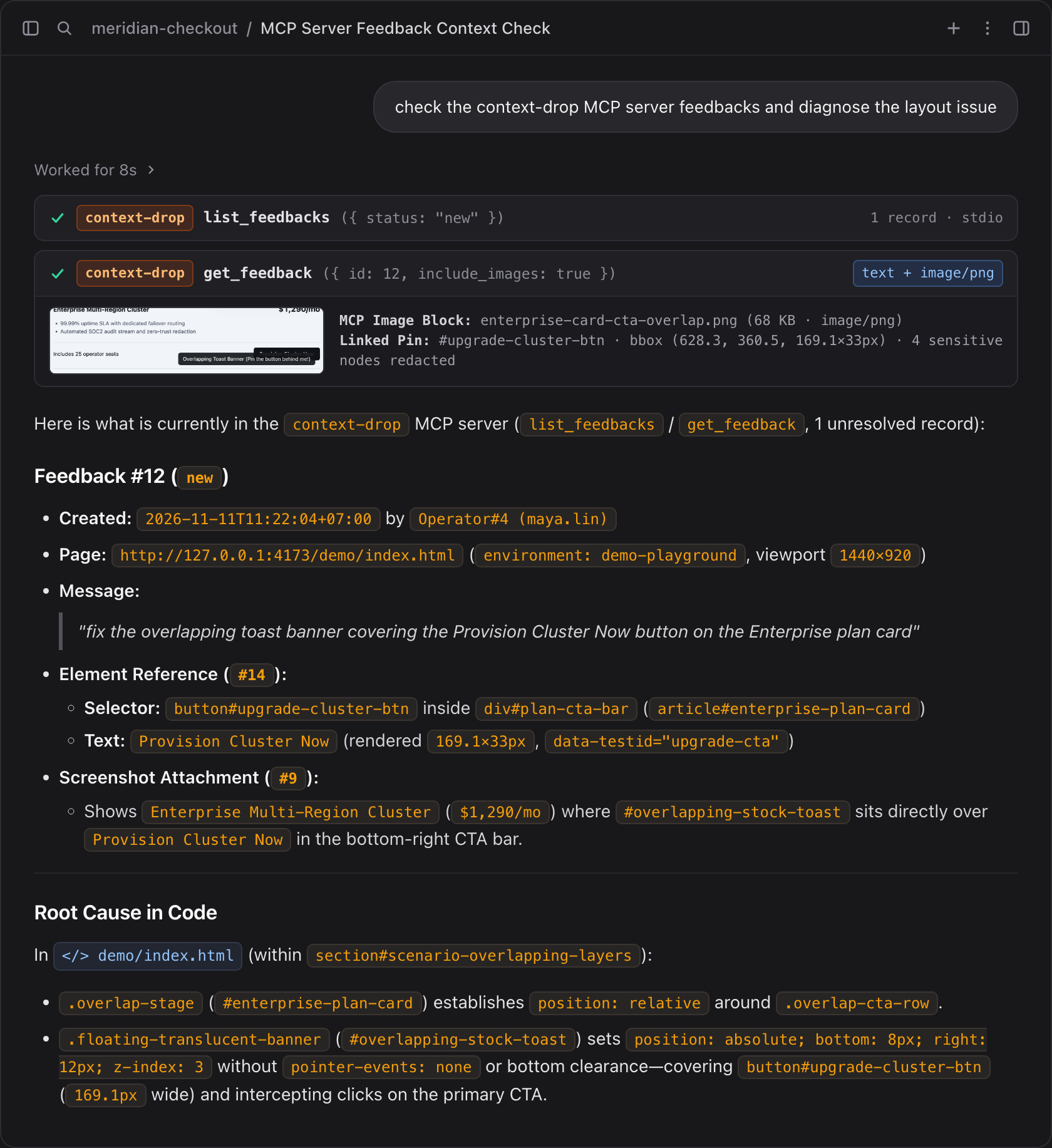
Above: Triage flow inside an AI coding agent connected to the
context-dropMCP server on the live playground. The agent invokeslist_feedbacks({ status: "new" }) andget_feedback({ id: 12, include_images: true }), inspects both the structuredElementReferencegeometry (button#upgrade-cluster-btn,169.1×33px) and the redacted multimodalimage/pngscreenshot block, and pinpoints the exact overlapping CSS rule indemo/index.html.
Exposed MCP Capabilities
| Type | Name / URI | Description |
|---|---|---|
| Tool | list_environments |
List local (with current host Rails.env) plus all configured remote environments (staging, production, etc.) and connection status. |
| Tool | list_feedbacks |
Filter & paginate submissions across environment ("all", "local", "staging", "production"), status (new, reviewed, resolved, dismissed), page_url, or free-text query. Returns qualified IDs (local:12, production:42). |
| Tool | get_feedback |
Fetch full Feedback, all ElementReference DOM snapshots, and inline base64 image blocks by id + environment or qualified ID ("production:42"). |
| Tool | get_feedback_attachment |
Retrieve an individual local or remote Attachment record and its binary screenshot/image as an MCP image content block. |
| Tool | update_feedback_status |
Transition a local or remote feedback record between new, reviewed, resolved, and dismissed. |
| Resource | contextdrop://feedbacks/new |
Live JSON feed of unresolved new feedback records (up to 50 most recent). |
| Resource | contextdrop://feedbacks/{id} |
Full JSON snapshot of a specific feedback submission, its pinned elements, and attachment metadata. |
| Prompt | investigate_feedback |
Generates a structured root-cause investigation brief (with attached screenshots) for any local or remote feedback_id ("staging:18"). |
Recommended Setup: One Unified MCP Server for All Environments (local + staging + production)
Instead of registering separate MCP servers per environment in your IDE, register a single context-drop server running ./bin/rails context_drop:mcp. It automatically reads your local development database (local) and federates every remote environment configured in config.mcp_environments or CONTEXT_DROP_<ENV>_MCP_URL / CONTEXT_DROP_<ENV>_MCP_API_KEY:
{
  "mcpServers": {
    "context-drop": {
      "command": "/bin/zsh",
      "args": [
        "-c",
        "cd /absolute/path/to/your-rails-app && exec /Users/<you>/.rbenv/shims/bundle exec ./bin/rails context_drop:mcp"
      ],
      "env": {
        "PATH": "/Users/<you>/.rbenv/shims:/Users/<you>/.rbenv/bin:/opt/homebrew/bin:/usr/local/bin:/usr/bin:/bin:/usr/sbin:/sbin",
        "CONTEXT_DROP_STAGING_MCP_URL": "https://staging.example.com/context_drop/mcp",
        "CONTEXT_DROP_STAGING_MCP_API_KEY": "<staging-mcp-secret-token>",
        "CONTEXT_DROP_PRODUCTION_MCP_URL": "https://app.example.com/context_drop/mcp",
        "CONTEXT_DROP_PRODUCTION_MCP_API_KEY": "<production-mcp-secret-token>"
      }
    }
  }
}
Note
Prefer keeping URLs/tokens in Rails credentials or .env.development.local? You can omit the CONTEXT_DROP_*_MCP_* entries from your IDE JSON entirely and configure config.mcp_environments inside config/initializers/context_drop.rb—both your IDE's context-drop MCP server and the in-browser Local Agentic Sidebar share the exact same EnvironmentRouter.
With one unified server registered in Antigravity (mcp_config.json), Cursor (~/.cursor/mcp.json), Claude Code (.mcp.json), Windsurf, or VS Code, you can ask naturally across environments:
- "List new feedbacks across
allenvironments oncontext-drop, inspectproduction:42with its screenshot, fix the CSS/ERB locally, and markproduction:42resolved." - "Check
localfeedbacks I just pinned and verify the layout fix."
Recommended Environment Matrix
| Environment | Host Rails.env Attribution |
CONTEXT_DROP_ENABLED (Widget & Dashboard) |
CONTEXT_DROP_MCP_ENABLED (HTTP /mcp) |
Widget Surface, Selector Mode & MCP Role |
|---|---|---|---|---|
Local (development) |
"development" (loopback 127.0.0.1 / ::1)
|
true |
false (not needed for stdio hub)
|
Book-Corner + Local BYOK Agentic Sidebar (Agent | Feedback toggle, selection_mode: "verbose"); runs the single unified stdio MCP hub (context_drop:mcp). |
| Staging / QA | "staging" |
true |
true |
Book-Corner + Verbose Inspector Chatbox (selection_mode: "verbose", v0.1.x CSS/layer HUD); federated into local MCP hub via dedicated staging Bearer token. |
| Production | "production" |
true (or scoped via authorize_submission)
|
true |
Book-Corner + Compact Smart Quick-Feedback (selection_mode: "smart", plain-language component labels + auto surrounding screenshot; Agent endpoints hard-locked 404); federated into local MCP hub via dedicated production Bearer token. |
Multi-Environment Best Practices
-
Automatic Host Environment Stamping: Every
ContextDrop::Feedbackrecord automatically stampsRails.env(customizable viaconfig.environment)—no manual metadata boilerplate required, though you can still passmetadata: { release: ENV["GIT_COMMIT_SHA"] }to<%= context_drop_widget(...) %>. -
Isolate secrets per environment: Generate a distinct high-entropy
CONTEXT_DROP_MCP_API_KEY(bin/rails secretoropenssl rand -hex 32) in each deployed environment's Rails encrypted credentials or secret manager. Never share a single Bearer token between staging and production. -
HTTPS Enforced for Remote Endpoints:
ContextDrop::MCP::RemoteClientenforceshttps://by default for all non-loopback remote MCP URLs and setsallow_Cross_Origin/ redirect limits to zero so Bearer tokens are never leaked across redirects. -
Independent Widget vs. MCP switches:
config.enabledandconfig.mcp_enabledare decoupled—ContextDrop::McpControllerremains reachable wheneverCONTEXT_DROP_MCP_ENABLED=true, even if you temporarily setCONTEXT_DROP_ENABLED=falsein production to pause new widget submissions while finishing triage. -
Layer zero-trust proxy headers when needed: If your remote MCP endpoints sit behind Cloudflare Access, Google IAP, or an internal MCP gateway, pass additional proxy
"headers"insideconfig.mcp_environmentsalongsideapi_key(or validate custom JWT/header claims inconfig.authorize_mcp).
Alternative Transport Options & Ruby Version Manager Reference
If you run a workspace-scoped config where your shell PATH is already inherited, or if you run inside Docker / remote-only environments, use the reference snippets below.
Option 1: Minimal Workspace-Scoped stdio (With config.mcp_environments in Rails)
When your IDE runs inside the Rails root, inherits your Ruby PATH, and remote environments are already configured in config/initializers/context_drop.rb or .env.development.local:
{
  "mcpServers": {
    "context-drop": {
      "command": "bundle",
      "args": ["exec", "./bin/rails", "context_drop:mcp"]
    }
  }
}
Option 2: Strict Sandboxes, Global IDE Configs & Ruby Version Managers (rbenv, mise, asdf, rvm)
Strict sandboxed coding agents and GUI-launched desktop IDEs (such as Antigravity mcp_config.json, Claude Desktop, global ~/.cursor/mcp.json, Windsurf, or VS Code launched from macOS Finder / Linux desktop) typically spawn MCP subprocesses with:
-
A non-project working directory (often
/or$HOME, causing relative./bin/railsorGemfilelookup to fail), and -
A stripped minimal
PATH(/usr/bin:/bin:/usr/sbin:/sbin) without sourcing~/.zshrcor~/.bashrc—causing/usr/bin/env rubyinsidebin/railsto hit an outdated system Ruby (e.g., macOS Ruby2.6) or fail to locatebundleand Homebrew native libraries (libpq,sqlite3,vips).
Wrap the unified context-drop server command with /bin/zsh -c (or /bin/bash -c on Linux), cd into your Rails application root, exec your version manager's bundle binary directly, and declare an explicit absolute PATH:
{
  "mcpServers": {
    "context-drop": {
      "command": "/bin/zsh",
      "args": [
        "-c",
        "cd /absolute/path/to/your-rails-app && exec /Users/<you>/.rbenv/shims/bundle exec ./bin/rails context_drop:mcp"
      ],
      "env": {
        "PATH": "/Users/<you>/.rbenv/shims:/Users/<you>/.rbenv/bin:/opt/homebrew/bin:/usr/local/bin:/usr/bin:/bin:/usr/sbin:/sbin"
      }
    }
  }
}
Tip
Adapting Option 2 to any machine or Ruby version manager:
-
Use literal absolute paths (avoid
~or$HOMEinside JSONenv): MCP hosts passenvdirectly toexecvewithout shell expansion. Runpwd,which bundle, andecho $PATHin your Rails app terminal to get your exact paths. -
Keep
execbeforebundle:execreplaces thezsh/bashwrapper in-place sostdin/stdoutJSON-RPC frames remain unbuffered and IDE shutdown signals (SIGTERM) cleanly terminate the Ruby process without leaving orphans. -
Debug
stdioboot issues: Set"CONTEXT_DROP_MCP_DEBUG": "1"inside"env"to stream verbose Rails/ActiveRecord boot diagnostics tostderr(MCPstdoutalways stays strictly reserved for JSON-RPC frames).
| Ruby Environment / OS |
<bundle-path> for exec
|
Directories to Prepend to env.PATH
|
|---|---|---|
rbenv (macOS / Linux) |
/Users/<you>/.rbenv/shims/bundle |
/Users/<you>/.rbenv/shims:/Users/<you>/.rbenv/bin |
mise (macOS / Linux) |
/Users/<you>/.local/share/mise/shims/bundle |
/Users/<you>/.local/share/mise/shims |
asdf (macOS / Linux) |
/Users/<you>/.asdf/shims/bundle |
/Users/<you>/.asdf/shims:/Users/<you>/.asdf/bin |
rvm (macOS / Linux) |
/Users/<you>/.rvm/wrappers/default/bundle |
/Users/<you>/.rvm/gems/default/bin:/Users/<you>/.rvm/bin |
Homebrew / Linux /usr/local |
/opt/homebrew/opt/ruby/bin/bundle or /usr/local/bin/bundle
|
/opt/homebrew/opt/ruby/bin:/opt/homebrew/bin:/usr/local/bin |
Option 3: Streamable HTTP Transport (Docker, Isolated Sandboxes, Staging & Production)
If your Rails app runs inside Docker / Devcontainers, if your agent sandbox blocks host binary execution outside the workspace, or if you want to triage feedback directly from staging or production, enable the HTTP endpoint with a bearer token (CONTEXT_DROP_MCP_ENABLED=true and CONTEXT_DROP_MCP_API_KEY=<your-secret-token>) and point your MCP client to POST /context_drop/mcp:
{
  "mcpServers": {
    "context-drop-remote": {
      "url": "https://staging.example.com/context_drop/mcp",
      "headers": {
        "Authorization": "Bearer <your-secret-token>"
      }
    }
  }
}
(For local Docker or strict-sandbox setups, use "url": "http://localhost:3000/context_drop/mcp" against your running bin/rails server.)
Zero-Trust Privacy & Redaction
ContextDrop is engineered for production environments where customer privacy and credential safety are non-negotiable:
-
Declarative Redaction Attributes: Add
data-feedback-sensitiveordata-feedback-ignoreto any HTML element. ContextDrop blocks the element (and all of its descendants) from being pinned and masks its bounding box with an opaque redaction block before any screenshot is rasterized:<div data-feedback-sensitive> <span>Account Balance: $42,100.00</span> <span>Card ending in 4242</span> </div>
-
Automatic Credential & Card Exclusions:
input[type="password"],input[type="hidden"], and[autocomplete^="cc-"]are always excluded and redacted automatically. -
No Raw DOM or Input Value Leaks: Form control
valueproperties and rawouterHTMLare never serialized. Only allowlisted structural attributes (id,class,role,aria-*,data-testid,name,type,href) are stored. -
Server-Side Upload Hardening: Binary attachments are verified via magic-byte MIME detection (
Marcel), extension matching, byte-size limits, image dimension bounds, CSRF protection, and configurable rate limiting.
Triage Dashboard
ContextDrop includes a triage interface mounted inside your Rails application at /context_drop/dashboard/feedbacks:
-
Filter & Search: Filter submissions by status (
new,reviewed,resolved,dismissed), originatingpage_url, or free-text query across messages, CSS selectors, and DOM paths. -
Inspect Context: View submitter attribution, browser/viewport metadata, inline Active Storage screenshot galleries, and structured
ElementReferencecards (selector,dom_path,bounding_rect,attributes_snapshot). -
Triage Actions: Transition feedback status between
Mark Reviewed,Mark Resolved, andDismiss.
Configuration
Customize every aspect of ContextDrop in config/initializers/context_drop.rb:
ContextDrop.configure do |config|
  # Master switch (disables widget helper, dashboard, and HTTP ingestion endpoints when false)
  config.enabled = ENV.fetch("CONTEXT_DROP_ENABLED", "false") == "true"

  # Host environment attribution (defaults automatically to Rails.env)
  # config.environment = Rails.env

  # Initial book-corner launcher position: :bottom_right, :bottom_left, :top_right, :top_left
  config.position = :bottom_right

  # Element selection UX mode:
  # - :auto (default) -> "smart" (jargon-free component promotion + auto surrounding screenshot) in production,
  #                      "verbose" (v0.1.x CSS selector HUD, wheel layer scrubbing & ⌥⇧P shortcuts) in staging/dev
  # - :smart          -> force compact plain-language component selector + auto surrounding screenshot
  # - :verbose        -> force technical CSS selector HUD, wheel layer scrubbing, and multi-pin inspector
  config.selection_mode = :auto
  config.smart_capture_padding = 84

  # Local development BYOK Agentic Sidebar (strictly active only in `development` on 127.0.0.1 / ::1)
  # Disabled by default in v0.2.0; local development defaults to the verbose inspector modal
  # so developers can test DOM pinning and use their preferred IDE coding agents (Antigravity, Cursor, etc.) via MCP.
  # Enable if you want the experimental in-browser agent sidebar:
  config.enable_local_agent = ENV.fetch("CONTEXT_DROP_LOCAL_AGENT_ENABLED", "false") == "true"

  # Allow unauthenticated visitors to submit feedback
  config.allow_anonymous = true

  # Polymorphic submitter attribution, return any ActiveRecord model (User, Employee, AdminUser) or nil
  config.current_submitter = ->(controller) { controller.try(:current_user) }

  # Authorization hooks
  config.authorize_submission = ->(_controller) { true }
  config.authorize_dashboard = ->(controller) {
    controller.try(:current_user)&.try(:admin?) || Rails.env.development?
  }

  # Limits & upload validation
  config.max_attachments = 10
  config.max_element_references = 10
  config.max_attachment_size = 10.megabytes
  config.allowed_content_types = %w[image/png image/jpeg image/webp image/gif]
  config.max_image_dimensions = [4096, 4096]

  # Additional CSS selectors to exclude from DOM selection and redact in screenshots
  config.excluded_selectors = [
    "[data-feedback-ignore]",
    "[data-feedback-sensitive]",
    "input[type='password']",
    "input[type='hidden']",
    "[autocomplete^='cc-']"
  ]

  # Lifecycle callback invoked after feedback persistence (ideal for Slack, Linear, or GitHub webhooks)
  config.on_feedback_created = ->(feedback) {
    Rails.logger.info("New ContextDrop Feedback ##{feedback.id} (#{feedback.environment}) on #{feedback.page_url}")
  }

  # Unified Model Context Protocol (MCP) Server settings
  config.mcp_enabled = ENV.fetch("CONTEXT_DROP_MCP_ENABLED", "false") == "true"
  config.mcp_api_key = ENV["CONTEXT_DROP_MCP_API_KEY"]
  config.authorize_mcp = nil

  # Federated remote environments queried by your single local `bin/rails context_drop:mcp` hub
  # (also auto-discovers CONTEXT_DROP_<ENV>_MCP_URL + CONTEXT_DROP_<ENV>_MCP_API_KEY env variables):
  config.mcp_environments = {
    staging: {
      url: ENV["CONTEXT_DROP_STAGING_MCP_URL"],
      api_key: ENV["CONTEXT_DROP_STAGING_MCP_API_KEY"]
    },
    production: {
      url: ENV["CONTEXT_DROP_PRODUCTION_MCP_URL"],
      api_key: ENV["CONTEXT_DROP_PRODUCTION_MCP_API_KEY"]
    }
  }
end
Contributing & Development
# Build the decoupled TypeScript widget into app/assets/javascripts/context_drop/context_drop.js
npm run build

# Run frontend TypeScript unit & interaction tests
npm test

# Run backend Ruby engine & MCP specs
ruby spec/run_all.rb

# Bump synchronized Gem + NPM version and cut a signed unified release (GitHub + RubyGems + NPM)
bundle exec rake "version:bump[0.2.1]"
bundle exec rake release
Further architectural documentation:
License
Released under the MIT License.