Jquard
Build modern admin panels and apps in Ruby on Rails.
Jquard is a mountable Rails engine, inspired by Filament PHP. With Jquard, you can simply describe your models with a chainable Ruby DSL and get a beautiful and functional admin panel.
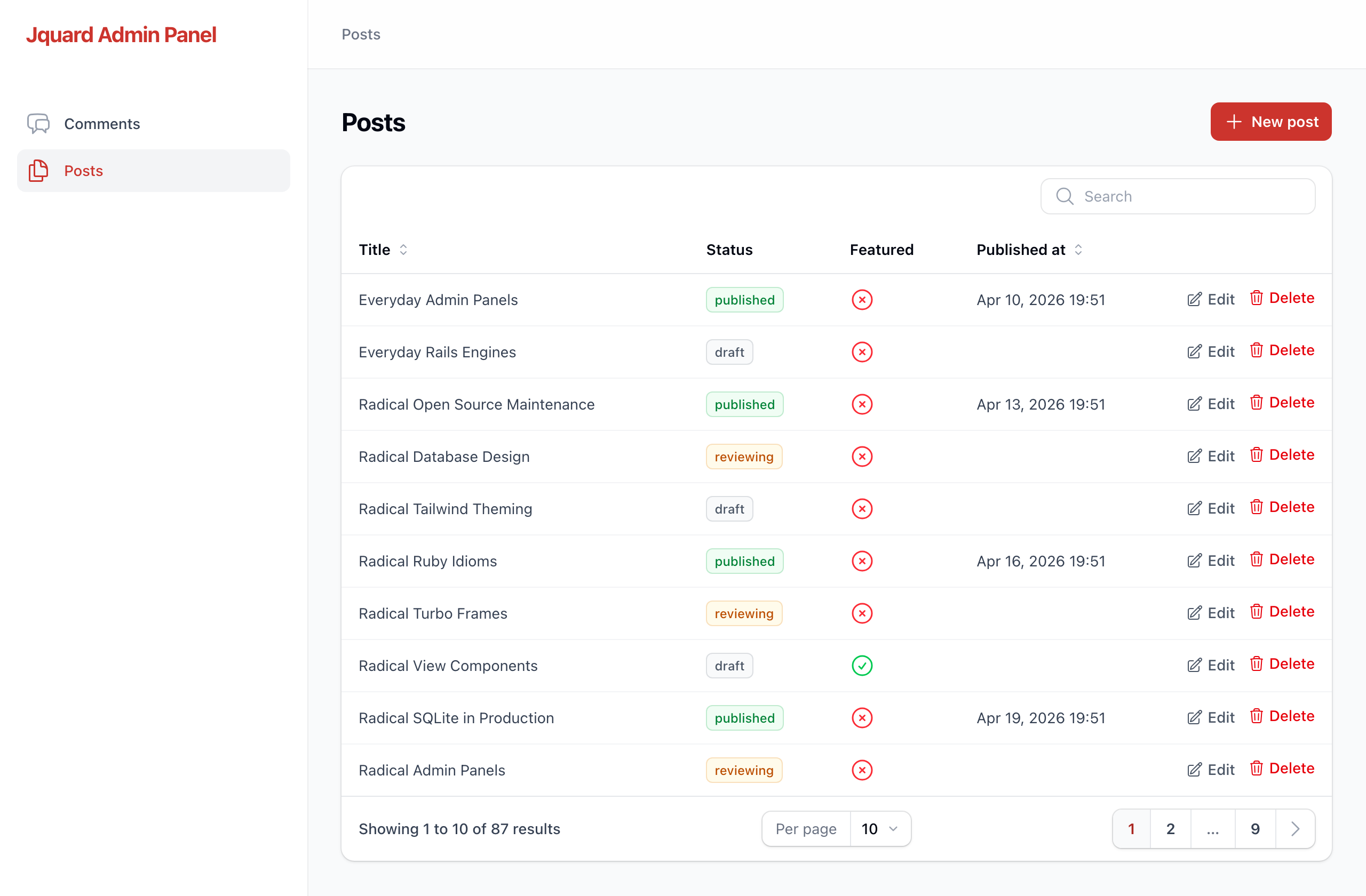
What you get
- Beautiful Tables with search, sortable columns, pagination, status badges, and boolean icons.
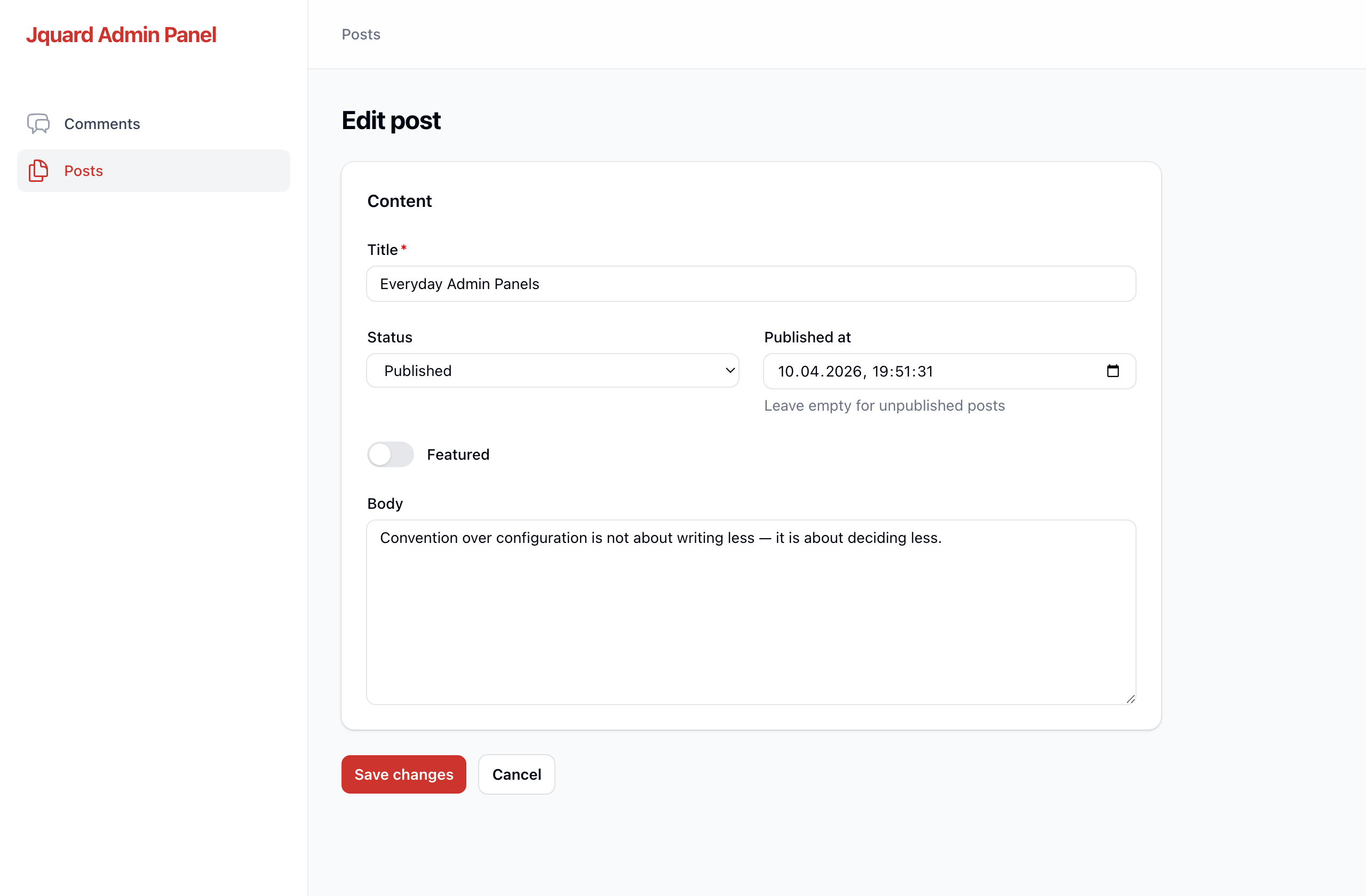
- Beautiful Forms for creating and editing records, with section layouts, and validation errors.
- Authentication — supports Devise authentication; Jquard restyles its screens to match the panel.
- Generators that magically turns a model into a working resource in one command.
Requirements
- Rails 8.0 or newer
- Ruby 3.2 or newer
Getting started
Say you already have a Comment model in your app:
# app/models/comment.rb
class Comment < ApplicationRecord
  validates :author_name, presence: true
end
backed by a table like this:
create_table :comments do |t|
  t.string   :author_name, null: false
  t.text     :body
  t.boolean  :approved, null: false, default: false
  t.datetime :posted_at
  t.timestamps
end
Here's how to put it in an admin panel.
1. Install the gem
Add it to your Gemfile:
gem "jquard"Then run the install generator. It mounts the engine at /admin and creates a config file:
$ bundle install
$ bin/rails generate jquard:install
The generated config/initializers/jquard.rb starts with an open panel —
config.authenticate_with { } — so you can look around right away. Before you
deploy, replace it with real authentication: see
Authentication.
2. Generate a resource for your model
$ bin/rails generate jquard:resource Comment3. Open /admin
That's it. You have a Comments table you can search and sort, a form to create new comments, and edit and delete on every row. The author_name column is searchable because it's a string; approved shows a check or a cross because it's a boolean; posted_at is formatted as a date. Jquard picked those from your database columns.
What the generator wrote
The generator created a small folder of plain Ruby files. This is your code now — edit any of it.
app/jquard/resources/comments/
├── comment_resource.rb          # ties the model, table, form, and pages together
├── tables/comments_table.rb     # the columns shown in the list
├── schemas/comment_form.rb       # the fields shown in the create/edit form
└── pages/
    ├── list_comments.rb
    ├── create_comment.rb
    └── edit_comment.rb
The table it wrote:
# app/jquard/resources/comments/tables/comments_table.rb
module Jquard
  module Resources
    module Comments
      module Tables
        class CommentsTable
          include Jquard::Tables::Components

          def self.configure(table)
            table
              .columns([
                TextColumn.make(:author_name).searchable.sortable,
                IconColumn.make(:approved).boolean,
                TextColumn.make(:posted_at).date_time.sortable
              ])
              .record_actions([ EditAction.make, DeleteAction.make ])
              .default_sort(:created_at, :desc)
          end
        end
      end
    end
  end
end
And the form:
# app/jquard/resources/comments/schemas/comment_form.rb
module Jquard
  module Resources
    module Comments
      module Schemas
        class CommentForm
          include Jquard::Schemas::Components

          def self.configure(schema)
            schema.components([
              Section.make("Details").columns(2).schema([
                TextInput.make(:author_name).required,
                Textarea.make(:body).rows(6).column_span_full,
                Toggle.make(:approved),
                DateTimePicker.make(:posted_at)
              ])
            ])
          end
        end
      end
    end
  end
end
Every line maps to something you can see on screen. Read the next section to change any of it.
Customizing
Table columns
Each column starts with .make(:attribute) and reads left to right:
table.columns([
  TextColumn.make(:title).searchable.sortable,
  TextColumn.make(:status)
    .badge
    .color(draft: :gray, reviewing: :warning, published: :success),
  IconColumn.make(:featured).boolean,
  TextColumn.make(:published_at).date_time.sortable
])-
.searchable— this column is matched by the search box. -
.sortable— the header becomes a sort toggle. -
.badge— render the value as a pill;.color(...)maps values to colors. -
.boolean— (onIconColumn) show a check for true, a cross for false. -
.date_time— format a timestamp; pass a format string like.date_time("%Y-%m-%d")to change it.
Form fields
Fields live inside layout sections. A Section is a titled card; .columns(2) arranges its fields in two columns, and .column_span_full makes one field span the whole width.
schema.components([
  Section.make("Content").columns(2).schema([
    TextInput.make(:title).required.max_length(255).column_span_full,
    Select.make(:status).options(draft: "Draft", reviewing: "Reviewing", published: "Published"),
    DateTimePicker.make(:published_at).helper_text("Leave empty for unpublished posts"),
    Toggle.make(:featured),
    Textarea.make(:body).rows(8).column_span_full
  ])
])
Available fields: TextInput (with .email, .password, .numeric variants), Textarea, Select, Checkbox, Toggle, DatePicker, DateTimePicker, Hidden. Shared options include .required, .placeholder, .helper_text, .default, and .disabled.
Row actions
record_actions decides the buttons on each row. Delete shows a confirmation dialog you can word yourself:
table.record_actions([
  EditAction.make,
  DeleteAction.make
    .confirm_heading("Delete this comment?")
    .confirm("This can't be undone.")
    .confirm_button("Yes, delete")
])
The resource file
comment_resource.rb is the hub. It names the model and hands the table and form to the classes above:
class CommentResource < Jquard::Resource
  self.model = ::Comment
  self.navigation_icon = "chat-bubble-left-right"   # any Heroicon name

  def self.form(schema)
    Schemas::CommentForm.configure(schema)
  end

  def self.table(table)
    Tables::CommentsTable.configure(table)
  end
end
Authentication
Jquard does not ship an authentication system. Your app owns the users, the sessions, and the sign-in rules; Jquard hooks into whatever you already use and restyles its screens to match the panel.
The install generator disables authentication with an empty block —
config.authenticate_with { }, which means no authentication and leaves the
panel public. That is fine while you build locally; for production you would want to add authentication.
Today Devise is the documented and supported option.
1. Install Devise in your app
$ bundle add devise
$ bin/rails generate devise:install
$ bin/rails generate devise User
$ bin/rails db:migrate
For an admin panel you usually do not want public sign-up. Remove
:registerable from the generated model, and create your admins from the
console or seeds:
# app/models/user.rb
class User < ApplicationRecord
  devise :database_authenticatable, :recoverable, :rememberable, :validatable
end
# in bin/rails console
User.create!(email: "admin@example.com", password: "a-good-password")Keep :registerable if you do want sign-up (a SaaS app, for instance) —
Jquard ships registration views, and they'll be styled and ready to use.
2. Point Jquard at it
In config/initializers/jquard.rb, replace the empty authenticate_with { }
block the generator wrote by uncommenting the three lines below it:
# config/initializers/jquard.rb
Jquard.configure do |config|
  config.authenticate_with { authenticate_user! }
  config.current_user_method = :current_user
  config.sign_out_path = -> { main_app.destroy_user_session_path }
end-
authenticate_withruns as abefore_actionon every panel page, in the controller's context. Anything you can call in a controller works here, which is also where you put authorization:authenticate_with { authenticate_user!; head :forbidden unless current_user.admin? }. -
current_user_methodtells the user menu who is signed in. Without it the menu is hidden. -
sign_out_pathis the target of the "Sign out" button. Use a lambda when the path comes from your app's routes — inside the engine they live undermain_app. If your sign-out route uses a verb other thanDELETE, setconfig.sign_out_method = :get.
That's the whole integration. There is no generator and nothing to copy into your app.
What you get
Because Devise renders through Jquard's layout and views, your sign-in, password reset, and (if enabled) registration screens automatically match the panel — same brand name, same primary color, same form styling. Nothing is copied into your app, so these stay in sync as Jquard evolves.
Password reset emails still use Devise's plain default templates; only the web pages are styled.
Other auth systems
Any auth library works for locking the panel — the three config options above are deliberately generic. For example, with Rails 8's built-in authentication generator:
config.authenticate_with { require_authentication }
config.current_user_method = -> { Current.user }
config.sign_out_path = -> { main_app.session_path }
What is Devise-specific today is only the styling of the auth screens: Jquard ships views for Devise's controllers. With another library you get a secured panel and your own unstyled sign-in page.
Running without authentication
A public panel (a local prototype, a demo) is opt-in through the empty block the generator writes:
config.authenticate_with { }Theming
The install generator wrote config/initializers/jquard.rb:
Jquard.configure do |config|
  config.brand_name = "My App"

  # A built-in palette name...
  config.primary_color = :ruby

  # ...or a full set of shades:
  # config.primary_color = {
  #   50 => "#eff6ff", 100 => "#dbeafe", 200 => "#bfdbfe", 300 => "#93c5fd",
  #   400 => "#60a5fa", 500 => "#3b82f6", 600 => "#2563eb", 700 => "#1d4ed8",
  #   800 => "#1e40af", 900 => "#1e3a8a", 950 => "#172554"
  # }
end
The brand name shows in the sidebar; the primary color is used for buttons, links, the active nav item, and form focus rings.
Status
Jquard is early. Today it covers the core admin panel: list, create, edit, and delete, plus the generator and authentication. Planned next: authorization, a read-only view page, relation managers, custom and bulk actions, and a dashboard. It follows semantic versioning.
Development
The repo includes a dummy Rails app under test/dummy that mounts the engine.
$ bin/rails test        # run the test suite
$ bundle exec rubocop   # lint
Contributing
Bug reports and pull requests are welcome on GitHub at https://github.com/jquard/jquard.
License
Jquard is open source under the MIT License.
It ships with Heroicons by Tailwind Labs, also MIT licensed — see lib/jquard/icons/LICENSE.