twin

Sync configuration between Macs (or to any host you can reach over ssh) from self-documenting Markdown files. Designed for informed, interactive syncing.
A sync-file is a normal Markdown document. The notes are for you, or for an AI assistant. twin only uses the fenced YAML blocks:
---
Active: 1
Source: /Users/admin
Target: admin@macbook:/Users/admin
---

## Fish Shell

Shell config, including completions and abbreviations. `local.fish` stays
machine-specific, the MacBook keeps its own configuration.

```yaml
Program: Fish Shell
Path: .config/fish
Description: Fish Shell configuration
Own: conf.d/local.fish
```
twin runs selected configuration updates. Where the target has changes of
its own, it stops and asks (verified against content, never guessed from
timestamps). At its core it's just rsync, but a year later the notes in the
file still tell you why you did it that way.
That is the whole idea, and for most entries it stays as small as the example above. The rest of this README covers more complex cases: files that are specific to the other computer, files that have changed on both sides since the last sync, and paths that differ per host. If you are wondering how the concept differs from chezmoi and its kind: Alternatives.
Why Markdown
- You can read it later. The reason a path is synced sits next to the path, in the notes.
- Machines can read it too. The YAML blocks can be extracted by grubber.
- It stays editable by hand. No generated state, no database. Add a block in your editor and twin can use it.
- Ask your AI to help you write it. Show this README and an existing sync-file, describe the next entry, and what comes back is valid for grubber and still readable by you.
Screenshots
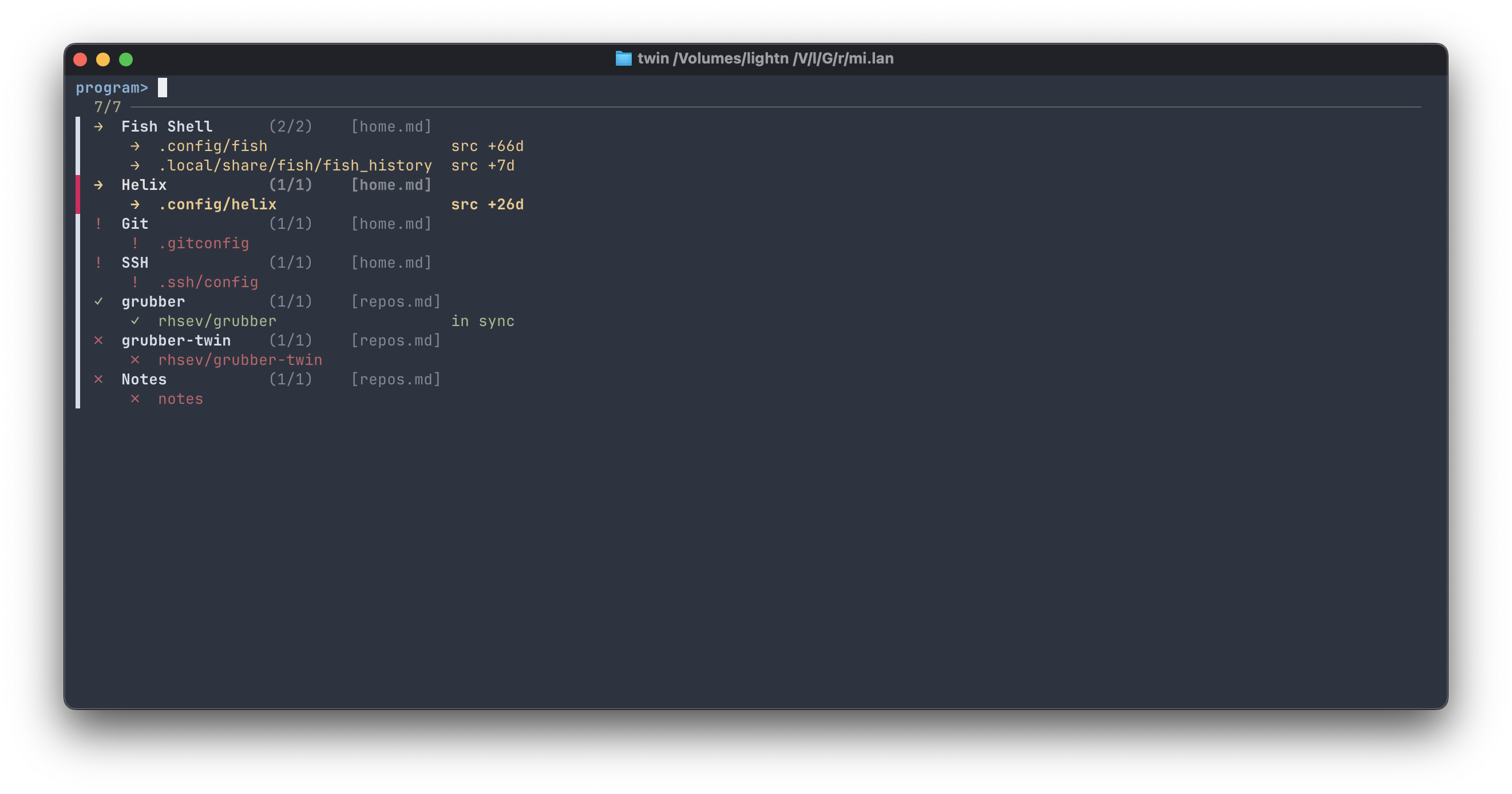
Stage 1 — one row per program: status, name, active paths, and the
sync-files it comes from. A name that appears in several sync-files (the app
in one, its config in another) is one entry, and a trailing bracket group ties
variants to their base name — livesync [agent] lists under livesync. The
pane on the right lists the program's paths, colour-coded by status:
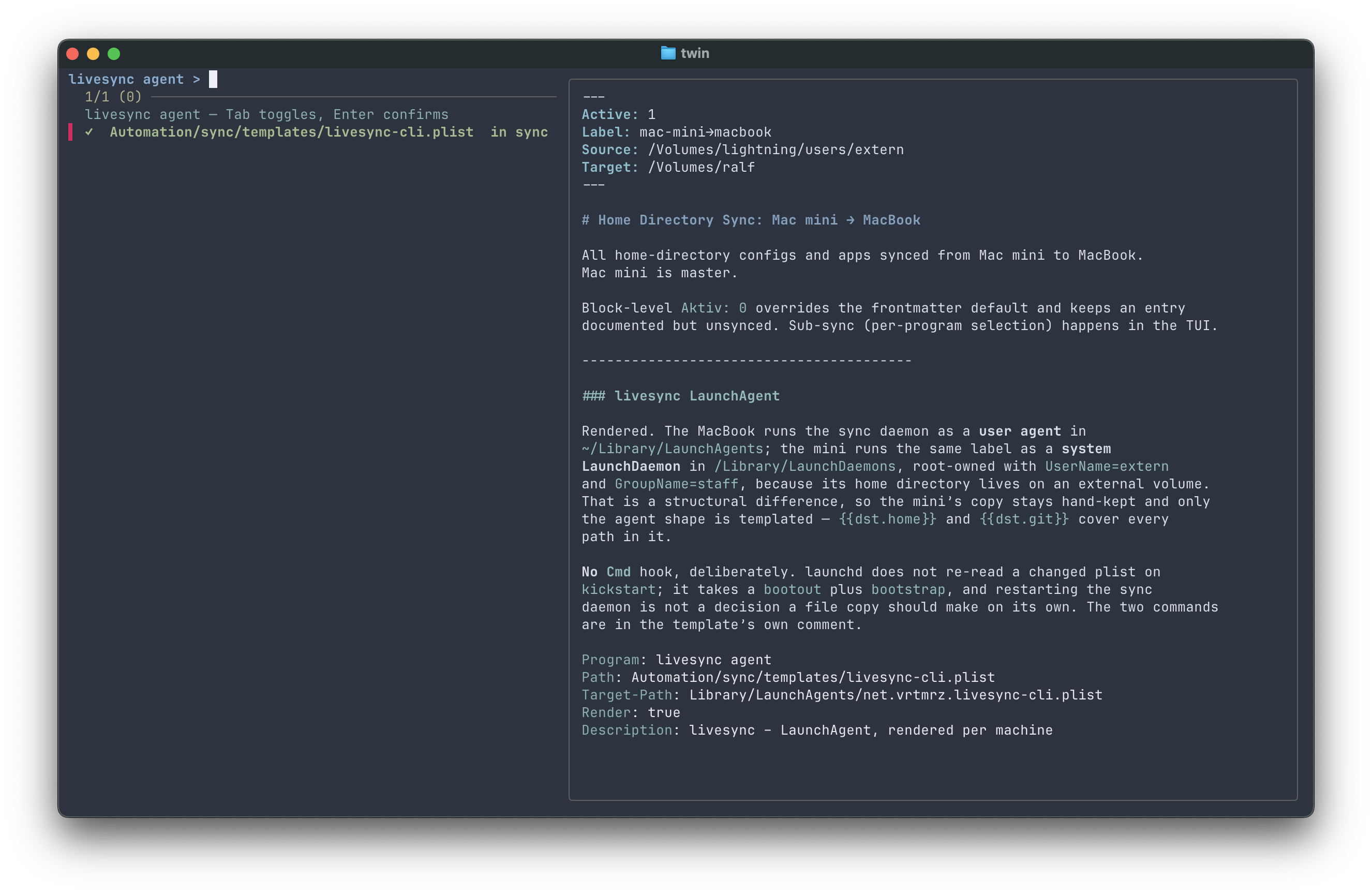
Stage 2 — the paths of one program, with a selection column. file names
each path's origin, changes says what a sync would move and, after one, what it moved. The right pane
shows the relevant sync-file section, rendered by apex:
Install
twin is a single binary. Download the one for your platform from the
releases — twin-macos-arm64,
twin-macos-amd64, twin-linux-amd64, twin-linux-arm64 — and put it in
your PATH as twin. Or, with Go installed:
go install github.com/rhsev/mark-twin/cmd/twin@latestPlus grubber, a small Go binary —
download it and put it in your PATH. rsync ships with macOS.
Optional: one of apex, glow or bat for the preview pane (tried in that
order, plain text if none are present). twin doctor reports what it found.
git clone https://github.com/rhsev/mark-twin.git
cd mark-twin
make build            # ./twin
make install          # copies to /usr/local/bin (PREFIX=… to change)
Needs Go 1.26.5 or newer.
Versions up to 0.6.1 were a Ruby gem. Sync-files, config.yaml, the journal
and every command are unchanged; only the installation differs:
gem uninstall mark-twinthen install the binary as above. fzf is no longer needed.
Getting started
1. Choose ssh or a mounted volume. Target: takes either form:
Target: admin@macbook:/Users/admin              # over ssh
Target: /Volumes/macbook/Users/admin            # a mounted volume (SMB, NFS, …)
Over ssh you need key-based login — twin runs ssh -o BatchMode=yes and never
prompts for a password, so set up ssh-copy-id macbook first. A mounted volume
needs no keys but has to be mounted; twin checks before every sync. The
comparison below covers the two differences that
actually matter.
2. Point twin at a folder for sync-files, in ~/.config/twin/config.yaml:
sync_dir: ~/Sync

global_excludes:
  - .DS_Store
  - .git/
3. Write a sync-file, or start from one of the examples:
mkdir -p ~/Sync
cp examples/home.md ~/Sync/
$EDITOR ~/Sync/home.md      # adjust Source: and Target:
twin add ~/.config/fish does the same interactively, if you prefer prompts to
an editor — it finds the matching sync-file, derives the relative path,
suggests excludes for what it sees in the directory, and appends a block with a
placeholder note.
4. Check first:
twin status              # what differs
twin sync --dry-run      # what a sync would do, without doing it
twin                     # interactive: pick a program, pick paths, Enter
Everyday commands
twin                         # TUI — all programs across all sync-files
twin home.md                 # TUI — one sync-file in sync_dir (by name)
twin ./some/dir/             # TUI — all sync-files in a directory
twin list                    # plain listing
twin status                  # what a sync would change, content-verified
twin sync -p grubber         # sync one program by name pattern
twin sync --file=repos       # sync all programs from a sync-file
twin sync --dry-run          # preview without writing
twin sync -v                 # rsync's full output instead of just the changes
twin log                     # recent journal entries (-n N, --json)
twin doctor                  # check tools, renderers, targets, remote hosts
twin --version               # which twin is actually running
twin --help                  # show usage
A file argument without / is matched by substring against sync-file names in
sync_dir; anything containing / is treated as a path, file or directory.
By default a sync prints only what changed — the lines below, plus anything a
Cmd produced and any error. A job that moved nothing says so:
(nothing to transfer). -v adds rsync's headers and transfer summaries
back. The bare twin command needs a terminal and says so instead of waiting
when there is none, so cron jobs and ssh host twin … fail with a usable
message rather than hanging.
Every job is journaled to ~/.local/state/twin/log.jsonl — one JSON line with
timestamp, program, path and outcome. twin sync exits non-zero if any job
failed.
The text user interface (TUI)
Two stages, one screen: a filter on top, the table in the middle, the preview
on the right. At the bottom, a line says what is running (loading,
verifying, syncing) and the next one shows the last result, or a hint:
grey rows are not verified yet, and v checks them with rsync.
| Stage 1 — programs | Stage 2 — paths of one program | ||
|---|---|---|---|
enter |
open the program |
space / tab
|
toggle the path |
/ |
filter by name |
a / u
|
select all / none |
v |
verify all directories in the background | enter |
sync the selection (or the current row) |
r |
reload the sync-files | d |
dry-run the selection, verdict onto the row |
p |
show/hide the preview | v |
re-verify the directories |
J / K
|
scroll the preview | esc |
back to the programs |
esc / q
|
quit | q |
quit |
Opening a program verifies its directory entries — the ∘ rows turn into a
real verdict as rsync answers, and the changes column says what a sync would
move. A sync runs inside the interface: the status line follows it job by job,
each row shows its result as soon as it is done, and the preview shows the
output. If the target has changes of its own, the preview lists them and asks
before anything is copied: y overwrites and syncs, d shows the diffs, n
syncs nothing. The checks and the journal are the same as for twin sync.
Reading a dry-run
--dry-run passes rsync's --itemize-changes through, which is precise but
terse. The first two characters are what matter:
| Line | Means |
|---|---|
>f+++++++++ |
new file, does not exist on the target yet |
>f.s....... |
s is set: the size differs, so the content really changed |
>f..t...... |
only t: same size, later timestamp — usually identical bytes |
.f...p..... |
no transfer at all, permissions only |
.d..tp..... |
a directory's own timestamp or permissions |
*deleting |
removed on the target (Delete: true jobs) |
Two rules cover most of it: a leading > means data would move and a leading
. means it would not, and among the flags s is the one that proves the
content changed rather than just a timestamp.
Only the > and *deleting lines appear by default — the . ones are what
-v adds back, along with rsync's headers and byte counts. A job with nothing
to move prints (dry-run: nothing would change), and a run full of
>f..t...... lines is twin re-stamping files whose contents already match,
which is normal after syncing a tree in both directions. In the user interface, d
runs the same dry-run for the selected paths and keeps each verdict on its
row.
Sync-files
One Markdown file per relationship. Frontmatter sets it up, YAML blocks define
the individual paths. Frontmatter fields are merged into every block, so
Source:/Target: are usually written once at the top — but a block may
override them, which is how one file can serve several destinations.
Blocks sharing a Program are grouped: they are selected together, synced
together, and run in the order they appear in the file.
Field reference
Field names are capitalised English. An unknown key is ignored silently and a
missing Active counts as 0, so a typo shows up as an entry that never syncs
rather than as an error. A list where a single value belongs
(Exclude: [a, b] instead of Exclude: a, b) is an error that names the block.
| Field | Where | Meaning |
|---|---|---|
Program |
block | Group name; blocks sharing it sync together. A trailing […] lists under the base name in the TUI |
Path |
block | Path relative to Source (file or directory) |
Source |
either | Absolute base path on this machine |
Target |
either | Absolute base path, or user@host:/path for ssh |
Target-Path |
block | Path under Target, when it differs from Path
|
Active |
either |
1 syncs, 0 skips. Default 0
|
Description |
block | Shown in listings and the TUI |
Label |
either | Free-text grouping, filterable via --label
|
Exclude |
block | Comma-separated paths that are not part of the sync |
Own |
block | Comma-separated paths the target owns |
Include |
block | Comma-separated entries under a directory Path; when set, only these sync |
Delete |
block |
true mirrors deletions, with backups |
Sudo |
block |
true writes through sudo rsync as root:root — remote targets only, never with Delete
|
Cmd |
block | Shell command, run only when bytes actually moved |
Render |
block |
true substitutes {{tokens}} instead of copying |
Verify |
block |
false skips content verification — for entries too big (see below) |
Exclude or Own?
Both keep rsync away from a path and both take a comma-separated list
(Exclude: *.log, __pycache__/). What differs is the meaning, and twin status
reports them apart:
-
Exclude:— not part of this sync at all. Build artefacts, logs, caches,.git/, a test script with no business on the other machine. -
Own:— inside the sync scope, but the target owns it. Machine-specific configuration the source must never clobber:conf.d/local.fish,lazy-lock.json, a per-host credentials file.
The distinction is documentation, not mechanism. Six months on, Own: still
says "deliberate, the other machine maintains this", where the same entry sitting
in Exclude: between *.dwarf and .DS_Store is something you once
filtered out.
Include: a positive list
Exclude fails open: whatever nobody thought to list travels along. For a
directory that mostly holds things the other machine does not want — a ~/bin
with symlinks into local checkouts, retired scripts and one-machine tools —
Include turns it around:
Program: bin
Path: bin
Include: flink, Skripte/
Only the named entries under Path take part; an entry may be a file, a
directory (with everything below it) or a nested path (Skripte/tool.sh).
Without the field, everything syncs, exactly as before. Exclude and Own
still apply inside what is included, so a .DS_Store in Skripte/ stays
home. Forgetting an entry fails closed: the script is simply missing on the
target, which shows the first time it is called. Entries outside the list are
also safe from Delete on the target — rsync never deletes what it excludes.
Include on a file Path is refused at scan time.
No suffix is needed: each entry is filtered both as a file and as a directory
with everything below it, and leading or trailing slashes are stripped — Skripte,
Skripte/ and /Skripte all name the same thing. Several entries are
comma-separated in the one field; a YAML list is refused ("must be a single
value (comma-separated for several)"). For a long list, fold it:
Include: >-
  flink,
  Skripte,
  tools/mkicon
Cmd: doing something after a sync
Cmd runs a shell command once rsync has actually transferred bytes — a no-op
sync runs nothing. Typically a curl to a local automation endpoint like
mi.lan, or an ssh host '…' for remote
targets (Cmd always runs locally).
It belongs to a block rather than to the program, which is what you want when
different paths need different follow-ups — reload nginx after its config,
re-link binaries after bin/. For a restart, put the command in the
last block: jobs run in file order, so a restart placed earlier brings the
service back before the remaining paths are written. The same command repeated
across blocks restarts repeatedly, for the same reason. One command, last block.
There is no hook before a sync, and by design: rsync writes each file beside
the old one and renames it into place, so a running process keeps the file it
opened and notices nothing. Stopping a service first buys nothing; restarting
it afterwards is what makes the change take effect, and that is what Cmd is
for. A file the running process itself writes to, a database above all, is
not a job for twin's standard means: use the database's own dump or
replication instead.
Delete: mirroring removals
Delete: true adds --delete, so files removed from the source disappear on
the target too. Deleted and overwritten files are moved to
<target>/.twin-backup/<timestamp>/ rather than destroyed — a safety net worth
pruning occasionally. It applies to Delete jobs only.
Sudo: privileged targets
Sudo: true makes the far side run rsync through sudo, for targets only
root may write — /usr/local/bin on Ubuntu, say. Files land as root:root
(--chown), because -a would otherwise transplant the source UID onto the
target, where it belongs to nobody — yet. Reading needs no privilege on a
world-readable target, so twin status compares against the real files and
drift detection stays honest.
The target host needs passwordless sudo for the connecting user; twin doctor checks sudo -n wherever a Sudo: job points, because the sync
itself would fail only at write time. Two rules are enforced at scan time:
Sudo needs a remote target, and it never shares a block with Delete —
root rights plus --delete plus one wrong Path is how a system directory
gets cleaned up. Whoever needs both has to argue the case in code.
Mounted volume or ssh
Both are first-class. twin status, the user interface, Exclude/Own, Delete and
Cmd behave identically; remote paths are stat'ed (and, where timestamps
disagree, checksummed via md5/md5sum) in batched ssh round-trips per host,
all hosts at once, and an unreachable host shows as ? instead of failing the
scan. --file and --label pick the sync-files first, so only their hosts
are asked. An unmounted
volume shows the same ? — "could not look", not "every file missing".
The remote side needs rsync and /bin/sh; stat (or date -r) and
md5/md5sum improve status from there, and twin doctor probes a host for
all of them before the first sync fails halfway. No particular login shell is
required — twin drives the far side through /bin/sh explicitly. That matters
more than it sounds: until 0.4.5 the stat script went to whatever shell the
account uses, so a host with fish (or any other non-POSIX shell) reported
every path as unreachable. It looked exactly like a machine being switched
off, which is why it went unnoticed for a while.
Two differences are real:
| mounted volume | ssh | |
|---|---|---|
| Setup | volume must be mounted | ssh key (ssh-copy-id) |
| Before syncing | mount check | reachability check |
| Target absent |
? unreachable |
? unreachable |
Render: true |
supported | not supported |
Render needs to read and write file contents on the target, which twin only
does locally. Keep rendered files on mounted targets, or render locally and sync
the result.
Syncing is push-only in both cases: Source: is always this machine.
---
Active: 1
Label: mini → server
Source: /Volumes/lightning/Git/Website
Target: ralf@server:/srv/www
---
When the target has changed too
A sync has a direction: the source wins. But targets get edited — a quick fix made on the server at midnight, a config tweaked where it runs. Twin looks for that before it moves the files, and asks once for the whole program:
target has changed since the last sync — 1 file(s) differ:
  ! app/code.rb (target 2h newer)
syncing would replace them with the source version.

overwrite these on the target and sync? [y]es / [d]iff / [n]o (abort)
d prints a unified diff per file, then asks again. n aborts the entire
program — nothing is written, so you never end up with half a deploy applied.
Whether a change over there is normal depends on what the target is. A
machine you also work on — a second Mac — gets edited on both sides; a newer
file over there is ordinary, and the prompt is where you decide which version
you want. A machine that only runs what you deploy — a server, a container, a
NAS — should never change on its own: the target is never a source, and a
target_newer there means the rule was broken, which is worth stopping for
rather than waving through. Write the rule into the sync-file itself, in the
notes where the next person — you, in a year — will read it:
---
Active: 1
Label: mini → dylan
Source: /Volumes/lightning/Git/rhsev/dy.lan
Target: /Volumes/docker/dylan
---

# Dylan

Deploy to the container. **Work happens locally; the target is never a
source.** A `target_newer` in `twin status` is therefore not a normal
state — find out who edited over there before overwriting it.
Two properties make this bearable day to day:
- Content, not timestamps. A file that is merely newer on the target with identical bytes is not a conflict and does not ask. Sync a tree in both directions and you collect dozens of those; a prompt that fires on them gets answered without being read.
-
Directory mtimes are ignored. Editing a file in place leaves its
directory's mtime untouched, and
rsync -aequalises those anyway. Twin asks rsync what it would actually transfer instead of guessing from a directory.
twin status gives the same verdict without syncing: it runs the dry-runs per
entry and reports what would flow, what merely differs in timestamp, and what
changed on the target. The TUI's first stage stays mtime-blind for
directory entries — it marks them ∘ (unverified) rather than guessing,
because the dry-runs would make it slow to open. Opening a program runs them
for just that program, and v runs them for everything in the background
while you keep working.
One escape hatch: Verify: false opts an entry out of every content round —
the md5 checks, the status dry-runs, the TUI's verification, the pre-sync
conflict listing. It exists for entries where the walk itself is the cost: a
node_modules tree on an SMB mount stats tens of thousands of files for one
verdict. Such an entry stays ∘/mtime-based, and the TUI says so rather
than letting the ∘ pass as pending; a sync still leaves newer target files
alone (--update holds), they just aren't itemised first.
Automation
For a scheduled run (launchd, cron):
twin sync --quiet --skip-unavailable --skip-conflicts-
--quiet— only conflicts, errors and jobs that changed something. A no-op run is silent. -
--skip-unavailable— a laptop that isn't docked is skipped, not an error. -
--skip-conflicts— leave target-side changes alone and sync the rest. Use--forceinstead to overwrite them.
Which of the two to pre-arrange depends on the target. On a machine you also
work on there is rarely a right answer in advance, so run those syncs by hand,
or with --skip-conflicts and read the log. On a machine that only runs what
you deploy, --force matches the model — the source is the truth — but it
discards a target-side edit without showing it to you first. That is precisely
the trade the prompt exists to make deliberate, so prefer --skip-conflicts
for scheduled runs and keep --force for the moment you have looked and
decided.
Without a terminal and without one of those two flags, a real conflict aborts the run with exit code 1 rather than picking an answer for you. Output and a non-zero exit therefore mean something genuinely needs attention — which is what launchd's logging wants. The journal records every job regardless.
Templating
Skip this until you hit the problem it solves.
Some configs differ per machine — a LaunchAgent plist pointing at
/Volumes/lightning/… on one Mac and /Users/ralf/… on another. Those used to
fall out of twin and get hand-maintained.
Define a host table in ~/.config/twin/config.yaml:
host: mini          # which machine twin runs on
target: book        # the machine being synced to

hosts:
  mini: { home: /Volumes/lightning/users/extern, git: /Volumes/lightning/Git }
  book: { home: /Users/ralf, git: /Users/ralf/git, mount: /Volumes/ralf }
That exposes three sets of {{tokens}}, each with one fixed meaning:
| Token | Resolves to | Use in |
|---|---|---|
{{src.home}}, {{src.git}}, … |
the running host's own paths |
Source: (read side) |
{{dst.mount}} |
where the target is mounted here (/Volumes/ralf) |
Target: (write side) |
{{dst.home}}, {{dst.git}}, … |
the target's native paths | rendered file content |
The distinction matters: a file written to the mount (/Volumes/ralf/…) but
read by the target machine must contain that machine's native paths
(/Users/ralf/…). {{dst.mount}} and {{dst.home}} keep the two apart.
Quote templated values.
{{at the start of a YAML value collides with YAML flow-mapping syntax, so writeSource: "{{src.home}}", notSource: {{src.home}}— exactly as in Ansible.
Render: true turns a block from copy into render: twin reads the source as a
template, substitutes {{…}} in its content, and writes the result only if
it differs from the current target, so a Cmd hook fires only on a real change.
Target-Path: overrides the target-side relative path:
## LiveSync LaunchAgent

```yaml
Program: livesync [agent]
Source: "{{src.home}}/Automation/launchd"
Path: com.ralf.livesync.plist
Target: "{{dst.mount}}"
Target-Path: Library/LaunchAgents/com.ralf.livesync.plist
Render: true
Cmd: curl -s http://mi.lan/livesync-reload
```
twin doctor checks that every {{token}} resolves, and twin status compares
rendered output by content rather than mtime. Without a hosts table,
templating is inert and literal-path sync-files behave exactly as before.
Configuration
~/.config/twin/config.yaml:
sync_dir: /path/to/sync-files

global_excludes:
  - .DS_Store
  - .git/

# Optional preview rendering (apex):
# apex_theme: default
# apex_width: 80                  # default: the width of the preview pane
# apex_code_highlight: monokai
# apex_code_highlight_theme: dark
Environment overrides: TWIN_SYNC_DIR, TWIN_CONFIG, TWIN_HOST (which host
twin runs as — lets one config serve both machines).
Alternatives
twin overlaps with the dotfile managers without being one: it syncs whatever you want, documents included, but it specialises in configuration files. Taking chezmoi as the most capable representative of its kind:
| twin | dotfile managers (e.g. chezmoi) | |
|---|---|---|
| Focus | deliberate sync between a few machines | converging many machines from one repo |
| Model | interactive: pick, preview, sync | git: commit, push, apply |
| Where the why lives | notes next to the YAML block, same file | commit messages, separate docs |
| Conflicts | stops and asks, diff in hand | three-way merge on apply |
| Templating | host paths ({{dst.home}}) |
full engine, secrets from password managers |
| Scale | two or three Macs/servers | dozens of machines |
If you want a fleet converging automatically, or secrets injected at apply time, choose chezmoi. twin is built for the smaller case: easy to configure, with room to read and think about what the target changed before it gets overwritten.
Design
Sync instructions and their context in one place. The engine is a small Go
package; the user interface sits on top of it, built with
basekit, the Bubble Tea foundation
shared with matterbase and taskbase. apex renders, rsync does the work.
See ARCHITECTURE.md for the data model and internals.
Tests
make testPart of a family of plain-text tools — the profile page has the map.