Nuri Language Compiler
Table of Contents
- Introduction
- To Build
- Install
- Usage
- Nuri Language
- Nuri JSON
- Deserialisation (JSON-to-Nuri)
- Planning
- License
Introduction
The Nuri language serves two objectives:
- To specify a declarative specification of configuration state of a system.
- To model a reconfiguration task which consists of:
- an initial state
- a goal state
- a set of actions
- global constraints
This compiler can do:
- syntax checking
- type checking
- evaluating the global constraints over the specification
- generating a compilation result in JSON
- automatically generate a plan of a reconfiguration (planning) problem -- this requires additional softwares
This compiler is used by the Nuri configuration management tool.
To Build
Requirements:
- OCaml version >= 3.12.1
Compilation:
sudo apt-get install ocaml
cd ocaml
make
The above commands generates file nuric. Notes that in default the codes are
compiled into OCaml byte-codes. However, we can compile it into native by
setting variable NATIVE=1:
make NATIVE=1Install
If you are familiar with Ruby, you can install a pre-compiled binary distribution through Rubygems:
sudo gem install nuric
To test, try:
nuricThis gem also provides a Ruby wrapper of the Nuri compiler so that you can call the compiler/planner through any Ruby program.
TODO: A Python wrapper is under development.
Usage
The simplest way is:
nuric spec.nuriThis will parse the specification in file spec.nuri, perform the type-
checking, evaluate the global constraints, and finally generate a compilation
result in JSON.
Other options:
-
-x: the compiler will only perform syntax-checking over the specification; -
-t: the compiler will only perform syntax-checking and type-checking over the specification, and then print the type of every variable; -
-m: the compiler will perform syntax-checking, type-checking, determine the final value of every variable, evaluate the global constraints, but it will use objectrootas the final output instead of objectmain; -
-i: the compiler will evaluate specification from standard input (STDIN); -
-g: the compiler will perform syntax-checking, type-checking, determine the final value of every variable, but it will not evaluate the global constraints; -
-p: the compiler will solve a planning (reconfiguration) problem which requires two input files (one is the initial state, and second is the goal state).
Notes that -p option requires an external program that is not included in
this repository. You can contact the author (Herry)
or use a binary distribution through Rubygems (see Install).
Nuri Language
Nuri language is a declarative configuration language which allows us to define three aspects of configuration:
- a configuration state of the system,
- a model of configuration change called as action,
- global constraints, which are constraints that should be maintained during the changes.
Nuri adopts a prototype-object mechanism from SmartFrog
where an object can be used as a prototype of other objects. This allows
configuration composition through inheritance (extends). Nuri also supports
a traditional composition through file inclusion (import and include).
Nuri is a static-typed language with a powerful type-inference (the compiler
can determine the variable's type based on its value). It supports common types
i.e. bool, int, float, string, object, reference, and array. It
also allows two user-defined types i.e. schema and enum.
This section is a short introduction to Nuri language. It describes several aspects which are supported by the language with some examples.
Main Object
In Nuri, the configuration of the target system must be defined inside object
main. Other variables or objects defined outside this object main are
treated as prototypes which will not be included in the final compilation
output.
x 1;
main {
  a 2;
  b true;
  a 3;
}
In the above specification we have object main and three variables i.e. x,
a, and b. Since x is defined outside main, then it will not be included
in the final output. On the other hand, since a and b are defined inside
main, then they will be included in the final output. Thus, the final output
after compilation is:
{
  "a": 3,
  "b": true
}
Notice that during compilation the value of a has been changed from 2 to
3.
Attribute Name of Object
For practical purpose, attribute name will be automatically added by the
compiler whenever it is not defined explicitly. The value object name
will be the name of the variable that holds this object.
main {
  a { }
  b {
    name 1;
  }
}
The compilation output will be:
{
  "a": {
    ".type": "object",
    "name": "a"
  },
  "b": {
    ".type": "object",
    "name": 1
  }
}
Notice that attribute name of object a is automatically added and its
value is a. While the value of attribute name of object b is 1 which
is equal to the declaration.
Static Typing
There are 4 basic types i.e. bool, int, float, and string. The type of
a variable is determined by its first declaration. We can let the compiler to
automatically infer the type of the variable based on its value, or explicitly
declare the type.
main {
  a : bool true;  // type: bool
  b 1;            // type: int
  c 2.3;          // type: float
  d 'a string';   // type: string
  c 4;            // type: float
}
The above specification shows that the type of a is explicitly declared as
bool. While the types of b, c, and d are automatically inferred by the
compiler i.e. int, float, and string respectively. The last statement
(c 4;) is accepted because any float variable can be assigned with any
integer value, but not vice versa.
Nuri allows us to define an object, which is very useful to model a resource
component. Basically, all objects have type object. However, we can use
schema to defined a custom type of object -- more details about schema will
be described in the following subsection. A variable also can have a type of
reference of a schema, which is a natural way to express
dependency between resources.
Array is an abstract data structure supported by Nuri. For simplicity, we can
only have an array of bool, int, float, string, or reference. An array
can be in any size of dimensions where the type of an n-dimension array is
compatible with an m-dimension array.
There is another way to define a custom type i.e. using enum. Enum allows us to define a set of symbols that can only be used by particular variable.
// enum type with two symbols: stopped & running
enum State { stopped, running }

// main object
main {
  machine {
    state State.running;
    ipaddress '10.0.0.1';
    users ['herry', 'paul'];
    apache {
      state State.stopped;
    }
  }
}
The above specification defines an enum type State which has two symbols
i.e. stopped and running. It has a machine whose state is running.
Its IP address is 10.0.0.1. It has two users i.e. herry and paul.
It also has an apache server whose state is stopped. Note that the compiler
automatically infers the type of variable state i.e. enum State.
Note that references of basic values (bool, int, float, string, array) and enum are using assign-by-value semantics. On the other hand, references of objects are using assign-by-reference semantics. The following example shows this difference:
main {
  a 1;
  b { c 2; }
  d a;    // reference of a basic value (int) - assign by value
  e b;    // reference of an object           - assign by reference
  f := a; // link-reference of a basic value
  g := b; // link-reference of an object
}
The above specification shows that since d's value is a reference of a, then the compiler will assign the value of a to d (assign-by-value). On the other hand, since e's value is a reference of object b, then the compiler will assign the reference of b to e. f and g are assigned with link-references. Thus, the compiler will copy and assign the values from the source either for the basic-value or the object. The following is the compilation result.
{
  ".type": "object",
  "a": 1,
  "b": {
    ".type": "object",
    "c": 2,
    "name": "b"
  },
  "d": 1,
  "e": "$b",
  "f": 1,
  "g": {
    ".type": "object",
    "c": 2,
    "name": "b"
  },
  "name": "main"
}
Schema
Schema is similar to class on programming languages. However, it is more
flexible in the sense that any object that implement a schema may have
attributes that are not exist in the schema's definition. Thus, we do not have
to define a new schema for every specific object. A schema is very useful to
group objects (resources) that have similar properties, for example: Machine,
File, Service. A Nuri schema is static which means that once it has been
declared, it cannot be modified. This is for keeping consistency of the
schema's structure at every step of compilation.
schema Machine {
  name '';
  running false;
}
You can define a schema by declaring its name and attributes. The above is an
example of schema Machine which has two attributes i.e. name (type
string) and running (type bool), where their default values are an empty
string ('') and false respectively. Note that the Nuri compiler uses
type-inference technique to determine the type of name and running, where
in this case their types are obtained from the values.
An attribute (or in general, any variable) can be assigned with value TBD
(To Be Defined), which means that we must replace this value with a non-TBD
value later. The compiler will ensure that the final output does not have
variable with TBD value. If such situation exists, then a compilation error
will arise.
Inheritance and Reference
schema PM extends Machine { }
schema VM extends Machine {
  is_on : *PM null;
}
We can create a schema which is a child of another schema. For example, the
above specification declares two new schemas i.e. PM and VM. PM extends
schema Machine, thus it inherits all Machine's attributes (name and
running) and their default values. VM also extends schema Machine, but
besides attributes name and running, it also has a new attribute i.e.
is_on with type reference of PM. So is_on can only be assigned with a
reference of an object that implements schema PM or other sub-schemas of
PM.
Note that Nuri only allows single inheritance.
schema Service {
  name '';
  running false;
}
schema Client {
  refer : *Service null;
}
The above specification is another example where schema Client has an
attribute refer whose type is a reference of Service where its default
value is null.
main {
  a1 { }                // type: object
  a2 isa Service { }    // type: Service
  a3 0;                 // type: int
  b1 a1;                // type: *object
  b2 a2;                // type: *Service
  b3 a3;                // type: int
}
The above specification shows that we can only have a reference of an object,
but not a basic value. b1 is a reference of object a1 and b2 is a
reference of object a2, while b3 is equal to 0 because a3's value is
not an object.
Link Reference
A Nuri link-reference is very useful whenever we want to copy any kind of value (either basic value or object) of particular variable to another variable. Note that Nuri allows us to have forward link reference.
To distinguish between a link with a normal reference is that a link is
using operator :=, while a normal reference is without an operator.
main {
  x := a;  // link-reference
  a {
    b 1;
  }
  y a; // reference
}
The compilation output of the above specification is:
{
  "x": {
    ".type": "object",
    "b": 1
  },
  "a": {
    ".type": "object",
    "b": 1
  },
  "y": "$a"
}
Function
A variable can be assigned with a function. Currently, Nuri supports four types of function:
- arithmetic
- string-operation
- shell-command
- conditional
Arithmetic Functions
Nuri supports basic arithmetic functions:
- addition
+ - subtraction
- - multiplication
* - division
/ - modulo
%
TODO: other arithmetic functions such as power and square-root will be supported in the next version.
Note that the operands of the arithmetic functions should be integers, floats, or both.
main {
  a 1;           // integer: 1
  b (a + 2);     // integer: 3
  c (b - 1);     // integer: 2
  d (c * 6);     // integer: 12
  e (d / 3) + 1; // integer: 5
  f (e % 2);     // integer: 1
}
Above specification is using arithmetic functions where all results are integers (including division). This is because both left and right operands are integers. However, if one or both operands are float, then the result will be a float. For example:
main {
  a (2 * 3.1);  // float: 6.2
  b (a / 2);    // float: 3.1
}
String Operation Functions
There are three string-operation functions:
- string concatenation:
1 + ' is an integer, but ' + true + ' is a boolean.' - string interpolation:
"a string with a ${basic_value} or a ${variable}" - regular expression (regexp) matching:
'a string is matched with' =~ /regular expression/
The string concatenation resembles Java syntax where any basic value (boolean, integer, float, string, array, or reference) can be concatenated with a string. It uses the same symbol with arithmetic addition function i.e. +. To distinguish between arithmetric or string, the left association is used where if any operand (left or right) is a string then it will be a string concatenation, otherwise it will be an arithmetic addition.
A value or a variable can be used in the string interpolation if it is a basic value i.e. a boolean, an integer, a float, a string, an array, or a reference of object.
In the regular expression matching function, the left operand should be a string, a variable with type of string, or a function with type of string. It always returns a boolean true if the string matched the regular expression, otherwise false. The symbols that can be used in the regular expression are:
-
.any character except newline, -
*matches the preceding expression zero, one or several times, -
+matches the preceding expression one or several times, -
?matches the preceding expression once or not at all, -
[...]matches one of the character set, -
^match at the beginning of line, -
$match at the end of line, -
|alternative between two expressions, -
(...)grouping expressions, -
\quotes special characters.
Shell-Command Function
We can execute a shell-command and then assign the result (as a string value) to a variable. The command should be declared between two backticks (`...`).
main {
  apache {
    status `service status apache`;   // get apache service's status
    running (status =~ /is running/); // check the status with regular expression
  }
}
The above example shows how to get the status of Apache service and then assign the result to variable status. Then this variable is matched with particular regular expression where the matching result (i.e. true or false) is assigned to variable running.
Note that we can use string interpolation in the command. For example:
main {
  service {
    name 'apache';                    // assign the name of the service
    status `service status ${name}`;  // use variable 'name' in the shell command
    running (status =~ /is running/); // check the status with regular expression
}
The above specification can be simplified by removing variable status, as the following:
main {
  service {
    name 'apache';
    running (`service status ${name}` =~ /is running/);
  }
}
Lazy vs Eager Evaluation
In default, all functions are lazy evaluated: the functions will not be evaluated until the last stage of compilation. This is very useful because functions inside schemas or prototype objects will not be evaluated during compilation. In addition, this can minimise the compilation time because only necessary functions that will be evaluated.
However, we can explicitly specify that a function is eager evaluated using symbol $(...). The compiler will directly evaluate the function inside the scope and return the result.
main {
  a 1;
  b a + 2;    // lazy evaluated
  c $(a + 2); // eager evaluated
  a 2;        // change a's value to 2
}
In the above example, b and c have the same functions but the former is lazy evaluated and the later is eager evaluated. Because c is eager evaluated, then its final value is 3 since a's value is 1 when the function is evaluated. On the other hand, b's final value is 4 since a's final value is 2.
schema Service {
  name : string TBD;
  running (`service status ${name}` =~ /is running/);
}

main {
  apache isa Service {
    name 'apache2';
  }
}
The above specification shows how to use lazy-evaluation function in order to define a schema (or a prototype-object) whose attributes will be inherited by other objects. Below is the output of the compilation process.
{
  "apache": {
    ".type": "Service",
    "name": "apache2",
    "running" true
  }
}
File Inclusion
Nuri provides a way to include a specification in another file. There are two
keywords. First is import which should be used at the root-level of
specification. It has an argument which is a string of file's name to be
included without the extension (extension .nuri will be automatically
added). The compiler first searches the file in current working directory.
If it is not found, the compiler searches in the directories defined in
environment variable NURI_LIB.
For example, if we declares import 'file';, then the following priorities
are applied:
-
file.nuriin the current working directory -
file/file.nuriin the current working directory -
<dir1>/file.nuriwhereNURI_LIB=<dir1>:<dir2>:... -
<dir1>/file/file.nuriwhereNURI_LIB=<dir1>:<dir2>:... -
<dir2>/file.nuriwhereNURI_LIB=<dir1>:<dir2>:... -
<dir2>/file/file.nuriwhereNURI_LIB=<dir1>:<dir2>:... - ...and so on
Keyword #include is used inside any object declaration. However, we must
explicitly define the file extension.
import 'schemas';
main {
  a {
    #include 'attributes_a';
  }
}
Note that all imported/included files must have legal statements, which is different from others such as file-inclusion of C-preprocessor.
Debugging
If we have a large specification, then it is very useful to have a way to debug the compilation process. The Nuri provides function #echo <value or variable>; that will print the value or the variable's value to the standard output (STDOUT) for debugging purpose. For example:
main {
  a 1;      // assign '1' to 'a'
  #echo a;  // print the value of 'a' i.e. '1' to standard output
  a 2;      // assign '2' to 'a'
  #echo a;  // this will print '2'
}
Declarative Configuration State
The Nuri language can be used to specify a declarative configuration state of a system.
import 'schemas'; // import file schemas.nuri that contains schema:
                  // 'machine', 'PM', 'VM', 'Service', and 'Client'
main {
  pm1 isa PM {
    name 'Physical Machine #1';
    running true;
  }
  vm1 isa VM {
    name 'Virtual Machine #1';
    is_on pm1;
    httpd isa Service {
      name 'HTTP Server';
    }
  }
  pc isa Client {
    refer vm1.httpd;
  }
}
The above specification is an example a configuration state of a system in Nuri
language. The specification defines three objects that represent three machines
i.e. pm1, vm1, and pc. Each of which inherits the attributes of their
schema, where some attributes (e.g. vm1.running) inherits the default value
(false), while others (e.g. pm1.running) has a new value (true).
Notice that the objects are inside another object i.e. main. This is a
necessary because the compiler will ignore any declaration outside main
(only variables inside main will be in the final output). This is very useful
whenever you want to have objects/variables which act as prototypes of the
others.
Action = Configuration Change
An action describes a declarative specification of a configuration change. It
has preconditions (conditions) i.e. the constraints that must be satisfied
before executing the action, and postconditions (effects) i.e. the conditions
after executing the action. An action can also have a set of typed-parameters,
and a cost to express the preferences.
We can define actions inside object declaration. However, the best practice is to define the actions inside a schema so that every object can inherit the actions through schema. This will allow us to implement design pattern in our specification.
schema Service {
  name '';
  running false;

  def start {
    conditions this.running = false;
    effects {
      this.running true;
    }
  }
  def stop {
    conditions this.running = true;
    effects {
      this.running false;
    }
  }
}

schema Client {
  refer : *Service null;

  def redirect ( s : Service ) {
    conditions s.running = true;
    effects {
      this.refer s;
    }
  }
}
The above specification shows that schema Service has two common actions i.e.
start and stop which will be inherited by all objects that implement
Service. Action start has a precondition where the object (referred by
this) must be stopped (this.running false;). After execution, the action
changes the object's state to running (this.running true;). A similar thing
is applied to action stop.
Action redirect of schema Client has a parameter which is an object of
Service. It has a precondition where the object Service (referred by s)
must be running (s.running true;). After execution, the action changes the
client object's state by setting attribute refer with value of a reference
of the parameter value.
Just like variable value, every action can be overidden simply by redeclaring an action with the same name. This is very useful whenever we want to change the preconditions or effects of an inherited action.
Nuri JSON
The Nuri compiler compiles a specification into a JSON data format. This makes the compilation output to be programming language agnostic because almost all platform can easily parse a JSON data.
Nuri is using a specific but simple JSON data format. The conversion details are described in the following subsections.
Simple Values
The following tables show conversions of Nuri simple values to JSON and vice versa.
| Nuri | JSON | Example |
|---|---|---|
| bool | bool |
a true; <-> {"a": true}
|
| int | int |
a 1; <-> {"a": 1}
|
| float | float |
a 1.0; <-> {"a": 1.0}
|
| string | string |
a 'a string'; <-> {"a": "a string"}
|
| array | array |
a [1, 2]; <-> {"a": [1, 2]}
|
| reference | $string |
a b.c.d; <-> {"a": "$b.c.d"}
|
| null | null |
a : *Service null; <-> {"a:*Service": null}
|
| TBD | $string |
a : int TBD; <-> {"a:int": "$TBD"}
|
| enum-value | $string |
a State.running; <-> {"a": "$State.running"}
|
Object
Every Nuri object is converted into JSON object which has a hidden attribute
.type whose value is either object or a schema name. The schema name cannot
be schema, action, or enum.
a {
  b 1;
}
c isa Service {
  state State.running;
}
The above Nuri specification is equivalent with the following JSON.
{
  ".type": "object",
  "a": {
    ".type": "object",
    "b": 1
  },
  "c": {
    ".type": "Service",
    "state": "$State.running"
  }
}
Link Reference
Although a link-reference will be compiled and not exist in the compilation output, but we can express it in JSON data format.
a := b.c.d;{ "a": "§b.c.d" }### Schema
Every Nuri schema is converted into JSON object which has a hidden attribute
.type whose value is schema.
schema Service {
  running false;
}
schema Apache extends Service { }
The above Nuri schema is converted to the following JSON.
{
  "Service": {
    ".type": "schema",
    "running": false
  },
  "Apache": {
    ".type": "schema",
    ".super": "Service",
    "running": false
  }
Enum
Every enum-type is converted into a JSON object which has a hidden
attribute .type whose value is enum.
enum State {
  stopped,
  running
}
{
"State": {
".type": "enum",
"elements": ["stopped", "running"]
}
}Constraints
Both the global constraints and the action preconditions are converted into
JSON arrays where the first element of the array is the logic operator:
=, !=, >, >=, <, <=, not, imply, and, or, or in.
The followings are the examples of global constraints.
- Equality
- Nuri
global a = true; - JSON
{"global": ["=", "a", true]}
- Nuri
- Inequality
- Nuri
global a != true; - JSON
{"global": ["!=", "a", true]}
- Nuri
- Greater-than
- Nuri
global a > 1; - JSON
{"global": [">", "a", 1]}
- Nuri
- Greater-or-equals
- Nuri
global a >= 1; - JSON
{"global": [">=", "a", 1]}
- Nuri
- Less-than
- Nuri
global a < 1; - JSON
{"global": ["<", "a", 1]}
- Nuri
- Less-or-equals
- Nuri
global a <= 1; - JSON
{"global": ["<=", "a", 1]}
- Nuri
- Negation
- Nuri
global not a = true; - JSON
{"global": ["not", ["=", "a", true]]}
- Nuri
- Implication
- Nuri
global if a = true; then b = false; - JSON
{"global": ["imply", ["=", "a", true], ["=", "b", false]]}
- Nuri
- Conjunction
- Nuri
global { a = true; b = false; } - JSON
{"global": ["and", ["=", "a", true], ["=", "b", false]]}
- Nuri
- Disjunction
- Nuri
global ( a = true; b = false; ) - JSON
{"global": ["or", ["=", "a", true], ["=", "b", false]]}
- Nuri
- Membership
- Nuri
global a in [1, 2, 3]; - JSON
{"global": ["in", "a", [1, 2, 3]]}
- Nuri
Action
Every Nuri action is converted into a JSON object which has a hidden
attribute .type whose value is action.
def redirect (s : Service) {
  cost 1;
  conditions s.running true;
  effects {
    this.running true;
  }
}
The above Nuri action is converted to JSON as the following.
{
  "redirect": {
    ".type": "action",
    "parameters": {
      "s": "Service"
    },
    "cost": 1,
    "conditions": ["and", ["=", "s.running", true]],
    "effects": [
      ["=", "this.running", true]
    ]
  }
}
File Import or Inclusion
We can import or include a file in our JSON representation. This is very useful whenever we generate a configuration specification from a program such as the specification of the current state of the system.
{
  "import": "schemas",
  "main": {
    "#include": "subsystem.nuri",
    ...
  }
}
The above JSON is equivalent with the following Nuri specification.
import 'schemas';

main {
  #include 'subsystem.nuri';
  ...
}
Note that file import or inclusion will never exist in the compilation output because it will be immediately substituted by the compiler.
The next section will introduce a script (json2nuri) that can deserialised
from JSON to Nuri specification.
Deserialisation (JSON-to-Nuri)
The Nuri compiler compiles every specification into an intermediate representation in JSON format. However, sometimes we want to revert back from JSON to Nuri format. This deserialisation capability is very useful for reverse engineering or generating the current/goal state from a program.
Script json2nuri.rb (in directory utils) provides this capability. The script will receive a JSON data from given file or standard input (STDIN). It converts the JSON data into a Nuri representation and then print the output to standard output (STDOUT).
If we have a JSON specification in file spec.json, then the following
command will convert it into Nuri representation:
json2nuri.rb spec.jsonIf we want to give the JSON specification through standard input, then use the following command:
cat spec.json | json2nuri.rb -iPlanning
Nuri language can be used to specify a planning problem of reconfiguration i.e. a problem to generate a workflow that can bring the system from its current state to a particular desired state. Thus, to specify the problem, we need to have two descriptions in two separate files: first is the description of the current state of the system (initial state), and second is the description of the desired state of the system (goal state).
The following examples show how to specify the planning problem in Nuri language and then solve it using the Nuri compiler.
Example 1 : Service Reference
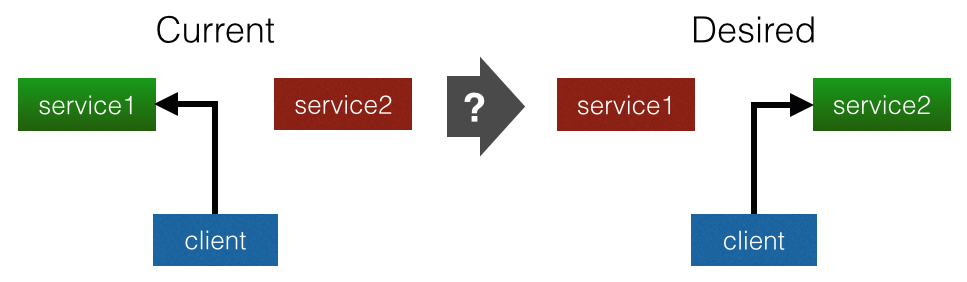
In the above figure, assume that we have two services i.e. service1 and
service2, and a client. The current state of the system (left side)
is that service1 is running, service2 is stopped, and the client is
referring to service1. Due to particular reason (e.g. maintenance on
service1), we would like to change the configuration of the system as
illustrated on the right side where service1 is stopped, service2 is
running, and the client is referring to service2. However, we have a
particular global constraints that should be maintained throughout
configuration changes i.e. the client should always refer to a running
service.
Schemas
The first step to model the planning problem is to model resources through schemas.
// file schemas.nuri
enum State {
    stopped,
    running
}

schema Client {
  refer: *Service null;
  def redirect(s : Service) {
    effect {
      this.refer s;
    }
  }
}

schema Service {
  state State.stopped;
  def start {
    condition this.state = State.stopped;
    effect {
      this.state State.running;
    }
  }
  def stop {
    condition this.state = State.running;
    effect {
      this.state State.stopped;
    }
  }
}
The above specification is in file schemas.nuri. It has an enum State that has two symbols i.e. stopped and running. It also has two schemas. First is Client that has attribute refer that holds a reference of a service. Schema Client has an action redirect which redirects the reference to any service. The second schema is Service that has attribute state whose default value is State.stopped. It has two actions i.e. start and stop.
Current State
// file initial.nuri
import 'schemas';

main {
  service1 isa Service {
    state State.running;
  }
  service2 isa Service {
    state State.stopped;
  }
  client1 isa Client {
    refer service1;
  }
  client2 extends client1  // use client1 as prototype
}
The above specification models the current state of the system where all resources are inside object main. Object service1 and service2 are implementing schema Service. Thus, they are inheriting their schema attribute and actions. Attribute state of service1 and service2 has value State.running and State.stopped respectively. On the other side, object client1 is implementing schema Client where attribute refer is equal to service1 (client1 is referring service1). While object client2 is using client1 as its prototype (this copies all attributes and actions of client1 to client2).
Desired State
// file : goal.nuri
import 'schemas';

main {
  service1 isa Service {
    state State.stopped;
  }
  service2 isa Service {
    state State.running;
  }
  client1 isa Client {
    refer service2;
  }
  client2 extends client1

  // global constraints
  global {
    client1.refer.state = State.running;
    client2.refer.state = State.running;
  }
}
The above specification defines the desired state of the system where service1 is stopped (state State.stopped;), service2 is running (state State.running;), while client1 and client2 are referring service2 (refer service2;).
The global constraints are defined in scope global where in this case the constraint is a conjunction of two equality statements. The first statement i.e. client1.refer.state State.running; states that client1 must always refer to a running service. The second statement i.e. client2.refer.state State.running; states that client2 must always refer to a running service. Since the constraint is a conjunction of logic formula, then the order is insignificant.
Solution Plan
The specification of the current state is defined in file initial.nuri, and the specification of the desired state is defined in file goal.nuri. To generate the plan, we can invoke the Nuri compiler using option -p as follows:
nuric -p initial.nuri goal.nuriNotes that the plan will only be generated if the solution does exist. If not, then the program will return a non-successful exit flat.
The above command will generate a plan in JSON format as the following.
{
  "type": "parallel",
  "version": 2,
  "actions": [
    {
      "name": "service2.start",
      "parameters": {
      },
      "cost": 1,
      "conditions": {
        "client1.refer": "$service1",
        "client2.refer": "$service1",
        "service1.state": "$State.running",
        "service2.state": "$State.stopped"
      },
      "effects": {
        "service2.state": "$State.running"
      },
      "before": [

      ],
      "after": [
        1,
        2,
        3
      ]
    },
    {
      "name": "client2.redirect",
      "parameters": {
        "s": "$service2"
      },
      "cost": 1,
      "conditions": {
        "service2.state": "$State.running"
      },
      "effects": {
        "client2.refer": "$service2"
      },
      "before": [
        0
      ],
      "after": [
        3
      ]
    },
    {
      "name": "client1.redirect",
      "parameters": {
        "s": "$service2"
      },
      "cost": 1,
      "conditions": {
        "service2.state": "$State.running"
      },
      "effects": {
        "client1.refer": "$service2"
      },
      "before": [
        0
      ],
      "after": [
        3
      ]
    },
    {
      "name": "service1.stop",
      "parameters": {
      },
      "cost": 1,
      "conditions": {
        "client1.refer": "$service2",
        "client2.refer": "$service2",
        "service1.state": "$State.running",
        "service2.state": "$State.running"
      },
      "effects": {
        "service1.state": "$State.stopped"
      },
      "before": [
        0,
        1,
        2
      ],
      "after": [

      ]
    }
  ]
}
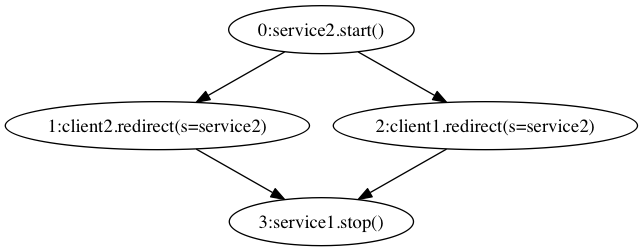
Notice that the actions of the plan is in an array of attribute actions. The order of the actions are the order of the solution sequential plan i.e.:
service2.start ()client2.redirect (s = service2)client1.redirect (s = service2)service1.stop ()
Notice that each action of the above plan has attribute before and after with an array of integers. These two attributes represent the partial-ordering constraints between the action with other actions where the integers are the indexes of other actions.
Let us focus on the second action i.e. client2.redirect:
{
  "name": "client2.redirect",
  "parameters": {
    "s": "$service2"
  },
  "cost": 1,
  "conditions": {
    "service2.state": "$State.running"
  },
  "effects": {
    "client2.refer": "$service2"
  },
  "before": [
    0
  ],
  "after": [
    3
  ]
}
The above action descriptions shows that the name of the action is client2.redirect (action redirect owned by object client2). It has a single parameter s with value $service2 -- the value is a reference to object service2 (in JSON, every Nuri reference is represented as a string started with $ character). The cost of the action is 1. The conditions before execution is service2.state State.running;. The effects after execution is client2.refer service2;. before gives a list of action indexes that must be successfully executed before this action -- in this case, action service2.start that has index 0 must be successfully executed before executing action client2.redirect. after gives a list of action indexes that should be executed after this action has been successfully executed -- in this case, action service1.stop.
By using partial-ordering constraints which are defined in before and after of all actions, the following partial-order plan can be executed using a parallel execution algorithm in order to decrease the execution time.
Example 2 : Continuous Deployment
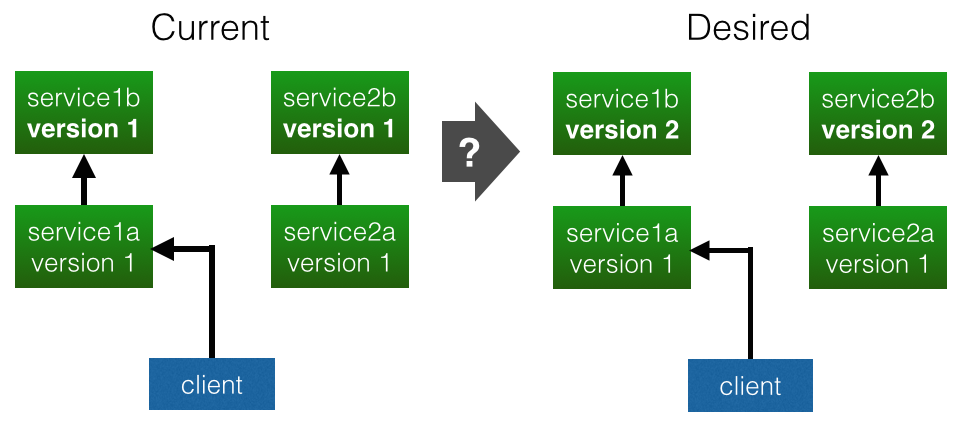
The above figure illustrates a common continuous deployment problem. Assume we have two identical 2-tier systems, one (service1{a,b}) is the primary and another (service2{a,b}) is the backup. The first layer of the system service1a and service2a depend on the service at the second layer i.e. service1b and service2b respectively. Currently, we have a client that refers to the primary system (service1{a,b}).
Due to a bug, we have to upgrade the second layer services (service1b and service2b) from version 1 to version 2. However, we do not want disrupting the client. In other words, we want the client to always using a running service.
Schemas
We can reuse the schemas that have been used in the first example. However, we need to modify schema Service in order to add attribute version and action upgrade.
// file : schemas.nuri
enum State {
  ...
}

schema Client {
  ...
}

schema Service {
  ...

  version : int TBD;

  def upgrade (ver : int) {
    condition this.state = State.stopped;
    effect {
      this.version ver;
    }
  }
}
As shown above, we add attribute version with type of int. This attribute represents the version of the service. The default value is TBD, which means that it must be replaced with any integer value.
We also add action upgrade that models the upgrade process of the service from one to another version. The action has a parameter ver which is the target upgrade version. The action has a precondition i.e. the service must be stopped. While the effect is that the service has been upgraded to the version specified in the parameter.
Note that the compiler will automatically set the parameter with any possible value. Thus, we do not need to define the value manually.
Current State
// file : initial.nuri
import 'schemas';

main {
  service1a isa Service {
    state State.running;
    version 1;
  }
  service1b isa Service {
    state State.running;
    version 1;
  }
  service2a isa Service {
    state State.running;
    version 1;
  }
  service2b isa Service {
    state State.running;
    version 1;
  }
  client isa Client {
    refer service1a;
  }
}
The above specification describes that the current state of the system. The primary system has two services i.e. service1a and service1b, while the backup system also has two services i.e. service2a and service2b. All services are running and they have version 1. We also have a client that is referring to service1a which is the first layer of the main system.
Desired State
// file : goal.nuri
import 'schemas';

main {
  service1a isa Service {
    state State.running;
    version 1;
  }
  service1b isa Service {
    state State.running;
    version 2;  // upgrade to version 2
  }
  service2a isa Service {
    state State.running;
    version 1;
  }
  service2b isa Service {
    state State.running;
    version 2;  // upgrade to version 2
  }
  client isa Client {
    refer service1a;
  }

  // global constraints
  global {
    if service1a.state = State.running; then service1b.state = State.running;

    if service2a.state = State.running; then service2b.state = State.running;

    client.refer.state = State.running;
  }
}
The above specification describes the desired state of the system where there are only two changes i.e. the version of service2a and service2b is changed to 2 (previously 1). Other attributes have the same value including the client where it is referring to service1a.
We have three global constraints. The first states that service1a depends on service1b. The second states that service2a depends on service2b. And the third states that the client always refers to a running service.
Solution Plan
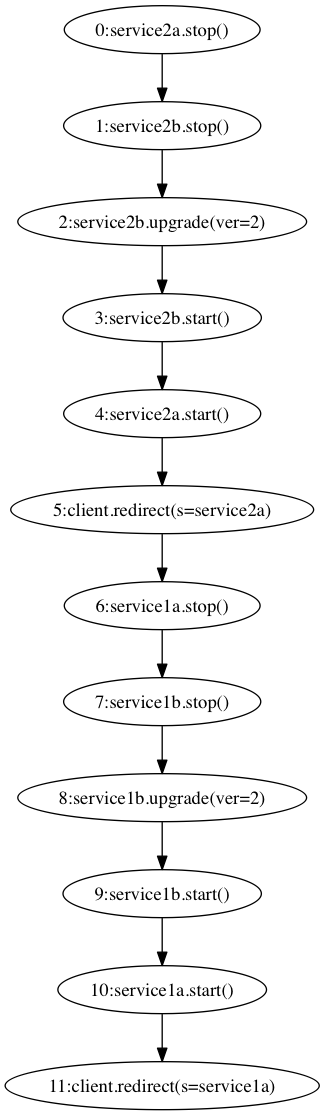
Invoking the same command i.e. nuric -p initial.nuri goal.nuri, we will get this solution plan. The following graph illustrates the workflow of the plan.