whiteblog-theme
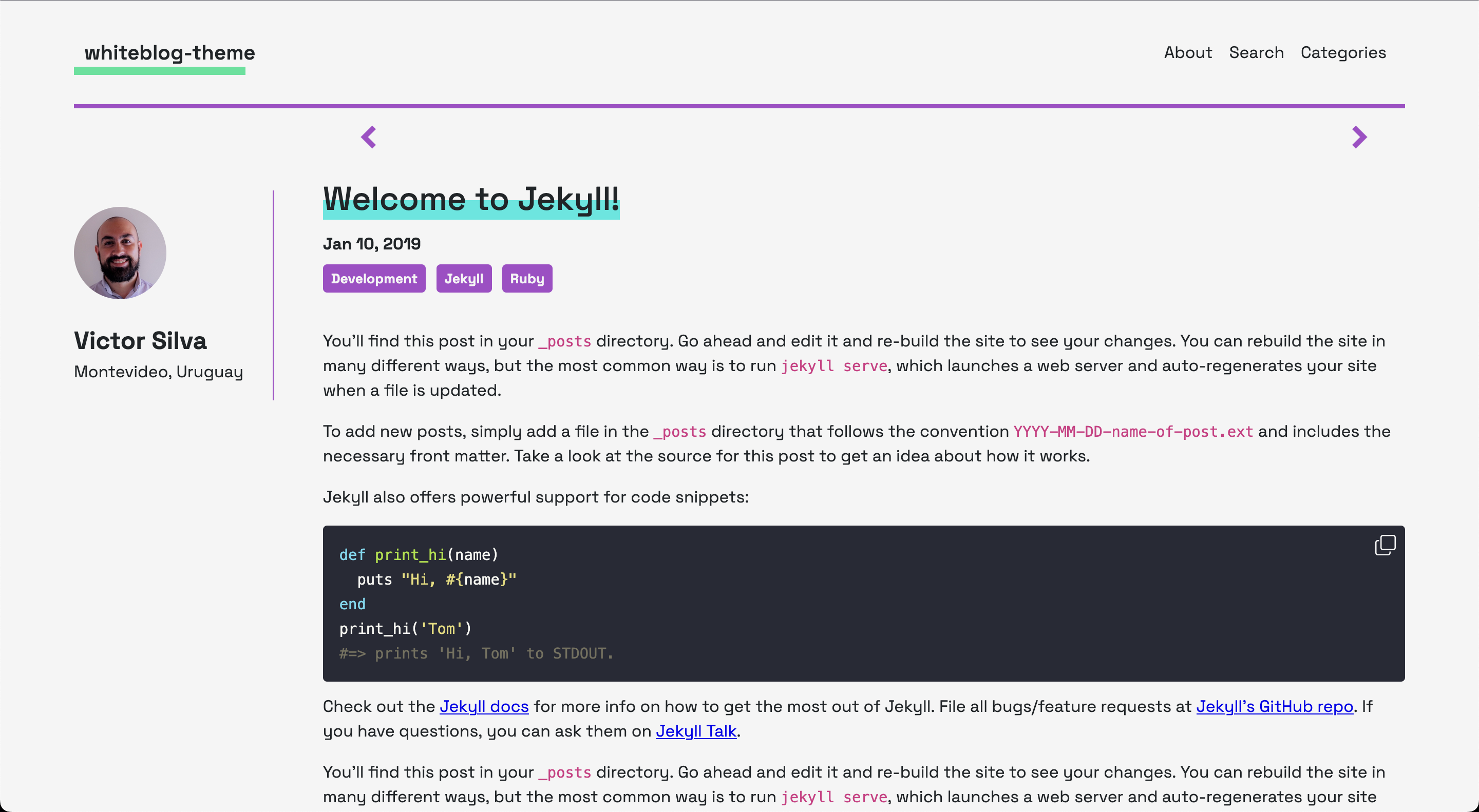
A minimal, wide and white Jekyll theme for technical blogs. Ships with a dark/light toggle, category pages, client-side search, automatic PNG preview generation for posts, an RSS feed, an automatic sitemap, reading-time estimates, and pluggable comment providers.
Live preview
https://whiteblog-theme.victorsilva.com.uy/
Screenshot
Features
-
Dark mode —
[data-theme="dark"]toggle withprefers-color-schemedetection andlocalStoragepersistence. Colours are CSS variables. -
Search — client-side search over a generated
search.json(SimpleJekyllSearch, no external service). - Categories — category index and per-category listing.
-
Post previews —
_plugins/previews.rbrenders a social PNG per post (see Post preview plugin for system requirements). -
SEO — meta description, Open Graph and Twitter tags, and JSON-LD
BlogPosting, all derived from the post excerpt. - Accessibility — skip link, ARIA labels, accessible pagination, keyboard-dismissable mobile nav, WCAG AA contrast.
-
Comments — Disqus, Cusdis or Giscus, selected in
_config.yml. - Analytics — optional Google Analytics 4.
Installation
Add this line to your Jekyll site's Gemfile:
gem "whiteblog-theme"And add this line to your Jekyll site's _config.yml:
theme: whiteblog-themeAnd then execute:
$ bundle
Or install it yourself as:
$ gem install whiteblog-theme
Configuration
All configuration lives in _config.yml.
Layouts
| Layout | Use |
|---|---|
default |
Base for every other layout |
home |
Paginated index |
post |
Blog entry |
page |
Static page with sidebar |
page-wide |
Static page without sidebar |
allposts |
Full post listing |
categories |
Category view |
Addons
addons:
  back_to_top      : true    # back-to-top button
  share_post       : true    # share buttons on posts
  old_post_warning : false   # banner on old posts
  buymeacoffee:
    id             : ""      # buymeacoffee username; empty disables the widget
    description    : "Support me on Buy me a coffee!"
    message        : ""
    color          : ""      # empty uses the theme's --color-accent, or a hex
    position       : "left"  # left, right
    x_margin       : "18"    # mobile horizontal margin
    x_margin_desktop : "72"  # margin at >= 950px, aligned to the sidebar edge
    y_margin       : "18"
Comments
Set comments.provider and fill in the matching block. Any other blocks are
ignored.
comments:
  provider : false           # false, "disqus", "cusdis", "giscus"
Disqus — create a site at disqus.com, then:
comments:
  provider : "disqus"
  disqus:
    shortname : "your-disqus-shortname"
Cusdis — self-hosted or cusdis.com; copy the App ID from your dashboard:
comments:
  provider : "cusdis"
  cusdis:
    appId : "your-cusdis-app-id"
Giscus — enable GitHub Discussions on a public repo, install the giscus app, then run the configurator at giscus.app to get the IDs:
comments:
  provider : "giscus"
  giscus:
    repo              : "username/repo-name"
    repo_id           : "..."     # from giscus.app
    category          : "General"
    category_id       : "..."     # from giscus.app
    mapping           : "pathname"
    reactions_enabled : "1"
    input_position    : "top"
    theme             : "preferred_color_scheme"
    lang              : "en"
Giscus and Cusdis follow the site's dark/light toggle without a page reload.
Analytics
analytics:
  google:
    tracking_id : "G-XXXXXXXXXX"   # empty / false disables GA4
Per-page frontmatter
-
head_inline— raw HTML injected into<head>for a single page (extra meta tags, a page-specific stylesheet, etc.). -
slug— overrides the slug used for the preview PNG path,assets/images/previews/<slug>.png.
Post preview plugin
_plugins/previews.rb generates one PNG per post via the imgkit gem, which
shells out to wkhtmltoimage. If pngquant is on PATH the PNG is
compressed in place. Both are external system binaries — install them before
building:
# macOS
brew install --cask wkhtmltopdf   # provides wkhtmltoimage
brew install pngquant             # optional, for compression

# Debian / Ubuntu
apt-get install wkhtmltopdf pngquant
Add the gem to your site's Gemfile:
group :jekyll_plugins do
  gem "imgkit"
end
GitHub Pages runs in --safe mode and will not execute this plugin; build and
deploy the _site output yourself if you need previews.
Development
To set up your environment to develop this theme, run bundle install.
bundle exec jekyll serve            # local server at http://localhost:4000
bundle exec jekyll serve --drafts   # include drafts
bundle exec jekyll build            # production build
When the theme is released, only the files in _layouts, _includes,
_sass, _pages and assets tracked with Git are bundled. To add a custom
directory, edit the regexp in whiteblog-theme.gemspec.
Contributing
Bug reports and pull requests are welcome on GitHub at https://github.com/vmsilvamolina/whiteblog-theme. This project is intended to be a safe, welcoming space for collaboration, and contributors are expected to adhere to the Contributor Covenant code of conduct.
License
The theme is available as open source under the terms of the MIT License.