bacon-tracker

A Ruby gem for managing XP-style stories, bugs, and chores as plain Markdown and Gherkin files in a git repo, with a local tracker board.
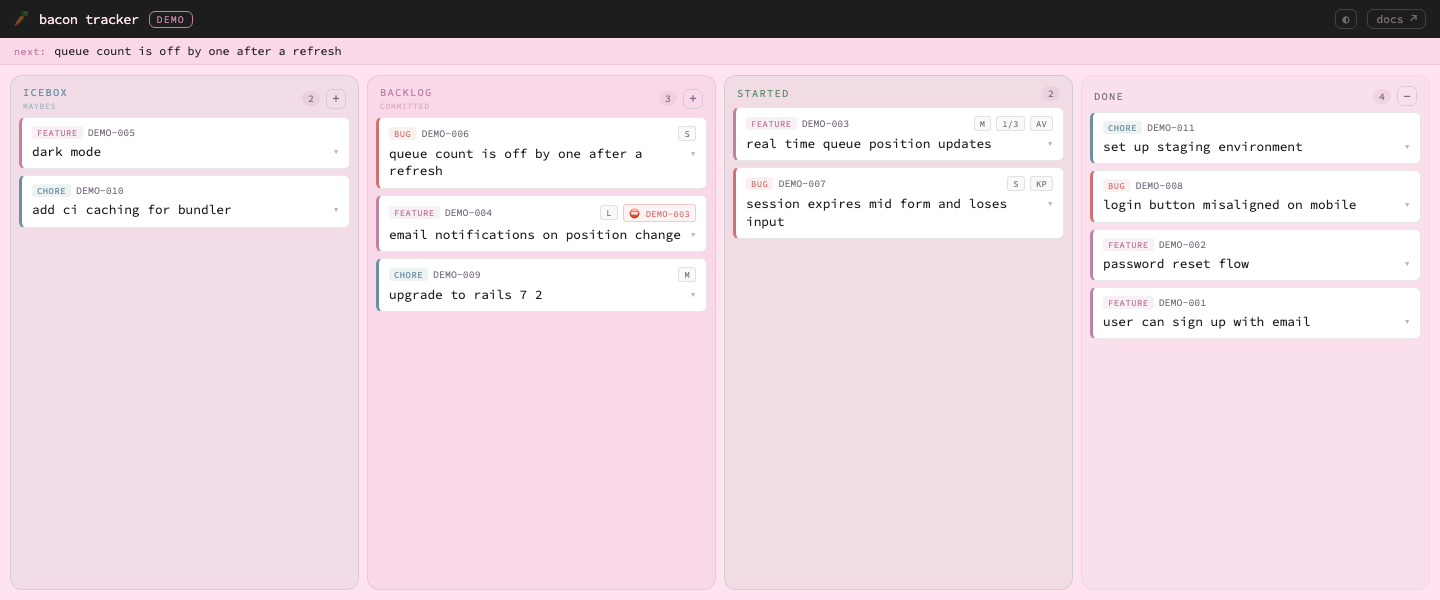
The local drag-and-drop tracker board, served at
http://localhost:4567. Want to poke at it right now? Boot the bundled demo tracker:cd examples/demo && rake story:server.
No database. No third-party service. Stories are files. The backlog is a text file. Everything lives in your repo and moves through four stages: icebox → backlog → started → done.
Every interface - the rake CLI, the tracker board, the /tracker Claude Code command, or your text editor - is a view over the same files. Use whichever fits; the state doesn't care.
Why a tracker in your repo
Hosted issue trackers keep your project's plan somewhere else. bacon-tracker keeps it next to the code, which changes two things.
The plan and the code share one history. A story, the change that delivers it, and the decision record behind it land in the same pull request and are reviewed together. git log on a story file shows every move it ever made, and a commit that names its story id links a line of code straight back to the reason for it. Months later you can still see what was decided, when, and why, without searching a separate system. A merge that leaves the tracker inconsistent is caught by story:lint in CI.
Agents work with it directly, and it is yours. A coding agent reads and edits stories the way it reads and edits code: as files. There is no MCP server to run, no tool definitions taking up the agent's context, and no API token to issue or rotate. The agent picks up a story, works it, and moves it to done in the same diff you review. Your plan never leaves your repository, so it sits with your code under your access rules and your backups, and it moves wherever the repository goes. And there is nothing to pay for: no seats, no plan tiers, no subscription. It is an MIT-licensed gem.
The personas the project is built for show who it serves: Ingo, a developer who owns several products; Leonor, a remote teammate who reviews the tracker alongside the code; and Jean, the AI agent working with both.
Quickstart
Five minutes from nothing to a story on a board. Requires Ruby >= 3.3.
gem install bacon-tracker

# Non-interactive setup: writes ./dashboard.md and ./Rakefile in the current
# directory, plus my-app/tracker/ and my-app/docs/decisions/.
# (Run `tracker-init` with no flags to be prompted instead.)
tracker-init --path ./my-app --namespace APP --title 'My App' --yes

# Run rake from the directory that holds dashboard.md and the Rakefile.
NS=APP rake "story:feature[My first story]"   # creates APP-001 in the icebox
NS=APP rake "story:commit[APP-001]"           # commit to it: icebox → backlog

tracker-dashboard --dashboard dashboard.md    # start the web UI
The namespace you pass to tracker-init (APP here) is the one you pass as NS= - pick your own, but keep the two in sync. Open http://localhost:4567, click your project card, and drag APP-001 across the board. Everything you just did - and everything the board does - is file moves inside tracker/, so git diff shows your project management history like any other change.
Why the quotes? zsh (the macOS default shell) treats [ ] as a glob pattern, so an unquoted rake story:feature[My first story] fails with zsh: no matches found. Quote the task, as every example in these docs does (noglob rake ... also works, for arguments without spaces). Other shells are happy with the quotes too.
The rest of this README is the detail: the working model, the two setup modes, the interfaces, and the file formats.
Working model
bacon-tracker is designed for ongoing product development. There are no sprints, releases, or finish lines. Work accumulates and ships continuously. (This section is the summary - the full way of working is written up in docs/flow.md, the bacon flow, and the terms it uses are defined in docs/vocabulary.md.)
| Stage | Directory | Meaning |
|---|---|---|
| Icebox | 1_icebox/ |
Ideas and future work - not yet committed |
| Backlog | 2_backlog/ |
Committed and prioritised - ready to work on next |
| Started | 3_started/ |
Actively in progress |
| Done | 4_done/ |
Complete - permanent record, never deleted |
Stories move forward with three commands:
icebox ──story:commit──▶ backlog ──story:start──▶ started ──story:done──▶ done
The verbs mean what they say: commit moves a story into the backlog - the act of committing to do it (icebox → backlog) - and start begins the work (backlog → started), landing it in 3_started/.
Icebox vs Backlog: Icebox holds everything you might do; backlog holds only what you will do next, in priority order. Moving a story from icebox to backlog is an act of commitment. Keep the backlog short (3–7 items).
Started: Pull from the top of the backlog when you begin work. A large started pile signals over-commitment.
Progress bar & health colors
Each dashboard card shows a progress bar measuring completion:
progress = done / total × 100
Workload health is signalled separately, by color:
- Card left border - green (actively working, 1–2 started), amber (overloaded, 3+ started), red (idle - backlog waiting but nothing started)
- Story counts - started and backlog counts turn from green to amber past the healthy thresholds (2 started, 5 backlog)
Sweet spot: 1 started (2 at most) and 3–4 in backlog.
Setup
Two ways to run it
Decide which shape fits before you initialize - the rest of this section sets up the first:
-
Central tracker with dashboard (recommended) - one tracker home directory manages every project. Each project keeps its story files in its own repo, but a single
dashboard.md+Rakefilein the tracker home drives them all, and you select a project withNS=<namespace>. Best when you juggle more than one codebase.tracker-initsets this up. See Central tracker with dashboard. -
Per-project (standalone) - the tracker lives inside a single project directory with a local
Rakefile; noNS=and no central dashboard. Best for a single repo. See Per-project (standalone).
Requirements: Ruby >= 3.3. Nothing else - no database, no service to sign up for, no daemon to keep running. (Bundler only comes in if you add the gem to a project's Gemfile for the per-project setup.)
Install the gem and run the interactive setup:
gem install bacon-tracker
tracker-init
tracker-init asks for a project directory, a namespace (e.g. APP), a title, and where to keep dashboard.md (default: ./dashboard.md), then writes:
.                            # your tracker home (where dashboard.md lives)
├── dashboard.md             # the projects this tracker manages
└── Rakefile                 # loads bacon-tracker, defines the story:* and decision:* tasks

my-app/                      # the project directory
├── tracker/
│   ├── .gitignore           # ignores .lock, the machine-local write lock
│   ├── .next-id             # next story number
│   ├── backlog.md           # the ordered backlog - position is priority
│   ├── features/            # .feature files (Gherkin)
│   │   ├── _template.feature
│   │   ├── 1_icebox/        # a stage is a directory
│   │   ├── 2_backlog/
│   │   ├── 3_started/
│   │   └── 4_done/
│   ├── bugs/                # .md files - same four stages, plus _template.md
│   └── chores/              # .md files - same four stages, plus _template.md
└── docs/
    └── decisions/           # decision records - see "Decision records" below
        ├── .gitignore
        ├── .next-id         # next decision number
        ├── _template.md
        ├── proposed.md      # the ordered list of decisions still to make
        ├── proposed/        # a status is a directory
        ├── accepted/
        ├── rejected/
        ├── deprecated/
        └── superseded/
That's the whole system. A story is a file in one of those stage directories; moving work forward moves the file. Nothing else is keeping state.
The project is registered in your dashboard.md; if there is no dashboard.md yet, one is created, along with a central Rakefile beside it if there isn't one already. Every stage and status directory gets a .gitkeep so the empty structure survives your first commit. An existing docs/decisions/ is left alone.
The namespace is 2-8 characters, a letter followed by letters or digits (APP, OPS, B2B); it is upcased for you, and anything else is refused rather than guessed at. It must be unique within a dashboard.md.
Pass --command to also install the /tracker Claude Code command at .claude/commands/tracker.md next to the dashboard (skipped if the file already exists, so your edits are kept). Without it, no Claude files are written.
You can also pass everything non-interactively:
tracker-init --path ~/projects/my-app --namespace APP --title "My App" --dashboard ~/tracker/dashboard.md --yes
--yes means no prompts at all, so the command can run unattended: --path and --namespace are required (missing either is an error), the title defaults to one made from the directory name, and the dashboard defaults to ./dashboard.md. Add --command if you also want the /tracker Claude command. tracker-init --help lists every flag.
Central tracker with dashboard (recommended)
The recommended setup is a single tracker home directory that manages all your projects. Run all commands from there using NS= to select the project.
dashboard.md
tracker-init creates and registers projects in dashboard.md:
## My App
path: ~/projects/my-app
namespace: APP

## Ops
path: ~/projects/ops
namespace: OPS
tracker: planning
docs: handbook
version: lib/VERSION
Each ## Heading is a project and its display name. path: is the project directory; relative paths are resolved against the directory holding dashboard.md. By default the stories are in <path>/tracker, the docs in <path>/docs (with decision records in <path>/docs/decisions), and the version shown on the docs front page comes from a VERSION file in the project. Three optional keys, each relative to path:, override those defaults: tracker:, docs: and version:. A project without a docs/ directory simply has no docs surface.
An older registry whose path: points straight at a tracker directory (one holding backlog.md or .next-id) is still recognised and works as before. The dashboard server re-reads dashboard.md when it changes, so there's no need to restart it.
Rake commands
cd ~/tracker

# Create stories (optional trailing field=value list - same fields as edit)
NS=APP rake "story:feature[Add login page]"
NS=APP rake "story:bug[Crash on startup,size=S,assignee=AB]"
NS=APP rake "story:chore[Upgrade Ruby]"

# Move through stages
NS=APP rake "story:commit[APP-001]"    # icebox → backlog (commit to it)
NS=APP rake "story:start[APP-001]"     # backlog → started (work on it)
NS=APP rake "story:done[APP-001]"      # → done

# Set fields (size/assignee/blocked_by/linked_to/title/body)
NS=APP rake "story:edit[APP-001,size=M,assignee=AB]"
NS=APP rake "story:edit[APP-001,blocked_by=APP-002,APP-005]"  # comma list is fine
NS=APP rake "story:edit[APP-001,linked_to=APP-012]"           # a "see also" sibling
NS=APP rake "story:edit[APP-001,size=]"                       # empty value clears it

# Inspect
NS=APP rake story:next                 # print top backlog item
NS=APP rake story:lint                 # check backlog.md, IDs, and blocked_by/linked_to
NS selects the project (NAMESPACE works too). Without it, only rake story:dashboard_server is available - the same dashboard server as tracker-dashboard, reading $DASHBOARD or else ./dashboard.md, on $PORT (default 4567). rake -T lists what is installed.
Every field can be set from any interface - at create time or later - via rake story:edit / a trailing field=value list on story:feature|bug|chore, /tracker edit, the web UI's edit mode, or by hand in the frontmatter. All of them go through the same validation (size is S/M/L; an empty value clears a field; changing title renames the file). The one practical limit: a rake body= is a single shell line, so for multi-line bodies and subtask checklists, reach for /tracker, the web UI, or your editor.
Migrating an existing repo
Adopting the tracker in a repo with pre-existing stories? story:migrate assigns namespace IDs to all existing story files, ordered by their first git commit:
NS=APP rake story:migratePer-project (standalone)
If you prefer to work from inside a project directory instead of a central tracker, add the gem to that project's Gemfile and use a local Rakefile:
require "bacon_tracker"
require "bacon_tracker/tasks"

BaconTracker.configure do |c|
  c.namespace      = "APP"
  c.tracker_root   = File.expand_path("tracker", __dir__)
  # Optional - leave these out and the docs and decisions surfaces are off.
  c.docs_root      = File.expand_path("docs", __dir__)            # the docs browser at /docs
  c.decisions_root = File.expand_path("docs/decisions", __dir__)  # decision records and decision:* tasks
  c.project_root   = __dir__                                      # README, CHANGELOG and VERSION on the docs front page
end

BaconTracker::Tasks.install
Roots may be relative or start with ~; they are expanded for you. c.version_path (relative to project_root) points at a VERSION file the default search can't find. Stage and status directories are created as they are first needed, and stories use built-in templates when there's no _template file, so an empty tracker/ is enough to start. Run rake from that directory without NS=:
rake "story:feature[Add login page]"
rake "story:commit[APP-001]"
Start a single-project server:
rake story:server
PORT=4000 rake story:server
Web UI
Start the dashboard server from the tracker home:
tracker-dashboard --dashboard ~/tracker/dashboard.md --port 4567
Visit http://localhost:4567. Click a project card to open its board.
--dashboard defaults to $DASHBOARD, then ./dashboard.md; --port defaults to 4567. The server binds to localhost only.
On macOS you can also let BaconTrackerMenu, a companion menu bar app, start and stop it for you, with a shortcut straight to each project's board.
Either way the server is an ordinary process: start it when you want the board, Ctrl-C when you don't. Nothing breaks while it's off - the files are the state.
The pages load one web font (Source Code Pro) from Google Fonts - the only request that leaves your machine. Offline, they fall back to your system's monospace font.
Board features
- Four columns: Icebox → Backlog → Started → Done
- Drag cards between columns to change stage
-
Drag within Backlog to reprioritize (syncs
backlog.md) - Click a card body to expand - shows rendered Markdown or syntax-highlighted Gherkin
-
Maximize (⤢) - open a story in a detail modal: full body and metadata at reading width, with interactive subtasks; closes on ✕ /
Esc/ click-outside -
Subtasks - Markdown checklist lines (
- [ ] task) in any story body render as clickable checkboxes; the card header showsdone/totalprogress, and toggling writes straight back to the story file - Edit mode - update title, T-shirt size, assignee initials, blocked-by / linked-to IDs, stage, and body; a failed save keeps your edits open
- Keyboard - Tab to a card, Enter/Space to expand it or tick a subtask; edit mode's stage picker moves a story without dragging (done stories stay done)
-
Reveal (↗) - show a story file in your file manager (macOS Finder, Windows Explorer, or the containing folder via
xdg-openon Linux) -
Deep links -
/#APP-042scrolls to that story and flashes it -
Relationships -
⛔a story is blocked by another; the derived amber⛔ blocksbadge shows the reverse (this story is holding one up);🔗a symmetric "see also" link. Badges that point at a known story are clickable and jump to it - "+" button in Icebox and Backlog column headers - inline create form
- Done column is paginated (20 per page)
- § badges - a story cited by a decision record links to it on the decisions board
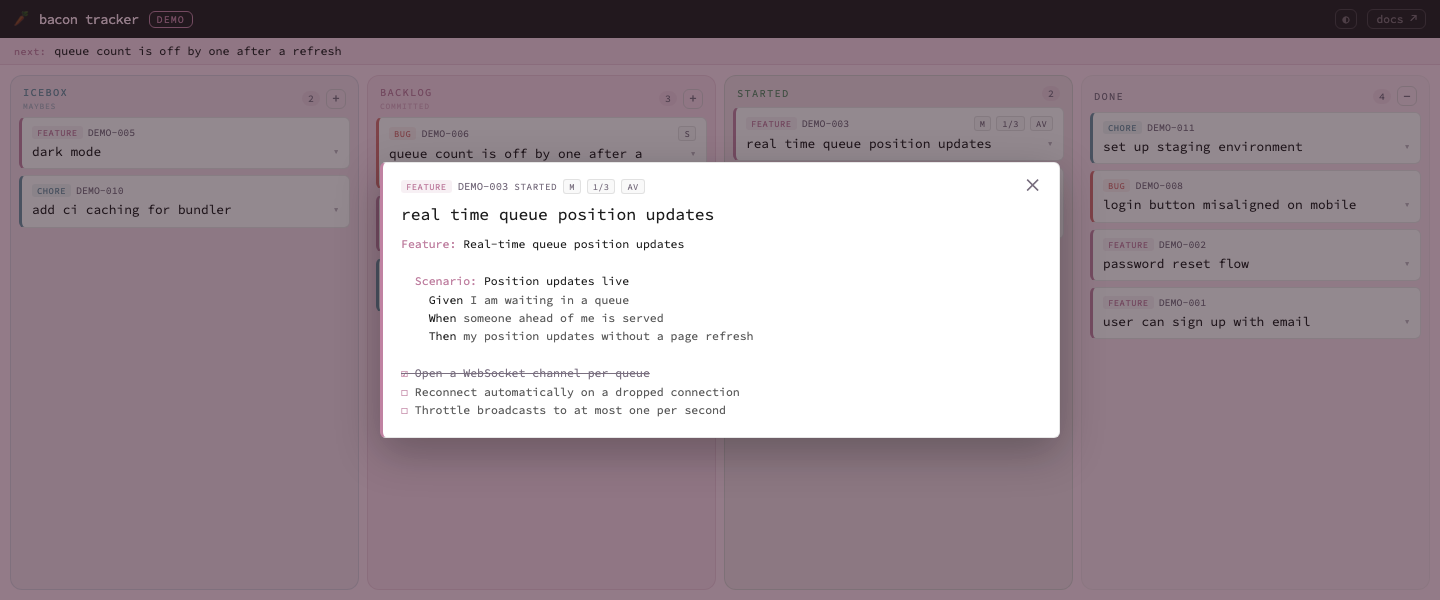
A story open in the detail modal - full metadata, syntax-highlighted Gherkin, and interactive subtasks.
Docs browser
When a project has a docs/ directory (in dashboard mode) or a docs_root (standalone), the server also serves its documentation at /docs - /projects/<slug>/docs in dashboard mode, linked from the project card as open docs. It renders the Markdown tree as a column browser with full-text search, a "recently changed" list from git history, and backlinks ("what links here"). The front page shows the project's README, CHANGELOG and version. Each page has open in editor and reveal buttons.
Markdown is sanitised on the server before it's shown: raw HTML, {::nomarkdown} blocks, event-handler and style attributes, and links or images whose scheme isn't http, https or mailto are dropped, and task lists render as disabled checkboxes.
"Open in editor" uses $BACON_EDITOR when set (split like a shell command, so BACON_EDITOR="code -w" works), otherwise the system default: open on macOS, start on Windows, xdg-open on Linux. Reveal works as on the board. Where no launcher exists, the page says so instead of pretending it worked.
Decision records
A decision record (an ADR) is a short Markdown file capturing one design decision: its context, what was decided, and the consequences. They live in docs/decisions/, and as with stories the directory is the state - one directory per status. IDs are <NS>-ADR-NNNN, a sequence separate from story IDs.
NS=APP rake "decision:new[Use Postgres for the queue]"      # APP-ADR-0001 in proposed/
NS=APP rake "decision:accept[APP-ADR-0001]"                  # or decision:reject
NS=APP rake "decision:deprecate[APP-ADR-0001]"               # accepted → deprecated
NS=APP rake "decision:supersede[APP-ADR-0001,APP-ADR-0002]"  # accepted → superseded by 0002
NS=APP rake decision:lint                                    # frontmatter, status vs directory, IDs, proposed.md
Decisions only move forward: proposed → accepted or rejected, accepted → deprecated or superseded. Nothing returns to proposed; to reverse a decision, supersede it with a new one. proposed.md is the ordered list of decisions still to make. decision:lint exits non-zero on integrity problems, so it works as a CI gate like story:lint.
The decisions board at /docs/decisions (open adrs on a dashboard card, once the project has a record) shows the records by status. Drag to reorder the proposed list or to move a record to a new status. A record's stories: frontmatter key cites stories, which then show a § badge on the tracker board.
The HTTP endpoints behind the docs browser and the decisions board are in docs/api.md.
Claude Code: /tracker
tracker-init --command installs a /tracker command for Claude Code at .claude/commands/tracker.md next to your dashboard - a natural-language interface over the same files:
/tracker                                  # status overview: counts + ordered backlog
/tracker new bug crash on empty cart      # create a story in the icebox
/tracker commit APP-007                   # icebox → backlog
/tracker start APP-007                    # backlog → started
/tracker done APP-007                     # → done
/tracker next                             # show the top backlog item
/tracker show APP-003                     # full story content
/tracker edit APP-003 size=M assignee=AB  # update fields (title renames the file)
/tracker delete APP-012                   # remove a story (asks first; refuses done)
/tracker list started                     # list stories, optionally by stage
/tracker lint                             # consistency checks
Because stories are plain files in the repo, the agent needs no API tokens or integrations - it reads and moves files, exactly like the CLI and the board do. And anything beyond the listed verbs you can just ask for in plain language: the files are right there.
Story format
A story is a plain file with a few frontmatter fields. Gherkin for features, Markdown for bugs and chores:
# id: APP-001
# type: feature
# status: backlog
# size: M
# blocked_by: APP-005

Feature: Implement user auth
  Scenario: A returning user signs in
    Given ...
The stage is the directory the file sits in, the backlog order is a line per
story in backlog.md, and a - [ ] line in any body is a subtask the board
counts and ticks off.
Full contract - both frontmatter dialects, every field and its valid values,
subtask fence rules, backlog.md and .next-id: docs/story-format.md.
Linting
NS=APP rake story:lintBecause the tracker is files, a merge can leave it inconsistent - a backlog
line whose file moved, an ID issued twice, a blocked_by whose blocker already
shipped. story:lint catches all of it and exits non-zero when something is
genuinely broken, so it works as a CI gate as-is. With LINT_FORMAT=github
each finding becomes an annotation on the story file and line that caused it.
Every check, what it means and what to do about it: docs/linting.md.
HTTP API
The server exposes a localhost JSON API consumed by the web UI - stories grouped by stage, create/move/edit/delete, backlog reordering, subtask toggling, project stats, and the docs and decisions endpoints. Full reference with request/response shapes: docs/api.md.
Development
bundle install
bundle exec rspec               # Ruby suite
node --test spec/js/*.test.js # JavaScript unit tests (board client)- The words this project uses - story, stage, card, commit - and the ones it doesn't: docs/vocabulary.md.
- Something not working: docs/troubleshooting.md.
- Cutting a release (maintainers): docs/releasing.md.
- How the project is tested and where to add coverage: docs/testing.md.
- Contributing guide: CONTRIBUTING.md.
- This project's own design decisions are recorded in docs/decisions/, one
directory per status - accepted/ is the set in
force. The record format itself is defined in
BT-ADR-0014,
and
rake decision:lintenforces it. - What changed in each release: CHANGELOG.md.
- A ready-to-run board with sample data lives in examples/demo/.
License
MIT.