 CafeCar
🚋 Recline in the cafe car while Rails renders your views for you.
🚀 Live demo → — a back-office rendered from plain models (clients, invoices, articles, users, notes). No signup; the data resets periodically.
Your model already knows its columns, types, and associations — a full description of a resource. CafeCar is a composable view extension for Rails that puts that description to work across the view layer: presenters that format any value, a form builder that renders typed fields from the schema, UI components, Pundit policies that drive what renders, and a query grammar on every model. Use each piece wherever it deletes view code — customer-facing pages as much as the back office.
The pieces also compose all the way up. Point the cafe_car controller macro
at a model and it renders index, show, new, and edit straight from the model,
with authorization, filtering, and Hotwire — a complete admin from one line of
controller code. That's one payoff of the composition, not the whole gem:
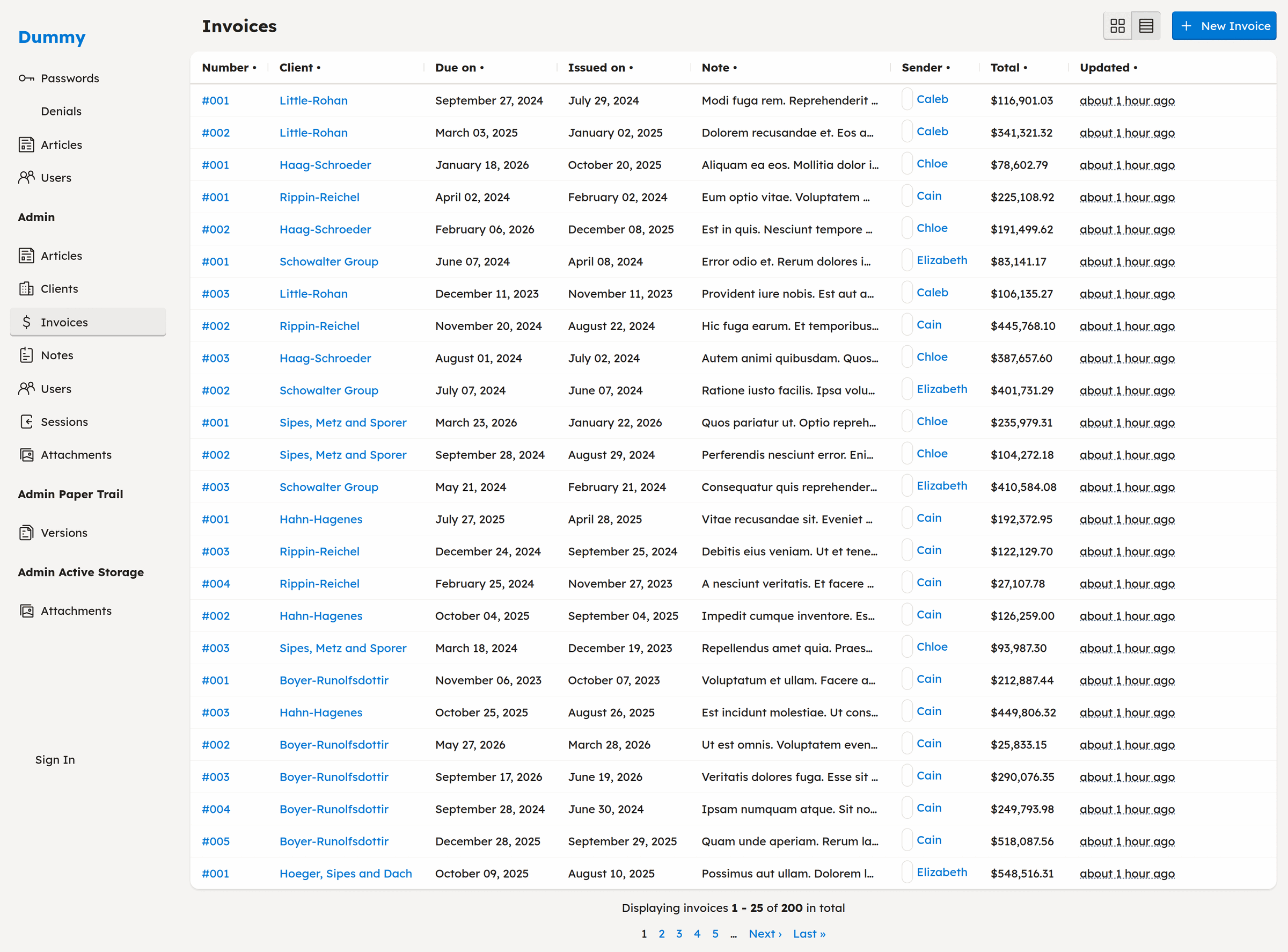
A complete admin index — sortable columns, formatted values, association links, and pagination — rendered from a model with one line of controller code. Try the live demo →
It's how Rails ought to work out of the box: render something for your models by default, then get out of the way. Every default is a starting point — override any view, presenter, or policy with ordinary Rails when the default is wrong.
Reach for it when: you're about to hand-write a form, a table, a formatting helper, or an admin — CafeCar probably already renders it.
Use the pieces anywhere
The cafe_car macro is one composition of the modules; each works alone, on
any page. The installer (bundle add cafe_car && bin/rails generate cafe_car:install) includes CafeCar::Controller in your
ApplicationController, so every controller gets the form builder as its
default and every view gets the safe helper surface — present, components
via ui, href_for — with no per-page setup and nothing overriding a Rails
or Ruby method in your views.
Format values on a customer-facing page with the presenters — the view code you delete, then what's left:
<%# app/views/orders/show.html.erb — a public page, no cafe_car macro %>

<%# before: hand-picked formats %>
<p>Placed <%= @order.placed_at.strftime("%B %-d, %Y") %></p>
<p>Total <%= number_to_currency(@order.total) %></p>

<%# after: the presenter picks the format from the type %>
<p>Placed <%= present(@order.placed_at, as: :date) %></p>
<p>Total <%= present(@order.total, as: :currency) %></p>
Render a public form from the schema — each f.field is the labeled, typed
input with hint and error markup you'd otherwise hand-write:
<%= form_with model: @review do |f| %>
  <%= f.field :rating %>
  <%= f.field :body %>
  <%= f.submit %>
<% end %>
Query any model with the same grammar the index URLs use (Filtering & Sorting) — it returns a relation:
@articles = Article.query("published" => true, "title~" => params[:q])None of this needs an admin namespace or the cafe_car macro — the modules
stand alone, and the macro is what you add when a resource deserves the full
CRUD surface.
Try it in 60 seconds
When a resource does deserve that full surface, compose the pieces with the macro:
# 1. Install the gem and run the installer
bundle add cafe_car
bin/rails generate cafe_car:install
# 2. Point a controller at a model (add `cafe_car :products` to your routes)
class ProductsController < ApplicationController
cafe_car
end# 3. Say who can do what — and which fields are editable
class ProductPolicy < ApplicationPolicy
def index? = user.present?
def update? = user.admin?
def permitted_attributes = %i[name price description]
endVisit /products: index, show, new, and edit, all rendered from the model.
When a default is wrong, override that one piece — see
Getting Started.
Table of Contents
- Use the pieces anywhere
- Try it in 60 seconds
- How CafeCar compares
- How CafeCar relates to ViewComponent & Phlex
- Features
- Prerequisites
- Installation
- Getting Started
- Core Components
- Controllers
- Policies
- Presenters
- UI Components
- Forms
- Filtering & Sorting
- Advanced Usage
- Sessions & Authentication
- Generators
- Resource Generator
- Controller Generator
- Policy Generator
- Notes Generator
- Sessions Generator
- Using CafeCar with AI coding agents
- Configuration
- Testing
- Contributing
- License
How CafeCar compares
The gems people compare CafeCar to are admin frameworks, so this table compares on that ground — the admin that falls out of CafeCar's composition. The difference in kind: where they mount a separate admin app with its own DSL, CafeCar stays inside Rails' own view layer. A plain model renders a working admin with essentially no configuration, and you extend it with the Rails you already know — controllers, Pundit policies, presenters, and ERB.
The established alternatives are all solid, and each fits a different taste. Reach for one of them when its model matches how you want to work:
| Gem | Reach for it when… | Trade-off |
|---|---|---|
| ActiveAdmin | You want a mature, batteries-included admin with a rich registration DSL. | You author screens in its Arbre/Ruby DSL rather than plain Rails views. |
| Avo | You prefer defining resources through configuration and want polished paid Pro features. | Config-driven, and the richer tiers are commercial. |
| Administrate | You want to scaffold controllers and views you fully own and edit. | You maintain the generated code as your app grows. |
| RailsAdmin | You want an admin mounted as an engine with almost zero setup. | Heavy runtime introspection and less conventional customization. |
| Trestle | You like a modular, DSL-driven admin with a built-in UI toolkit. | Another admin DSL to learn alongside Rails. |
Reach for CafeCar when you want view tools that are ordinary Rails everywhere in the app — and an admin that falls out of them.
How CafeCar relates to ViewComponent & Phlex
ViewComponent and Phlex answer "what's the unit of reuse for the UI I write?" CafeCar answers a different question: "why hand-write the CRUD index, show, and form views at all?" They sit at different layers, so they compose rather than compete.
CafeCar renders index, show, new, and edit straight from the model — the boilerplate you'd otherwise write once per resource and maintain forever. Keep your ViewComponent or Phlex components for the screens you customize, and drop them into a CafeCar view or presenter like any other partial. CafeCar covers the boilerplate screens; your component library covers the parts worth building by hand.
Plain partials work the same way. Pick whichever view primitive you like — CafeCar is the convention layer above it, deleting the boilerplate views so you write only the ones that earn their keep.
Features
- 🧩 Presenters on any page - Format any value — currency, dates, records,
attachments — with
present, no admin namespace required - ✏️ Form builder on any page - Plain
form_withrenders typed, labeled fields with hints and errors from the schema - 🚀 Index, show, new, edit from the model - One line of controller code renders all four, straight from your model
- 🎨 Component-based UI system - Flexible, composable components for building interfaces
- 🔐 Built-in authorization - Pundit integration for attribute-level permissions
- 📊 Smart presenters - Automatic type-aware display of your data
- 🔍 Advanced filtering - Range queries, comparison operators, and association filters
- 🔎 Keyword search - Turnkey search box on every index, matching across a model's text columns with zero per-model setup
- 📈 Chart view - A third index view (beside grid/table) that buckets records over any date column and plots the count, or a sum/average of a numeric column, as dependency-free inline SVG
- 📊 Dashboard - An opt-in overview page composing metric tiles and charts; you write one view to turn it on, off by default
- ⬇️ CSV export - One-click "Download CSV" of the current filtered, sorted view on any index
- ☑️ Bulk actions - Select rows and act on many at once (delete ships built in); every selected record is authorized against your policy on its own
- 📄 Pagination & sorting - Kaminari integration with sortable columns
- ⚡ Hotwire ready - Turbo Streams support out of the box
- 📝 Intelligent forms - Forms rendered from your schema, with smart field detection
Prerequisites
- Ruby 3.3+ (developed and tested against 3.3.5)
- Rails 8.0+ (developed and tested against Rails 8.1)
Installation
Add this line to your application's Gemfile:
gem "cafe_car"And then execute:
$ bundle installRun the installer to set up CafeCar in your application:
$ rails generate cafe_car:installThis will:
- Mount the CafeCar engine at
/under the:adminnamespace - Create
app/policies/application_policy.rb - Add
CafeCar::Controllerto yourApplicationController - Set up JavaScript imports for CafeCar, Trix, and ActionText
The core installer does not change your Gemfile. Optional features add only the
dependency they need; for example, cafe_car:sessions adds bcrypt.
Upgrading from an earlier version? UPGRADING.md lists each release's breakage — symptom, cause, and fix.
Getting Started
Quick Start: Generate a Complete Resource
The fastest way to get started is to generate a complete resource (model + controller + policy):
$ rails generate cafe_car:resource Product name:string price:decimal description:textThis creates:
- Migration and model (
app/models/product.rb) - Controller with CRUD actions (
app/controllers/products_controller.rb) - Policy with permission methods (
app/policies/product_policy.rb)
Run migrations and start your server:
$ rails db:migrate
$ rails server
Navigate to /products and you'll see a working CRUD interface.
Manual Setup
You can also add CafeCar to existing resources:
1. Add to Controller
class ProductsController < ApplicationController
  cafe_car
end
That single line provides:
- All 7 RESTful actions (index, show, new, create, edit, update, destroy)
- Automatic authorization via Pundit
- Filtering and sorting
- JSON/HTML/Turbo Stream responses
- Smart parameter handling
2. Create a Policy
# app/policies/product_policy.rb
class ProductPolicy < ApplicationPolicy
  def index?   = user.present?
  def show?    = user.present?
  def create?  = user.admin?
  def update?  = user.admin?
  def destroy? = user.admin?

  def permitted_attributes
    [:name, :price, :description, :category_id]
  end
end
The policy controls both authorization and which attributes can be edited.
Core Components
Controllers
The CafeCar::Controller module provides automatic CRUD functionality with the
cafe_car class method.
class Admin::ClientsController < ApplicationController
  cafe_car
end
What you get:
-
RESTful actions:
index,show,new,edit,create,update,destroy -
Authorization: Automatic
authorize!before each action - Smart defaults: Model detection from controller name
-
Callbacks: Lifecycle hooks for
render,update,create,destroy - Responders: JSON, HTML, and Turbo Stream responses
See it live → — the clients index from that one line.
Limiting actions:
cafe_car only: [:index, :show]
# or
cafe_car except: [:destroy]
Custom model:
class Admin::ClientsController < ApplicationController
  model Company  # Use Company model instead of Client
  cafe_car
end
Callbacks:
class ProductsController < ApplicationController
  cafe_car

  set_callback :create, :after do |controller|
    NotificationMailer.product_created(controller.object).deliver_later
  end
end
Policies
CafeCar extends Pundit with attribute-level permissions and auto-detection of displayable fields.
class ClientPolicy < ApplicationPolicy
  def index?   = admin?
  def show?    = admin?
  def create?  = admin?
  def update?  = admin?
  def destroy? = update?

  def permitted_attributes
    [:name, :owner_id, :email, :phone]
  end

  class Scope < Scope
    def resolve
      admin? ? scope.all : scope.where(owner: user)
    end
  end
end
Key methods:
-
permitted_attributes- Attributes that can be edited via forms -
displayable_attributes- Policy override for fields shown on record pages and used as the JSON/CSV basis. Its default is permitted keys plus every model column, with foreign keys folded into associations andid/Rails-filtered parameter names removed. Narrow it withsuper - %i[internal_note]for custom sensitive columns. -
listable_attributes- Policy override for the default index-table columns. Its default is model fields excludingid, timestamps, and digest columns. Narrow it separately when a field must also stay out of index tables. -
attributes.displayable/attributes.listable- The corresponding read surfaces used by CafeCar -
displayable_associations- Associations that can be displayed -
filtered_attribute?(attr)- Check if attribute should be hidden (uses Rails parameter filters)
Scope pattern:
The Scope class filters collections based on user permissions:
class Scope < Scope
  def resolve
    admin? ? scope.all : scope.where(owner: user)
  end
end
Presenters
Presenters convert model objects into view-ready representations with automatic type detection.
Automatic usage (in views):
<%= present(@product) %>This automatically:
- Finds the appropriate presenter for the object type
- Checks policy permissions
- Renders displayable attributes
- Uses type-specific formatting
Custom presenters:
# app/presenters/product_presenter.rb
class ProductPresenter < CafeCar::Presenter
  show :name
  show :price
  show :description
  show :category
  show :created_at

  # Custom display method
  def preview
    "#{name} - #{format_currency(price)}"
  end

  private

  def format_currency(amount)
    "$#{amount}"
  end
end
Built-in presenters:
-
RecordPresenter- ActiveRecord models -
DatePresenter,DateTimePresenter- Dates and times -
CurrencyPresenter- Money values -
RangePresenter- Range objects -
ActiveStorage::AttachmentPresenter- File attachments -
ActionText::RichTextPresenter- Rich text content -
EnumerablePresenter,HashPresenter- Collections -
NilClassPresenter- Handles nil values gracefully
Presenter methods:
presenter = present(@product)
presenter.show(:name)              # Display single attribute
presenter.attributes               # All displayable attributes
presenter.associations             # All displayable associations
presenter.to_html                  # Render to HTML
UI Components
CafeCar provides a flexible component system for building interfaces.
Basic usage:
# In views or helpers
ui.Card do
  ui.Field label: "Name" do
    @product.name
  end
end
Available components:
-
Page- Page container with title and actions -
Grid,Row- Layout containers -
Card- Content cards -
Table- Data tables -
Field- Form fields with labels -
Button- Action buttons -
Modal- Modal dialogs -
Alert- Flash messages -
Menu,Navigation- Navigation elements
Component options:
ui.Button "Save", class: "primary", type: "submit"
ui.Field label: "Email", required: true, hint: "We'll never share this"
ui.Card title: "Details", collapsed: false
Custom components:
Create partials in app/views/cafe_car/ui/:
-# app/views/cafe_car/ui/_badge.html.haml
%span.badge{ class: ui.classname }
  = yield
Use it:
ui.Badge class: "success" do
  "Active"
end
Forms
CafeCar provides an enhanced form builder with smart field detection.
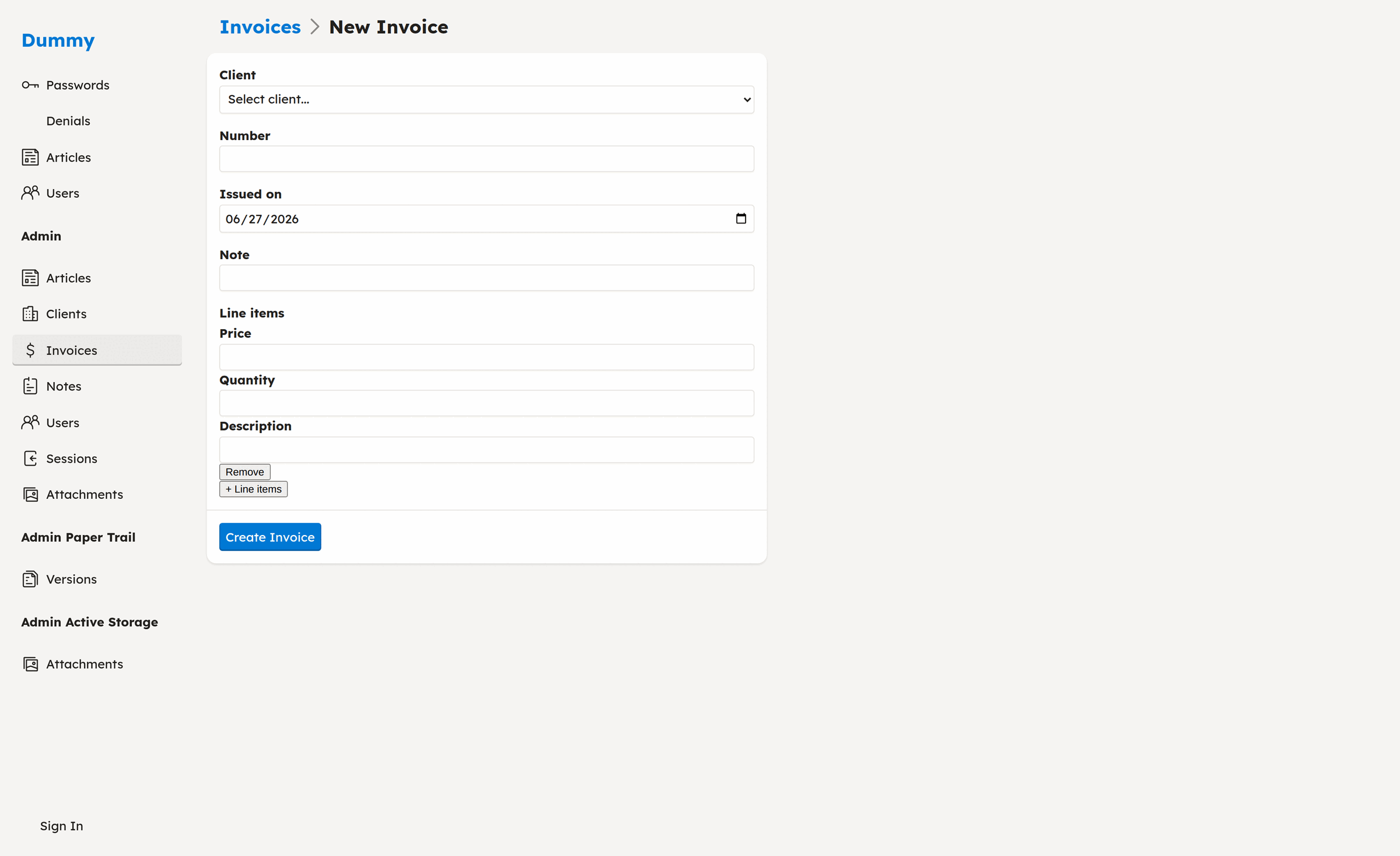
A form rendered from the model, with a typed date field, an association select, and
nested has_many line items — add and remove rows inline.
Basic forms:
<%= form_with model: @product do |f| %>
  <%= f.input :name %>
  <%= f.input :price %>
  <%= f.input :description, as: :text %>
  <%= f.association :category %>
  <%= f.submit %>
<% end %>
Smart field types:
The form builder automatically detects field types:
- Password fields (columns named
password,password_confirmation) - File attachments (ActiveStorage
has_one_attached,has_many_attached) - Rich text (ActionText
has_rich_text) - Associations (belongs_to, has_many)
- Polymorphic associations
- Dates, datetimes, booleans, etc.
Custom field rendering:
<%= form_with model: @product do |f| %>
  <%= f.field(:price).label %>
  <%= f.field(:price).input class: "currency" %>
  <%= f.field(:price).hint "In USD" %>
  <%= f.field(:price).error %>
<% end %>
Association select:
<%= f.association :category %>See it live → — add and remove nested line items on a new invoice.
Creates a select dropdown for the association. The select is searchable: it's
enhanced with Tom Select (vendored — no CDN, no
bundler) for keystroke typeahead. To keep large associations from rendering
thousands of <option>s, the initial list is capped at
CafeCar.max_collection_options (default 100); the typeahead then queries a JSON
options endpoint (GET /categories/options?q=…) so records past the cap stay
reachable. That endpoint is authorized through the model's policy scope, so the
search never returns rows the user can't see. Enhancement is progressive — if
JavaScript is disabled or fails, the field stays a working plain select.
Filtering & Sorting
CafeCar provides advanced filtering with minimal configuration.
URL-based filtering:
/products?name=Widget&price.min=10&price.max=50&created_at=2024-01-01..2024-12-31
Filter operators — a bare column key filters that column; a .operator
suffix compares it:
-
Equals:
status=active(orstatus.eq=active) -
Greater / less than:
price.gt=10,price.lt=50 -
At least / at most:
price.min=10,price.max=50(aliases:price.gte,price.lte) -
Range:
created_at=2024-01-01..2024-12-31(...for an exclusive end) -
Arrays (IN):
tags=red,blue,green
Combine them freely — ?price.min=10&price.max=50 reads as price BETWEEN 10 AND 50.
See it live → — sort, filter, and search a real index.
The filter panel:
Every index also renders those filters as a form — a sticky card of controls
beside the table, with no configuration. CafeCar reads the model policy's
permitted_filters (which defaults to the displayable columns and associations)
and renders one typed control per attribute, matched to the column type:
-
string / text — a "contains" box (substring match, the
~operator) - integer / decimal / float / date / datetime — a min/max pair (the range)
- enum — a select of the enum's own values (blank = Any)
- boolean — a tri-state select (Any / true / false)
- belongs_to / has_many — a searchable multi-select of the associated records (the same Tom Select typeahead as the edit form), matching any of the records you pick
The keyword-search box shares the card, and the whole panel submits as one GET form — a submission just rewrites the query string above, with the active sort and view riding along as hidden fields. Attachments, rich text, polymorphic targets, and password columns render no control (there's nothing to filter on).
Named model scopes opt in separately through permitted_scopes and render as
checkbox toggles:
class ArticlePolicy < ApplicationPolicy
  def permitted_filters = %i[title author published_at]  # narrow the panel
  def permitted_scopes  = %i[published draft]            # ?published=true
end
The policy is the source of truth: change permitted_filters to change which
controls appear, and a URL filter for an attribute that isn't on the list is
dropped before it reaches the query. Control labels read from your locale
(helpers.filter, plus each model's attribute names), and you replace any
control by dropping a _<type>_filter.html.haml partial in the view directory.
Filter through an association:
Add a dot-path to permitted_filters and the panel filters by the far model's
attribute:
class InvoicePolicy < ApplicationPolicy
  # own columns, plus a client's status and its owner
  def permitted_filters = %i[status client.status client.owner_id]
end
Each hop is the association name; the terminal is the far column, its enum, or a
belongs_to — client.owner_id and client.owner mean the same thing. The
control is typed by that terminal, so a nested belongs_to renders the same
searchable multi-select and a nested enum the same enum select as a top-level
one, and it composes with the other filters, search, and sort, round-tripping
into the URL like any other.
That one list is both the panel's source and the query whitelist: an undeclared
path is dropped before any join, even when it names a real column further out.
?client.owner.email= filters nothing unless client.owner.email is on
permitted_filters — the same gate as an unpermitted top-level column.
Sorting:
/products?sort=name              # Ascending
/products?sort=-price            # Descending (note the minus)
/products?sort=category,-price   # Multiple columns
Keyword search:
Every index ships with a search box — no configuration required. The q
parameter matches the term across the model's string/text columns
(case-insensitive, database-portable), and composes with the filters and sort
above:
/products?q=widget
/products?q=widget&category=tools&sort=-price
Define a search scope on the model to override the default with your own
logic (scoped columns, full-text, etc.):
class Product < ApplicationRecord
  scope :search, ->(term) { where("sku = ?", term) }
end
Columns hidden by Rails' parameter filter (passwords, tokens) are never searched.
CSV export:
Every index also renders as CSV — append .csv or click the "Download CSV"
link. The export honors the current filters and sort and includes matching
records across the whole result set (not just the page on screen). Columns
mirror the JSON index — the same filtered attribute set — so protected columns
(passwords, tokens) and association foreign keys never appear in the file:
/products.csv?category=tools&sort=-price
To keep a large export from materializing an unbounded result set in memory, the
output is capped at CafeCar.csv_export_row_limit rows (default 10_000). When a
download is truncated, CafeCar sets an X-CafeCar-Truncated: true response header
and logs a warning. Raise the limit in an initializer if your tables are larger:
CafeCar.csv_export_row_limit = 50_000Chart view:
Every index offers a third view beside grid and table. The Chart toggle buckets records over a date column and plots them as a bar chart:
/articles?view=chart&chart_x=published_at&chart_by=month
/invoices?view=chart&chart_x=issued_on&chart_y=sum:total
Pick the x-axis from any of the model's displayable date/datetime columns
(chart_x) and the bucket size from day, week, or month (chart_by,
default month) using the form above the chart — it defaults to created_at
and month, so the chart renders with zero configuration. Only date columns the
policy exposes are offered, and the selected column is validated against that
allowlist, so the parameter is never used as a raw column name.
By default the bars measure the record count per bucket. chart_y switches that
to an aggregate of a numeric column: count (the default), sum:<column>, or
avg:<column> — for example chart_y=sum:total. The chartable columns are the
model's policy-permitted numeric attributes (integer, decimal, or float), the
same policy-is-source-of-truth pattern as the x-axis dates. A chart_y selector
renders above the chart only when the model has at least one such column;
otherwise you get the count chart with no selector. An unknown or non-permitted
chart_y is validated against the allowlist and falls back to count, so the
value never reaches SQL raw. Sum and average aggregate through a portable
ActiveRecord calculation that runs on both SQLite and Postgres.
The chart aggregates the same collection the table shows: the active filters
narrow it and policy_scope still applies, so it never plots rows the current
user can't see. Aggregation is a single database GROUP BY (a portable Arel date
truncation — date_trunc on Postgres, strftime on SQLite), and the result is
dependency-free inline SVG — no JavaScript, CSP-safe. A model with no date column
shows a short "no date columns to chart" message instead.
In models:
class Product < ApplicationRecord
  include CafeCar::Model  # Auto-included via engine
end
The model gets:
-
sorted(*keys)- Parse and apply sort parameters -
normalize_sort_key(key)- Internal helper that converts a sort key to Arel order format
Custom filters in controllers:
class ProductsController < ApplicationController
  cafe_car

  private

  def find_objects
    @objects = model.where(active: true)
                    .query(filter_params)
                    .sorted(sort_params)
                    .page(page_params)
  end
end
Advanced Usage
Customizing Views
Override default views by creating templates in your application:
app/views/
  products/
    index.html.haml    # Override index view
    show.html.haml     # Override show view
    _form.html.haml    # Override form partial
CafeCar's shared overridable partials live in app/views/application/; its action
templates and Turbo Stream responses live in app/views/cafe_car/application/.
Normal Rails lookup lets a resource override either one under its own view path.
Custom Responders
class ProductsController < ApplicationController
  cafe_car

  def create
    run_callbacks(:create) { object.save! }
    respond_with object, location: custom_path(object)
  end
end
An action override replaces CafeCar's action, so it must not call super before
responding. The example keeps CafeCar's create callbacks and changes only the
successful response location.
Authorization Helpers
In controllers:
authorize!                    # Authorize current action
policy(object).update?        # Check specific permission
policy(object).permitted_attributes  # Get editable attributes
In views:
<% if policy(@product).update? %>
  <%= link_to "Edit", edit_product_path(@product) %>
<% end %>
Bulk Actions
Every index table carries a checkbox per row and a "select all" checkbox in the header. Pick some rows, choose an action from the bar, and CafeCar applies it to the selection. Delete ships built in.
Each selected record is authorized on its own: the candidate set is first
narrowed to the policy scope, then every row is checked against the action's
policy predicate (destroy? for delete). Rows the current user isn't allowed to
touch are skipped — a batch never bulk-bypasses a per-record denial.
The policy is the source of truth. A policy declares the actions its index
offers with permitted_bulk_actions, and the bar renders exactly that list:
class ArticlePolicy < ApplicationPolicy
  def permitted_bulk_actions = %i[publish destroy]

  def publish? = user.editor?   # per-record authorization for the batch
  def destroy? = !object.published?
end
A custom action "just works" from three conventional pieces — no registration:
- list its name in
permitted_bulk_actions(the policy), - a model bang method for the behavior (
Article#publish!), - a policy predicate for authorization (
publish?).
batch derives both from the name — it calls record.publish! on each row the
policy answers publish? for. Button labels and styles come from your locale
(en.destroy: Delete; bulk_actions.styles.destroy: danger), and you override
the whole bar for a resource by dropping an _bulk_actions.html.haml partial in
its view directory.
See it live → — select rows and delete the selection.
Member Actions
A member action runs one custom operation on a single record — a button on
the show page and on each index row, no row selection. It's the same three
conventional pieces as a bulk action, declared with permitted_member_actions:
class ArticlePolicy < ApplicationPolicy
  def permitted_member_actions = %i[publish]

  def publish? = !object.published?   # authorizes the record, and shows/hides the button
end

class Article < ApplicationRecord
  def publish! = update!(published_at: Time.current)
end
The name resolves by convention — no registration: publish? authorizes and
Article#publish! runs. CafeCar renders a Publish button on the show page's
Actions card and on the record's index row, each a POST to
/articles/:id/actions/publish. A record whose publish? answers false renders
disabled with a tooltip instead of a link, so the one predicate gates both the
display and the request — a forged POST is re-authorized and refused, and the
bang method never runs.
The action replies with a redirect that Turbo morphs in place, so the row
reflows without a full page reload. The button's label and style come from your
locale (en.publish; actions.styles.publish: primary), never a hardcoded
string.
Override the forwarding by defining a publish controller method — it takes
over after authorization and owns the response. Override the buttons by dropping
an _actions.html.haml (show) or _controls.html.haml (index) partial in the
resource's view directory.
See it live → — publish an article from its show page or index row.
Collection Actions
A collection action runs one action over a whole set at once, from a single
toolbar button — no row selection. It's the same three conventional pieces as a
bulk action, declared with permitted_collection_actions:
class ArticlePolicy < ApplicationPolicy
  def permitted_collection_actions = %i[publish_all]

  def publish_all? = user.editor?   # authorizes against the model class
end

class Article < ApplicationRecord
  def self.publish_all! = unpublished.update_all(published_at: Time.current)
end
The button runs over the currently-viewed, filtered set — not the whole
table. It carries the active filters and search from the URL, so the action hits
exactly the records the index is showing. Filter ?author_id=7, and Publish
all publishes that author's articles and nothing else. The button's label shows
the reach as a count — Publish all 21 — from your locale
(helpers.collection_action, a one/other hash you can reword).
Names resolve like member/bulk actions: publish_all? authorizes, then
Article.publish_all! runs within the filtered scope. Override the forwarding by
defining a publish_all controller method (scope its own query), and override
the toolbar by dropping an _index_actions.html.haml partial in the view directory.
Dashboard
CafeCar can render a single dashboard overview — an at-a-glance page that composes your data into metric tiles and charts. It's opt-in the CafeCar way: you write one view. Its existence turns the dashboard on; delete it and there's no dashboard at all (a direct hit 404s, no nav link), so a CRUD-only app never inherits a blank page.
Authorize the page with an ordinary Pundit policy:
class DashboardPolicy < ApplicationPolicy
  def show? = user.present?
end
Write app/views/cafe_car/dashboard/show.html.haml:
- title "Dashboard"

= Page title: "Dashboard" do |page|
  = page.Body do
    .Dashboard
      = metrics User
      = metric("Signups today") { User.where(created_at: Date.current.all_day).count }
      = chart "New users", model: User, x: :created_at, by: :month
Three helpers compose the page:
-
metric("Label") { … }— a tile showing a label over the number your block returns. -
metrics(Model)— the tiles a policy declares.Model's policy lists the scopes to surface inpermitted_metrics(:all= the whole relation), and CafeCar renders a count tile for each overpolicy_scope(Model)— the same policy-is-source-of-truth rule as bulk actions. -
chart "Title", model:, x:, by:— the same dependency-free inline-SVG bar chart as the index Chart view, bucketingmodel's records over thexdate column atbygranularity (:day/:week/:month, default:month). It reads frompolicy_scope(model); thexcolumn is validated against the model's date-column allowlist and truncated with portable Arel, so it's never interpolated as raw SQL.
class UserPolicy < ApplicationPolicy
  def permitted_metrics = %i[all active]   # total, then User.active.count
end
Tiles render in a responsive grid at dashboard_path (no JavaScript, CSP-safe).
Because the dashboard is a plain view, you can drop in headings, your own
partials, or any markup between tiles. Once the template exists, a Dashboard
link appears at the top of the sidebar nav — no template, no link.
See it live → — metric tiles and a chart on one page.
Current Context
Access current request context anywhere:
CafeCar::Current.user           # Current user
CafeCar::Current.request_id     # Request ID
CafeCar::Current.user_agent     # User agent string
CafeCar::Current.ip_address     # IP address
Set in controllers via set_current_attributes (automatically called by
cafe_car).
Sessions & Authentication
Sessions are opt-in. CafeCar works for plain CRUD with no login at all: when a policy denies access and no sessions infrastructure is present, the request gets a plain 403 Forbidden instead of redirecting to a login page that doesn't exist. Authorization (Pundit policies) is always on; authentication (knowing who the user is) is the part you turn on when you want it.
Enabling sessions
-
Run the generator to add the
sessionstable:$ rails generate cafe_car:sessions $ rails db:migrate
The
CafeCar::Sessionmodel andSessionPolicyship with the engine, so the generator only creates the migration (columns:user,ip_address,user_agent). -
Expose the routes. Mounting the engine already provides them. To expose login at the top level without mounting, add to
config/routes.rb:resource :session, only: %i[new create destroy], controller: "cafe_car/sessions"
This gives you
new_session_path(login form) andsession_path(create viaPOST, log out viaDELETE). -
Prepare your user model. It needs
has_secure_passwordand anemail:class User < ApplicationRecord has_secure_password has_many :sessions, dependent: :destroy, class_name: "CafeCar::Session" end
-
Different user model name? Set it in an initializer (resolved lazily):
# config/initializers/cafe_car.rb
CafeCar.user_class_name = "Account"
Once sessions are available, an authorization failure for a signed-out visitor redirects to the login form (remembering where they were headed) instead of returning 403.
Helpers
These are available in controllers and views:
-
authenticated?- truthy when someone is logged in -
current_user- the logged-in user (ornil) -
current_session- the currentCafeCar::Session
<% if authenticated? %>
  Signed in as <%= current_user.email %>
<% else %>
  <%= link_to "Log in", new_session_path %>
<% end %>
Logging in (POST /session with session[:email]/session[:password]) sets a
signed, http-only cookie; logging out (DELETE /session) clears it.
Generators
Resource Generator
Generate a complete resource (model + controller + policy):
$ rails generate cafe_car:resource Product name:string price:decimalController Generator
Generate just a controller:
$ rails generate cafe_car:controller ProductsPolicy Generator
Generate just a policy:
$ rails generate cafe_car:policy ProductNotes Generator
Add polymorphic audit trail notes to your app:
$ rails generate cafe_car:notesCreates:
- Migration for notes table
-
Notemodel -
Notableconcern for trackable models
Sessions Generator
Enable opt-in login/logout (see Sessions & Authentication):
$ rails generate cafe_car:sessionsCreates the sessions table migration. The CafeCar::Session model and
SessionPolicy already ship with the engine.
Using CafeCar with AI coding agents
CafeCar ships an Agent Skill — the mental model (the policy declares, the UI renders) plus ten reference pages, written for coding agents. Install it into your app:
$ rails generate cafe_car:agentsThis copies the skill to .claude/skills/cafe_car/ (Claude Code) and
.agents/skills/cafe_car/ (Codex, Copilot, and other agents), and adds a marker-delimited
pointer block to your AGENTS.md so agents read the skill before hand-rolling views,
forms, or formatting code.
Safe to re-run: only the marked block is replaced; the rest of your AGENTS.md is never
touched.
Two more ways to put CafeCar docs in front of an agent:
$ npx skills add craft-concept/cafe_car # install the skill in any skills-aware toolOr point an MCP-capable agent at gitmcp.io/craft-concept/cafe_car for live CafeCar docs with zero setup.
Configuration
Theme
CafeCar ships three bundled themes, each a set of CSS custom properties with a
built-in prefers-color-scheme: dark variant. Pick one with CafeCar.theme:
# config/initializers/cafe_car.rb
CafeCar.theme = :cool| Theme | Look |
|---|---|
:warm |
Warm neutrals on off-white — the default. |
:cool |
Cool blue-grey on a crisp light background. |
:cool2 |
The cool palette with translucent cards and darker dark mode. |
The selected theme is injected as a <link> into every CafeCar page's <head>,
so it takes effect without recompiling assets. It defaults to :warm (the theme
the engine has always shipped); an unknown value raises ArgumentError.
Association select size
f.association selects render at most CafeCar.max_collection_options options
(default 100) to keep a large association from loading its whole target table into
every form. Records past the cap stay reachable through the searchable select's
typeahead feed (see Forms). Raise or lower the cap globally:
# config/initializers/cafe_car.rb
CafeCar.max_collection_options = 250
Custom Form Builder
# config/initializers/cafe_car.rb
module CafeCar
  class FormBuilder < ActionView::Helpers::FormBuilder
    # Your customizations
  end
end
Custom Presenter
# app/presenters/application_presenter.rb
class ApplicationPresenter < CafeCar::Presenter
  # Application-wide presenter customizations
end

# app/presenters/product_presenter.rb
class ProductPresenter < ApplicationPresenter
  show :name
  show :price
end
Custom Policy
# app/policies/application_policy.rb
class ApplicationPolicy < CafeCar::ApplicationPolicy
  def admin?
    user&.admin?
  end
end
Testing
CafeCar integrates with standard Rails testing tools:
# test/controllers/products_controller_test.rb
class ProductsControllerTest < ActionDispatch::IntegrationTest
  test "index displays products" do
    get products_url
    assert_response :success
  end

  test "create with valid attributes" do
    assert_difference "Product.count", 1 do
      post products_url, params: { product: { name: "Widget" } }
    end
    assert_redirected_to product_path(Product.last)
  end
end
Contributing
Contributions are welcome! Please read CONTRIBUTING.md for
development setup, how to run the tests (bundle exec rake), and PR expectations.
By participating you agree to the Code of Conduct. To report a
security issue, see SECURITY.md.
If CafeCar saved you an afternoon, a star helps other Rails developers find it.
License
The gem is available as open source under the terms of the MIT License.