capybara-chromedriver-logger
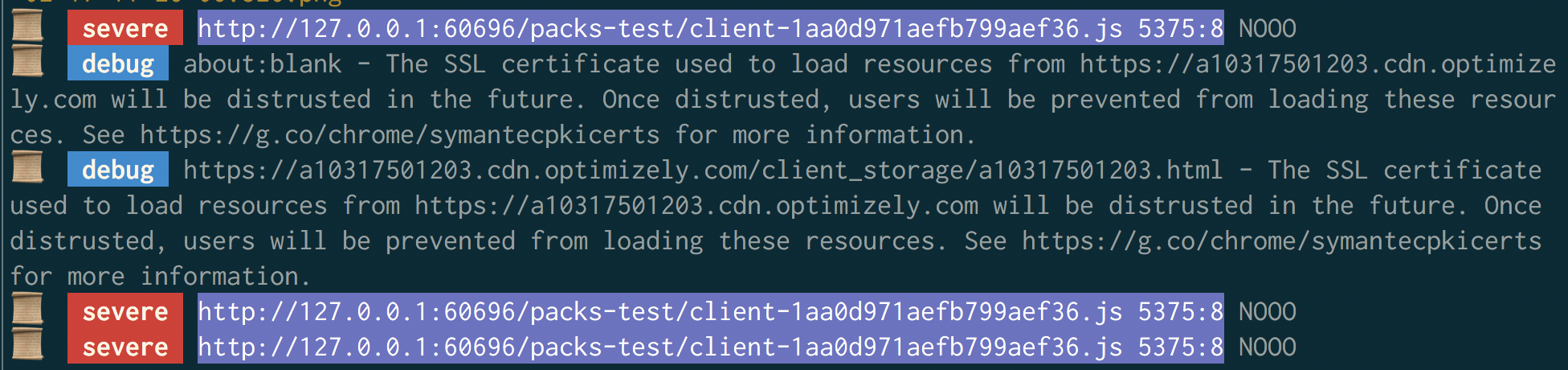
This gem provides console.log debug output for Ruby feature specs running under Chromedriver.
We currently assume you're running:
- capybara
- chromedriver + selenium-webdriver
- rspec
to handle your JS feature specs. I'd love to expand support for other combinations of test environments!
Installation
Add this line to your application's Gemfile:
gem 'capybara-chromedriver-logger'And then execute:
$ bundle
Or install it yourself as:
$ gem install capybara-chromedriver-logger
Usage
You'll want to modify your spec_helper.rb file to configure Capybara correctly:
Capybara.register_driver(:chrome) do |app|
  # option 1:
  # This wraps Selenium::WebDriver::Remote::Capabilities.chrome() with the
  # correct settings for logging.
  capabilities = Capybara::Chromedriver::Logger.build_capabilities(
    chromeOptions: {
      args: %w[headless]
    }
  )

  Capybara::Selenium::Driver.new(
    app,
    browser: :chrome,
    desired_capabilities: capabilities
  )
end

# Use the driver we've configured
Capybara.default_driver = :chrome
Capybara.javascript_driver = :chrome

# Option 1: Setup hooks for your feature specs
Capybara::Chromedriver::Logger::TestHooks.for_rspec!

# Option 2: if you prefer to hook it in manually:
RSpec.configure do |config|
  config.after :each, type: :feature do
    Capybara::Chromedriver::Logger::TestHooks.after_example!
  end
end
If you don't want to use the capability wrapper above for any reason, you can still manually configure things:
# option 2: manual setup
# Turn on browser logs
capabilities = Selenium::WebDriver::Remote::Capabilities.chrome(
  chromeOptions: {
    args: %w[headless],
    # required for Chrome 75+
    w3c: false
  },
  # For up to Chrome 74
  loggingPrefs: {
    browser: 'ALL'
  }
  # for Chrome 75+
  "goog:loggingPrefs" => {
    browser: 'ALL'
  }
)
Configuration
Here are examples of the supported configuration options:
# If you set this to true, any specs that generate console errors
# will automatically raise. This is similar to poltergeist's
# `js_errors: true` config option
#
# If you filter out any errors with the `filters` option, they will
# not trigger an exception in your spec examples.
#
# default: false
Capybara::Chromedriver::Logger.raise_js_errors = true

# If third-party libraries are dumping obnoxious logs into your output,
# you can filter them out here.
#
# default: []
Capybara::Chromedriver::Logger.filters = [
  /Download the React DevTools/i,
  /The SSL certificate used to load resources from/i
]

# If you want to filter out specific severity levels, you can do so here:
#
# default: nil
Capybara::Chromedriver::Logger.filter_levels = %i[
  severe
  info
  warning
  debug
]
Development
After checking out the repo, run bin/setup to install dependencies. Then, run rake spec to run the tests. You can also run bin/console for an interactive prompt that will allow you to experiment.
To install this gem onto your local machine, run bundle exec rake install. To release a new version, update the version number in version.rb, and then run bundle exec rake release, which will create a git tag for the version, push git commits and tags, and push the .gem file to rubygems.org.
Contributing
Bug reports and pull requests are welcome on GitHub at https://github.com/dbalatero/capybara-chromedriver-logger.
License
The gem is available as open source under the terms of the MIT License.