Legate

Legate (pronounced like "legit" — /ˈle·jit/ — because it is) is a framework for building AI agents in Ruby with dynamic tool selection, multi-step planning, and session management.
It's batteries-included — one gem ships the agent runtime, an LLM planner, a web UI, a CLI, MCP support, and an authentication subsystem. That's a deliberate choice: Legate is a framework, not a micro-library, so it bundles the dependencies those pieces need (Sinatra/Puma for the web UI, Thor for the CLI, and so on). If you only want the library, require 'legate' loads just the core — the web stack is opt-in via require 'legate/web' and the CLI via the legate executable, so library-only users never load Sinatra, Puma, or Slim.
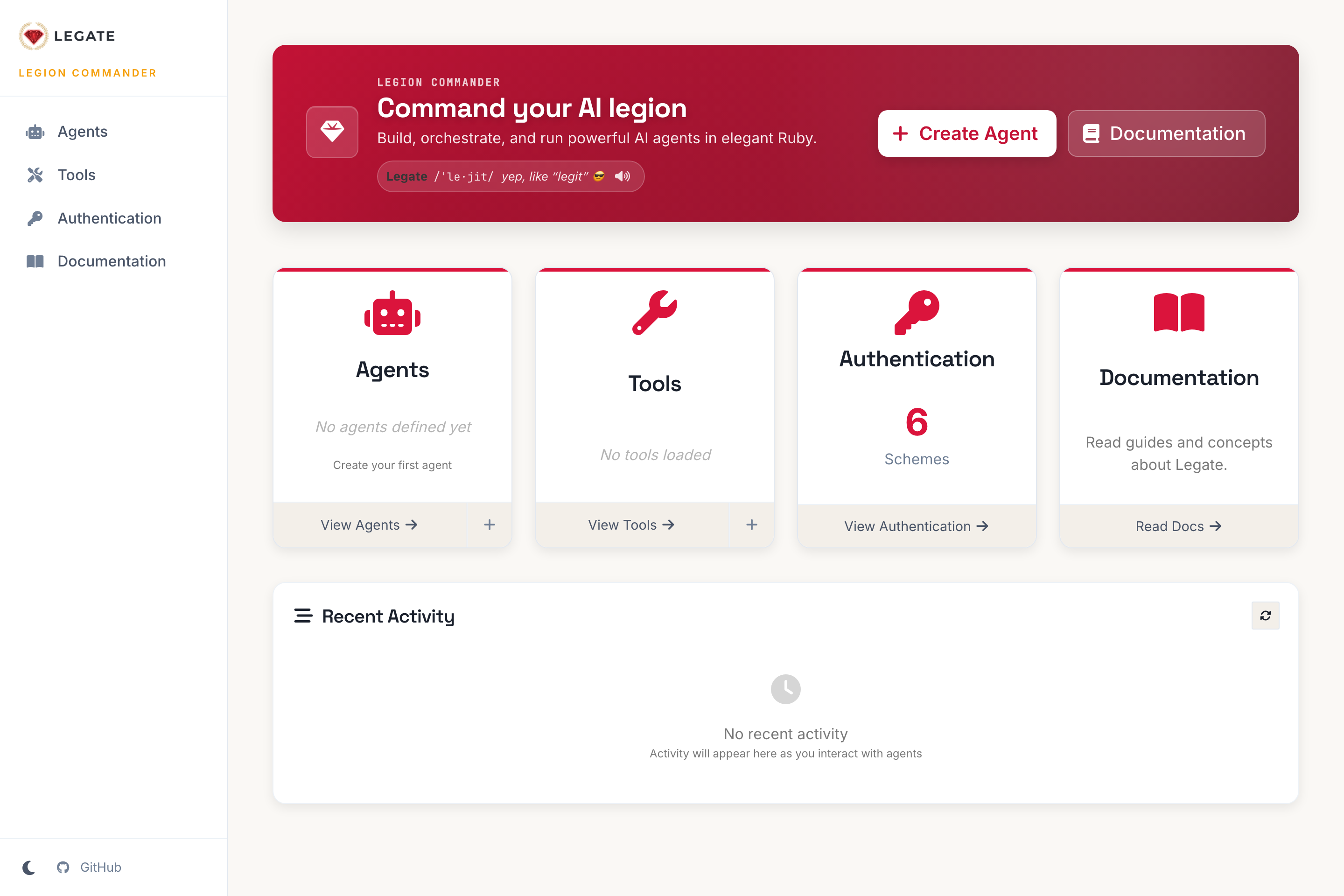
The built-in web UI (legate web start).
Features
- Flexible Agent Architecture — Create agents with custom tools, models, and capabilities
- Dynamic Tool System — Register and use tools with automatic parameter validation
- LLM-Powered Planning — Agents break down complex tasks into multi-step plans (Gemini by default; pluggable provider adapters)
- Session Management — Track agent interactions with in-memory session state
- Multi-Agent Systems — Sequential, parallel, and loop agent patterns with delegation
- MCP Integration — Model Context Protocol support for external tool servers (configs are trusted input — see Security model)
- Web UI — Visual interface for agent interaction and monitoring (Sinatra + HTMX; a developer tool, unauthenticated by default — see Security model)
- CLI — Command-line interface for running agents, managing auth, and AI-powered code generation
- Callbacks — 6 hooks (before/after agent, model, tool) for monitoring, caching, and authorization
-
HTTP Client Mixin — Built-in
HttpClientmodule for tools that call external APIs - Webhook Support — Trigger agent tasks via inbound HTTP webhooks
Installation
Add to your Gemfile:
gem 'legate'Then run:
bundle installQuick Start
Set your Gemini API key (without it, planning is disabled and you'll get a clear warning):
export GEMINI_API_KEY=your_gemini_api_key_hereThen ask an agent a question in one line:
require 'legate'

agent = Legate::Agent.new(definition: Legate::AgentDefinition.new.define do |a|
  a.name :calculator_agent
  a.description 'Does arithmetic with the calculator tool.'
  a.instruction 'Use the calculator to answer math questions.'
  a.use_tool :calculator
end)

puts agent.ask('What is 21 * 2?').answer
# => 42.0
ask starts the agent, runs the task, and returns the final event — call .answer
for the result (or .success? / .error_message).
Agents come with useful tools out of the box — including http_request (an
SSRF-safe, auth-aware HTTP client), read_webpage (fetch a page as readable
text), current_time, and calculator — so an agent can do real work without
you writing a tool first. See built-in tools.
Prefer a runnable file or the visual interface?
bundle exec ruby examples/00_quickstart.rb   # the example above, ready to run
bundle exec legate web start                 # then open http://localhost:4567
Configuration
Environment Variables
| Variable | Purpose | Required |
|---|---|---|
GOOGLE_API_KEY |
Google Gemini API key for LLM planning (GEMINI_API_KEY is accepted as an alias) |
Yes (for the default Gemini adapter) |
LEGATE_LOG_LEVEL |
DEBUG, INFO, WARN, ERROR, FATAL, NONE
|
No |
RACK_ENV |
development or production
|
No |
SESSION_SECRET |
Web UI session cookie secret | Production |
BASIC_AUTH_USER / BASIC_AUTH_PASSWORD
|
Enable optional HTTP Basic Auth on the web UI | No |
LEGATE_AUTH_ENCRYPTION_KEY |
Encrypts stored credentials at rest (libsodium) | No (recommended in production) |
LEGATE_ALLOW_PRIVATE_TOOL_URLS |
Let the HTTP tools (http_request / read_webpage) reach private/loopback hosts — development only
|
No |
LEGATE_ALLOW_PRIVATE_AUTH_URLS |
Let auth/credential-test requests reach private hosts — development only | No |
The library never reads
.envon its own. An application opts in by callingLegate.load_environment(as thelegateCLI and the numbered examples do), which loads.envand mapsGEMINI_API_KEY→GOOGLE_API_KEY.
LLM providers
Planning goes through a pluggable Legate::LLM::Adapter. Gemini is the default; a local Ollama adapter ships in the box (no API key, no cost). Select a provider for every agent with a factory:
# Use a local Ollama model instead of Gemini
Legate::LLM.default_adapter_factory = lambda do |model:, **|
  Legate::LLM::Ollama.new(model: model)   # talks to http://localhost:11434
end
Or inject an adapter per planner via Legate::Planner.new(agent:, llm_adapter:). Implement Legate::LLM::Adapter (available?, model_name, generate(prompt, json:)) to add any provider.
Examples
Simple Echo Agent
require 'legate'

echo_agent = Legate::Agent.new(definition: Legate::AgentDefinition.new.define do |a|
  a.name :simple_echo_agent
  a.description 'A simple agent that can echo messages'
  a.instruction 'You are an echo agent. Repeat the user input exactly.'
  a.use_tool :echo
end)

puts echo_agent.ask('Hello, world!').answer
ask is the convenience path. If you need explicit control over sessions and the
agent lifecycle (e.g. multi-turn conversations, long-lived hosts), use the
underlying API directly:
agent   = Legate::Agent.new(definition: echo_agent_definition)
service = Legate::SessionService::InMemory.new
session = service.create_session(app_name: agent.name, user_id: 'example_user')

agent.start
result = agent.run_task(session_id: session.id, user_input: 'Hello, world!', session_service: service)
puts result.answer
agent.stop   # tears down MCP connections; skip it to keep the agent warm for more asks
Multi-Step Planning
require 'legate'

random_calc_definition = Legate::AgentDefinition.new.define do |a|
  a.name :random_calculator_agent
  a.description 'An agent that uses random number and calculator tools.'
  a.instruction 'Generate a random number then perform a calculation with it.'
  a.use_tool :random_number
  a.use_tool :calculator
end

agent = Legate::Agent.new(definition: random_calc_definition)
result = agent.ask('Get a random number between 10 and 20, then multiply it by 3.')
puts result.answer
See the examples/ directory for more: multi-tool agents, MCP integration, webhooks, auth, callbacks, and multi-agent workflows.
Core Concepts
Agents
Agents are defined via AgentDefinition and instantiated with Agent.new:
my_definition = Legate::AgentDefinition.new.define do |a|
  a.name :my_agent
  a.description 'Description of what the agent does'
  a.instruction 'You are a helpful assistant.'  # Optional — defaults from name/description
  a.use_tool :my_tool_name
  a.model_name 'gemini-3.5-flash'  # Optional
end

agent = Legate::Agent.new(definition: my_definition)
Only name is required. instruction is optional — a tool-only agent gets a sensible default derived from its name and description.
Agent types: :llm (default, uses Gemini for planning), :sequential, :parallel, :loop
Tools
Tools inherit from Legate::Tool and define metadata via DSL:
class MyCustomTool < Legate::Tool
  tool_description 'Performs a custom action with input.'

  parameter :input_data, type: :string, required: true,
            description: 'The data needed for the action'
  parameter :optional_flag, type: :boolean, required: false

  private

  def perform_execution(params, context)
    input = params[:input_data]
    Legate::ToolResult.success("Action performed on #{input}")
  end
end
Return a Legate::ToolResult (.success(value) / .error(message) / .pending(job_id:))
or the equivalent hash ({ status: :success, result: ... }) — both work. The typed
form mirrors the Event#answer / #success? accessors and avoids hand-built hashes.
Built-in tools: :echo, :calculator, :cat_facts, :random_number, :delegate_task, :check_job_status
Selecting tools: use_tool takes a registered name (:echo or 'echo') or a Legate::Tool subclass — passing the class registers and selects it in one step:
a.use_tool MyCustomTool   # registers globally + selects it; no separate register_tool call
a.use_tool :echo          # a built-in by name
A typo'd or unknown tool name produces a warning with a "did you mean?" suggestion and the list of available tools (it stays non-fatal, since MCP tools register when the agent connects).
Parameter types: :string, :integer, :float/:numeric, :boolean, :array, :hash
Return values: a Legate::ToolResult (.success / .error / .pending) or the equivalent { status: :success, result: ... } hash; or raise Legate::ToolError / Legate::ToolArgumentError
Introspection: Legate.tools lists registered tools (name, description, parameters); legate tool list / legate tool info NAME do the same from the CLI.
Sessions
session_service = Legate::SessionService::InMemory.new
session = session_service.create_session(app_name: agent.name, user_id: 'user123')
Making HTTP Requests in Tools
Include the HttpClient mixin for standardized HTTP with error wrapping:
class MyApiTool < Legate::Tool
  include Legate::Tools::Base::HttpClient

  def initialize(**options)
    super(**options)
    setup_http_client(base_url: 'https://api.example.com/v2/')
  end

  private

  def perform_execution(params, context)
    response = http_get("items/#{params[:id]}")
    data = JSON.parse(response.body)
    { status: :success, result: data }
  end
end
Errors are automatically wrapped into ToolTimeoutError, ToolNetworkError, ToolHttpError, etc.
Callbacks
agent_definition = Legate::AgentDefinition.new.define do |a|
  a.name :agent_with_callbacks
  a.instruction 'You are a helpful assistant.'
  a.use_tool :echo

  a.before_agent_callback { |context| puts "Starting: #{context.session_id}" }
  a.after_agent_callback { |context, response| nil }
  a.before_tool_callback { |tool, args, context| nil }
  a.after_tool_callback { |tool, args, context, result| nil }
end
Inbound Webhooks
Trigger agent tasks via HTTP webhooks from external systems:
- Dynamic agent routing:
POST /webhooks/agents/:agent_name/trigger - Agent-defined validation and payload transformation
- Asynchronous processing (returns
202 Accepted) - HMAC signature verification support
CLI
# Start the web UI
bundle exec legate web start

# Agent commands
bundle exec legate agent list
bundle exec legate agent execute my_agent "task"
bundle exec legate agent chat my_agent

# AI-powered code generation
bundle exec legate agent ai-generate
bundle exec legate tool ai-generate

# Authentication management
bundle exec legate auth status
bundle exec legate auth scheme list
bundle exec legate auth credential list
Security model
Legate is a framework you embed in your own application. A few trust boundaries are worth understanding before you deploy it.
The web UI is a developer tool and is unauthenticated by default. legate web start binds an admin-grade interface — it can create agents, run tasks, and edit configuration. It ships no application login; the only built-in gate is optional HTTP Basic Auth, enabled by setting BASIC_AUTH_USER and BASIC_AUTH_PASSWORD. CSRF protection is on, and production refuses to boot without SESSION_SECRET, but those are not a substitute for authentication. Run the web UI on localhost or a trusted private network. Do not expose it to untrusted users without putting your own auth in front of it.
MCP server configurations are trusted input — treat them like a Gemfile entry. Configuring an agent's mcp_servers means running code you trust:
-
:stdioservers launch a local subprocess from the configuredcommand/args. Anyone who can setmcp_serverscan run arbitrary local commands — that is what stdio MCP is. -
:sse/remote MCP URLs are not SSRF-restricted. MCP servers legitimately live onlocalhost/your private network, so Legate intentionally does not block private/loopback/metadata addresses for them.
So the real boundary is who can supply an agent definition. In code you control, this is a non-issue. The risk only appears if you let untrusted users create/edit agent definitions — which, combined with the unauthenticated web UI above, is why the UI must not be public.
What is guarded: outbound webhook and auth/credential-test requests run through an SSRF guard (Legate::Auth::UrlGuard) that refuses loopback/link-local/private/metadata addresses (incl. IPv4-mapped IPv6) and fails closed on resolution errors — and the webhook tool additionally pins the connection to the validated IP to defeat DNS rebinding; inbound webhooks verify HMAC signatures with a constant-time compare; stored credentials are encrypted at rest (libsodium). MCP is deliberately exempt from the SSRF guard for the reason above.
To report a vulnerability, see SECURITY.md.
Known limitations
Worth knowing before you build on Legate:
- The web UI is unauthenticated by default — it's a developer tool. Run it on localhost or a trusted network, or put your own auth in front of it (see Security model).
-
State is in-memory by default. Sessions and the agent/tool registries live in the process — they're lost on restart and not shared across multiple Puma workers. Opt into
SessionService::ActiveRecordfor durable sessions; run a single web process (or add a shared store) for cross-worker consistency. -
LLM planning needs an API key, and plan quality depends on the model. Without
GOOGLE_API_KEY(or a local Ollama adapter), planning is disabled and tools can only be invoked directly. -
Pin a model you've verified. Hosted model lineups change — older models get retired and start returning 404s. The default tracks a current Gemini model, but if you set
model_nameexplicitly, confirm it's still available for your key. -
read_webpageis best-effort text extraction, not a browser. It strips HTML without running JavaScript, so JS-rendered/SPA pages yield little text and complex markup may extract imperfectly. -
current_timehas no named-timezone support (e.g.America/New_York) — onlyUTC,local, or a fixed offset like+09:00— to avoid a timezone-database dependency. - No built-in rate limiting or cost controls on LLM calls — budget and throttle at your application layer.
- MCP server configs are trusted input (stdio launches local subprocesses; remote MCP URLs are intentionally not SSRF-restricted) — see Security model.
Development
bundle install
bundle exec rspec              # Run the test suite
bundle exec rubocop            # Lint
bundle exec legate web start   # Start dev server
Contributing
Bug reports and pull requests are welcome on GitHub at https://github.com/tweibley/legate. See CONTRIBUTING.md for development setup and guidelines.
License
Legate is released under the MIT License.